
Most guides quote a single number for "WhatsApp chatbot pricing", as if every business paid the same bill. That number is misleading: an inbound FAQ bot may only incur its platform subscription, while a retailer sending promotional broadcasts to Brazil can spend $600 or more using the same underlying technology.
The real driver of your cost isn't the chatbot itself. It's how you use WhatsApp's messaging window.
This guide breaks down Meta's per-message fees, platform pricing, and real-world examples so you can budget with confidence in 2026.
How much does a WhatsApp chatbot cost in 2026
Let's break down what you'll really pay for a WhatsApp chatbot in 2026.
The answer depends entirely on how you use it. Here's a quick overview of the three main scenarios and what they typically cost:
- Inbound-only (support, FAQs, lead capture): Your bot replies to users within a 24-hour window. Meta charges $0 for these conversations. You only pay your chatbot platform subscription, which ranges from $0 (free tier) to about $90/month for moderate volume. Total monthly cost: $0–$90.
- Hybrid (inbound + marketing broadcasts): You send proactive template messages (promotions, updates) outside the free window. You pay both the platform fee plus Meta's per-message fees, which vary by region (e.g., ~$0.013 per marketing message in India, ~$0.063 in Brazil). Total monthly cost: $30–$600+ depending on volume and region.
- High-volume OTPs and authentication: Similar to marketing, but utility/authentication templates have lower Meta fees. Still, at scale, Meta fees can add up to hundreds of dollars per month.
For Typebot Cloud specifically, production WhatsApp deployment requires the Pro plan at $89/month. The Free and Starter plans let you build and test flows in the browser, but they do not include WhatsApp deployment.
The final bill is made up of three main parts: Meta messaging fees, your chatbot platform subscription, and the build/setup effort.
The three layers of WhatsApp chatbot pricing
- Meta messaging fees: These kick in when you send template messages (marketing, authentication, utility) outside the free 24-hour service window. Meta's rates depend on the recipient's country and the message category.
- Chatbot platform subscription (and any API / messaging provider costs): SaaS for the software that powers your bot (flow builder, inbox, automations). If you use a Twilio-style API provider for connectivity, that bill is separate from a marketing platform subscription — same Meta rates underneath, very different product fees on top.
- Build/setup effort: The upfront work can be free if you use a visual no-code builder and go DIY. But hiring an agency (or a developer) for custom integrations can cost thousands.
It's common for vendors to spotlight just their subscription price and leave out ongoing Meta message fees or maintenance labor. To get a realistic budget, make sure you map your needs:
- Inbound-only bots for support or lead collection: Very low cost — just your platform fee, and Meta fees are usually $0.
- Hybrid or outbound/marketing bots: You'll pay for both the platform and Meta template message fees. Make sure you check rates for your region and message volume.
Not sure which use case fits your budget? Check out our guide on WhatsApp API use cases to see which bot strategy aligns with your goals.
Meta WhatsApp messaging fees and per-message pricing
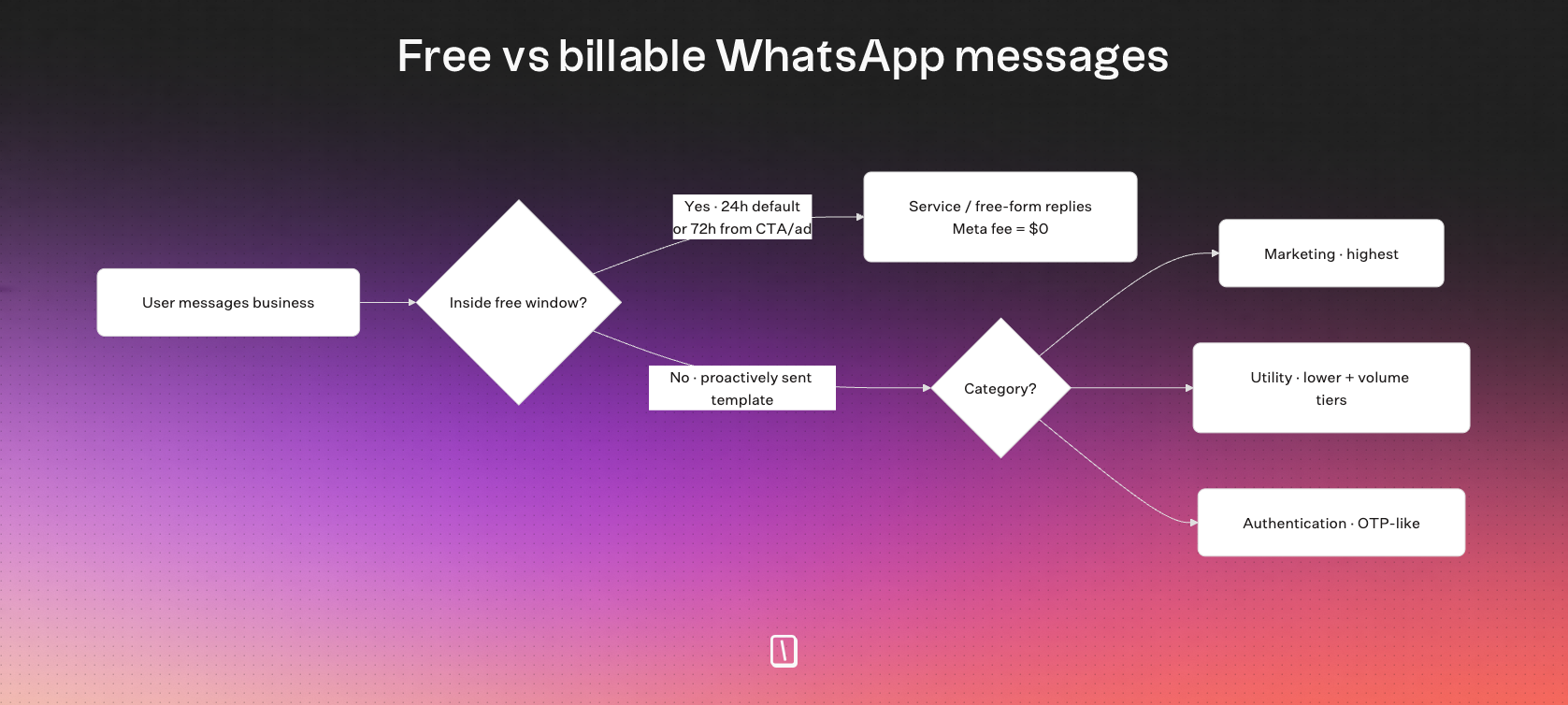
Meta switched to a per-message pricing model on July 1, 2025.
You’re only charged when your business sends a delivered template message, which includes marketing, utility messages sent outside the service window, and authentication messages.
All free-form service replies sent within the 24-hour customer service window are free.
Key cost rules
- Meta rates update every quarter. Always check the latest rate card for your recipient’s region before making cost calculations.
- Free entry points: If a conversation starts from a Click-to-WhatsApp ad or a Page CTA, the free window extends to 72 hours.
- Fees by recipient: Costs depend on your recipient’s country and the category of message you send, not where you’re sending from.
- Platform markups: WhatsApp marketing platforms and some resellers add fees or credit systems on top of Meta's base rates. Pure API/messaging providers usually pass Meta pricing through with their own connectivity billing. Typebot does not add any markup on Meta fees.
Message categories
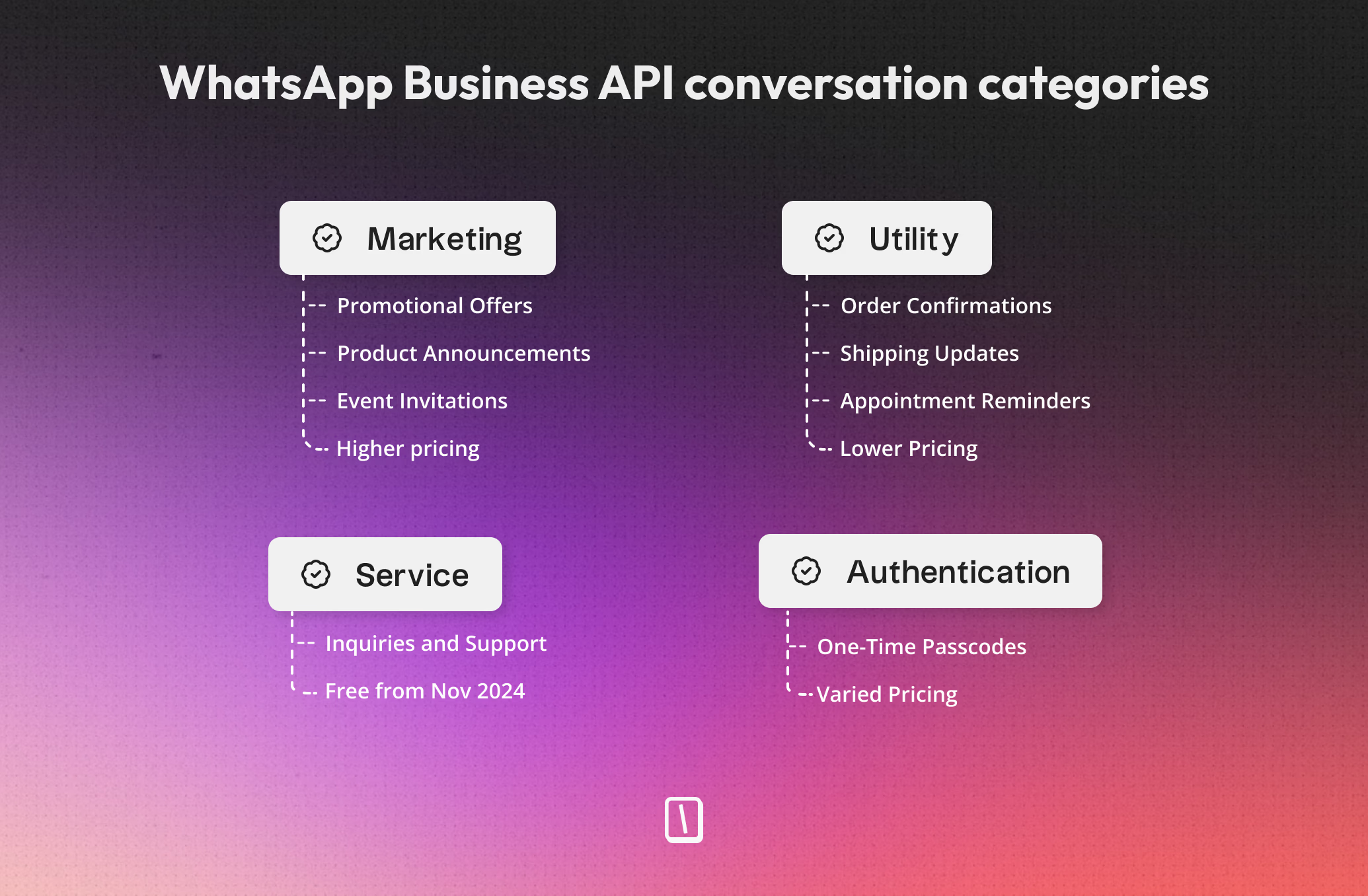
WhatsApp automations fit into four main categories, each with its own pricing rules.
| Category | Typical use | Meta bill? |
|---|---|---|
| Marketing | Offers, promos, newsletters | Yes, highest cost |
| Utility (outside window) | Order updates, reminders | Yes, lower cost, volume tiers apply |
| Authentication | OTPs, login codes | Yes, similar to utility |
| Service (free-form) | Replies inside 24h window | Free |
| Utility (inside window) | Transactional inside 24h window | Free |
Regional rates and volume tiers
Meta’s per-message fees can vary quite a bit depending on the region.
For the latest rates, it’s best to review the Official Meta Rate Card.
Here are some rough estimates of per-message costs:
| Country/region | Marketing | Utility | Authentication |
|---|---|---|---|
| India | ~$0.012 | ~$0.0014 | ~$0.0014 |
| North America | ~$0.025 | ~$0.003 | ~$0.003 |
| Brazil | ~$0.063 | ~$0.007 | ~$0.007 |
| Germany | ~$0.14 | ~$0.055 | ~$0.055 |
| Volume tiers: If you send a lot of utility or authentication messages, your rate goes down as volume goes up within a month. |
These discounts don't apply to marketing templates, which stay at the standard rate.
Chatbot platform and BSP costs compared
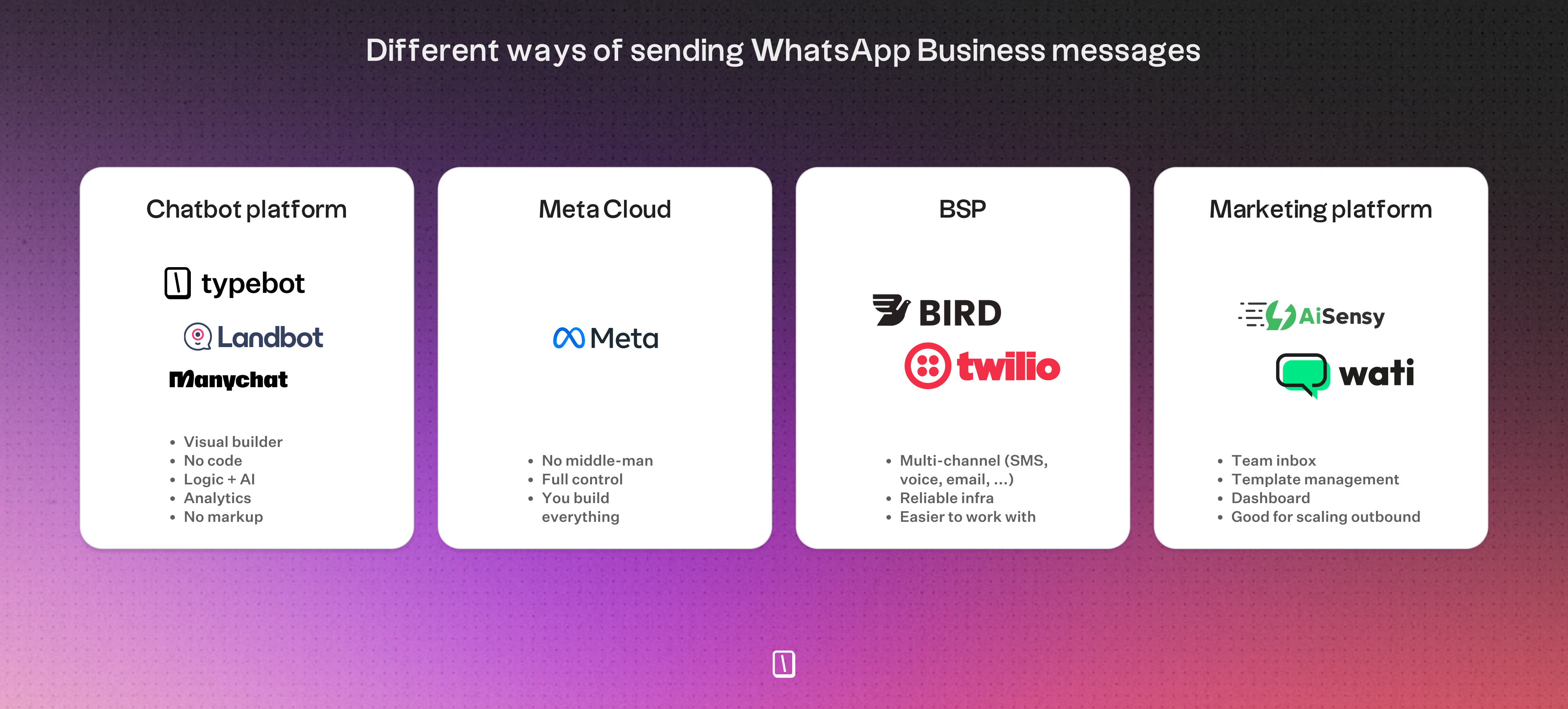
Beyond Meta's message fees, you also need a platform to build and run your chatbot — and that's where costs can vary significantly.
To use the WhatsApp Business API, businesses connect through Meta's ecosystem (Cloud API or a provider). A Business Solution Provider (BSP) is Meta's term for a partner authorized to host or resell that API access. In practice, the products in the market fall into different baskets, even if they're all labeled "BSP" or "WhatsApp API platform":
- Chatbot builders (e.g., Typebot, ManyChat, Landbot): Let you build conversational flows visually without code. Best for inbound support, lead qualification, and dynamic multi-step chats.
- WhatsApp marketing platforms (e.g., AiSensy, Wati): Layer broadcasts, shared team inboxes, template campaigns, and CRM-style contact management on top of API access. Many add markups or credit systems on Meta's rates.
- API / messaging providers (e.g., Twilio and similar BSPs): Focus on a reliable, developer-friendly WhatsApp API rather than a marketing app. Few product features, but strong stability, webhooks, SDKs, and often multi-channel (SMS + WhatsApp). Best when you build your own logic or connect a chatbot builder.
- All-in-one platforms (e.g., Freshchat): Add WhatsApp as another channel inside a customer service suite with agents, tickets, and AI already bundled.
How much you'll pay for a chatbot platform comes down to a few things: the monthly subscription, limits on chats or contacts, the number of users or seats, and whether the provider adds fees on top of Meta's base rates.
The table below shows how popular platforms compare on the costs that actually affect your budget.
| Platform | Price & Tiers | Included Volume | Seats | Meta Markup | Notes |
|---|---|---|---|---|---|
| Typebot | Free / $39 / $89 | 200 / 2k / 10k chats | 1 / 2 / 5 | No | WhatsApp deployment requires Cloud Pro at $89. Free and Starter are for building and browser testing. |
| ManyChat | Free / Pro $15+ | 1,000 contacts | 1+ | Sometimes | Costs climb as your contact list grows. |
| Landbot | Free / Paid $30+ | 100+ chats | 1+ | Yes | WhatsApp channel costs extra each month. |
| Wati | $39 / $79 / $199 | Unlimited conv. | Team | Yes | API access + team inbox with campaign tools; often includes Meta fee markups. |
| AiSensy | $45 / $99 | Unlimited, with limits | Team | Yes | Geared for India; uses a template credit system. |
| Twilio API | Pay-as-you-go | Session-based | N/A | No | Reliable multi-channel API (WhatsApp + SMS etc.); few product features on top of the API itself. |
| Freshchat | Free / $23 per agent | 500 bot sessions | Team | Yes (20%) | Part of Freshworks; session overages add up quickly. |
Real-world WhatsApp chatbot cost examples
How much you'll spend each month depends on your message volume and whether your main focus is inbound support or outbound WhatsApp marketing.
Here are rough estimates for different business setups.
1. Solopreneur: Pure inbound support
This setup works best if you mainly want to capture leads or handle FAQs.
The bot just responds to user questions.
| Item | Plan | Platform Cost | Meta API Fee | Total Monthly Cost |
|---|---|---|---|---|
| Typebot Pro | Pro | $89 | $0 | $89 |
| ManyChat Free | Free | $0 | $0 | $0 |
| Landbot Free | Free | $0 | $0 | $0 |
| As long as your bot stays within the 24-hour service window, Meta fees are zero. |
Typebot Cloud requires Pro before you can deploy the bot on WhatsApp, even when your Meta messaging fees are $0.
2. Small team: Inbound, higher volume
This profile fits teams managing a few thousand inbound chats per month.
It often includes several agents.
| Item | Plan | Seats | Platform Cost | Meta Fee | Total |
|---|---|---|---|---|---|
| Typebot Pro | Pro | 5 | $89 | $0 | $89 |
| AiSensy Basic | Basic | 6 | ~$45 | $0 | $45 |
| Wati Growth | Growth | 5 | $39 | $0 | $39 |
| Freshchat | Growth | 2 | $46 | $0 | $46 |
| For example, Typebot Pro gives you 10,000 chats and access for five agents for $89 a month. |
If you self-host Typebot, you can cut your platform fee down to nearly nothing.
3. Hybrid high-volume: Marketing & OTPs
If you send promotional broadcasts or authentication codes, you’ll pay both platform fees and Meta’s region-specific template charges.
Example: 10,000 marketing templates per month
| Platform | Plan | Meta Fee (India) | Meta Fee (Brazil) | Total (India) | Total (Brazil) |
|---|---|---|---|---|---|
| Typebot Pro + outbound service | $89 | ~$130 | ~$630 | ~$219 | ~$719 |
| AiSensy Pro | $99 | ~$130 | ~$630 | ~$229 | ~$729 |
| Wati Growth | $39 | $130 + Markup | $630 + Markup | >$169 | >$669 |
| Freshchat | $46 | $130 + 20% | $630 + 20% | ~$202 | ~$802 |
| Meta rates change every quarter, and outbound messages may include hidden markups. The Typebot totals above do not include the separate outbound service's own fee. |
It’s a good idea to double-check those details before you commit.
Monthly spend checklist
To figure out your own monthly costs, walk through these steps:
- Categorize your volume: Estimate how many inbound chats fall within Meta’s free window versus paid outbound template messages.
- Check regional rates: Look up Meta’s current rate card for the countries you’re targeting.
- Examine platform markups: Find out if your platform passes Meta’s costs straight through or adds a percentage as a fee.
- Tally up seats: Add fees for more agent access if your team needs extra accounts beyond the base plan.
- Budget for spikes: Plan for marketing pushes or seasonal campaigns by leaving a little cushion in your monthly estimate.
By separating platform subscriptions from Meta’s regional fees, you’ll have a clearer handle on your support budget and growth costs.
Reach your audience where they are. Integrate Typebot with WhatsApp for seamless, personalized communication.
No trial. Generous free plan.
Building and testing a WhatsApp chatbot for free
You can build and validate much of your conversation flow before spending anything.
Typebot’s Free plan gives you a visual builder, logic tools, and integrations, like OpenAI, Google Sheets, and webhooks, for up to 200 chats per month. You can build and test the flow in the browser for free. Publishing it to WhatsApp on Typebot Cloud requires the Pro plan.
The WhatsApp Business App does let you set up free auto-replies. However, it really doesn’t offer advanced automation, branching flows, or analytics.
Other options, like ManyChat or AiSensy, have free tiers. These usually come with limits on contacts or pared-back automation features.
Free WhatsApp bot comparison
| Platform | Free Offer | Core Limits | Best Use Case |
|---|---|---|---|
| WhatsApp Business App | Basic auto-replies | No AI, no logic, no data export | Micro-businesses |
| Typebot Free | Full visual builder | 200 chats/month, no WhatsApp deployment | Building and browser testing |
| ManyChat Free | Up to 1,000 contacts | Restricted automation/features | Marketing & onboarding |
| Landbot Free | Limited builder | Feature-sharing & channel caps | Flow evaluation |
| AiSensy Free | Basic live chat & tags | Limited automation & segmentation | Team inbox |
| Typebot Free is especially helpful for prototyping the flow before paying to deploy it on WhatsApp. |
Step-by-step: Build and test your Typebot flow for free
Here is how to build and validate the conversation with Typebot's Free plan, with no code required. Upgrade to Pro when you are ready to connect a production WhatsApp number.
1. Sign up for Typebot
Go to app.typebot.io and create a free account. You get access to the visual builder, logic blocks, integrations, and up to 200 chats per month — enough to prototype and validate your use case.
2. Create your bot and design the conversation flow
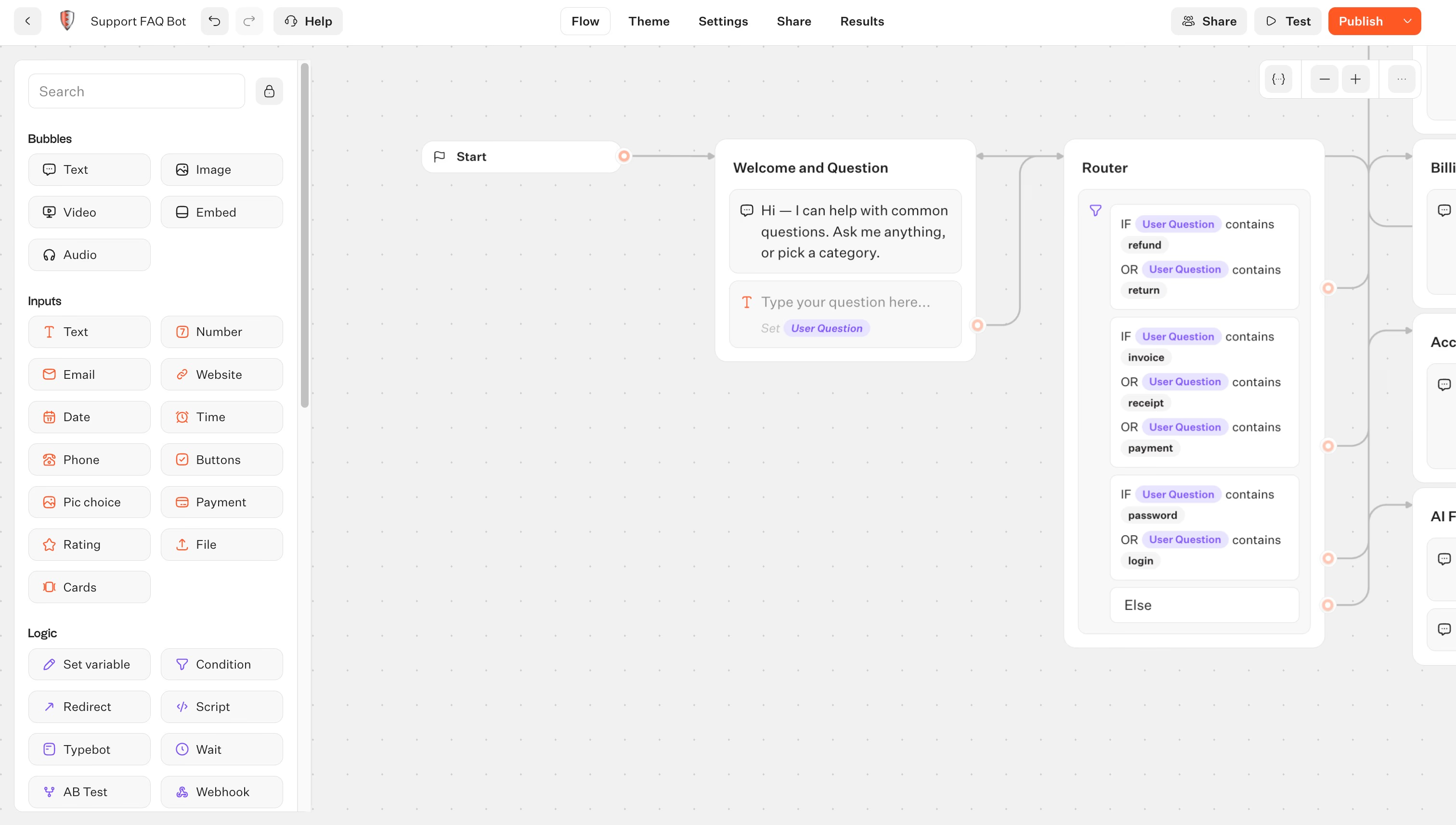
Click "Create a typebot" and start from scratch or use a template. The drag-and-drop canvas lets you add:
- Text bubbles for welcome messages and information
- Buttons so users can pick options (e.g., "Support," "Pricing," "Talk to a human")
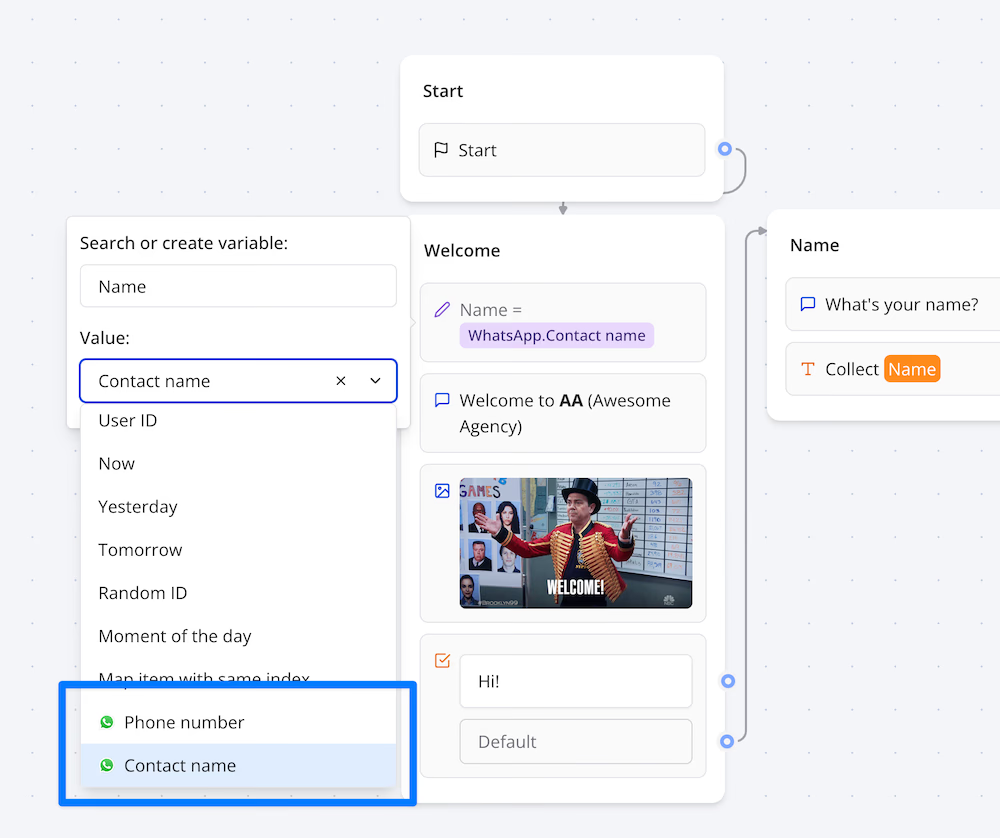
- Input fields to collect names, emails, or phone numbers
- Images and videos to make conversations richer
Connect blocks by dragging from the dots — each path can lead to different parts of the flow based on what the user chooses.
3. Add logic, branching, and optional AI
Use Condition blocks to route users differently depending on their answers. For example: if a user selects "Technical support," send them to a troubleshooting flow; if they select "Sales," ask for their email and forward it to your CRM via a webhook or Google Sheets integration.
To add AI, drop an OpenAI block into your flow, paste your API key, and write a system prompt. Your bot can then answer open-ended questions using ChatGPT — great for handling FAQs without writing every response manually.
4. Upgrade to Pro and connect Typebot to WhatsApp
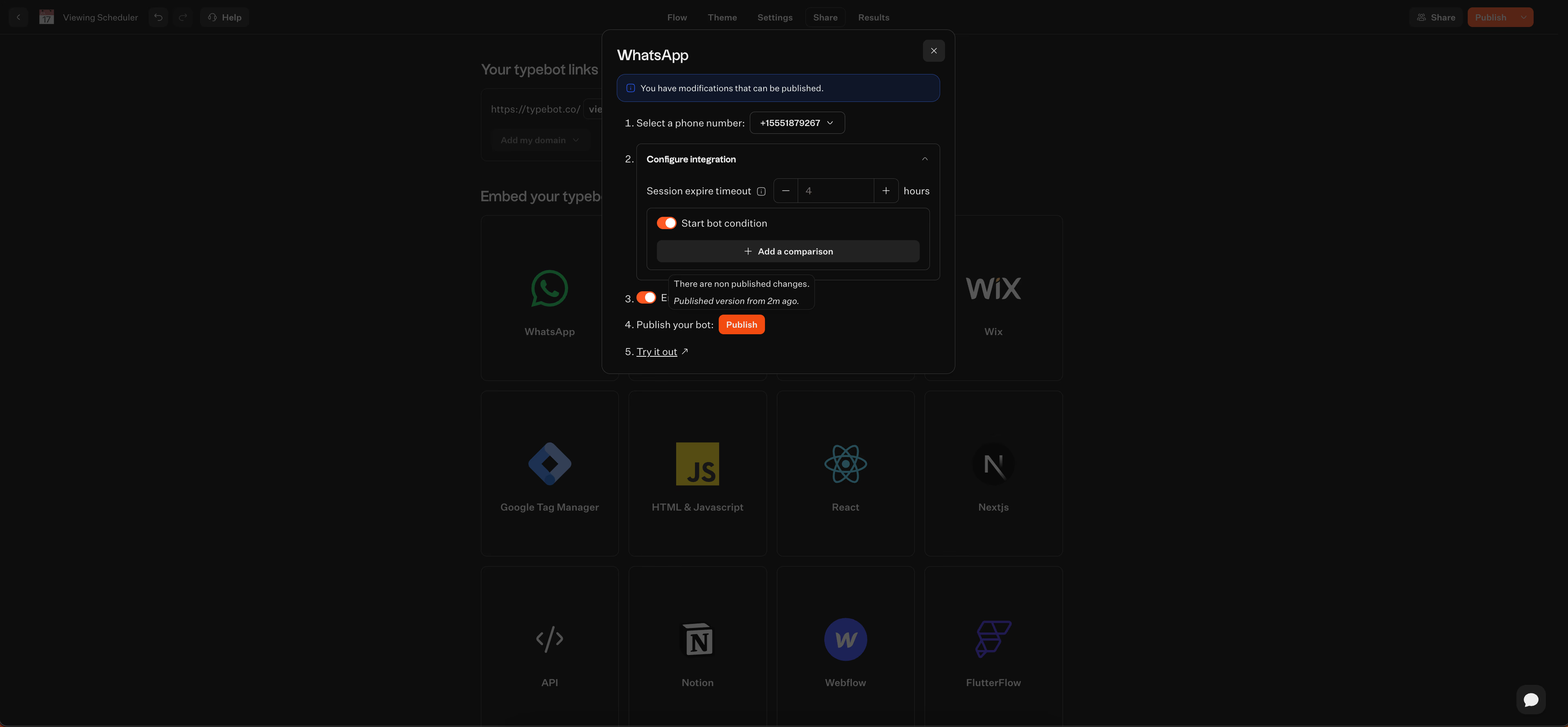
When the flow is ready, upgrade the workspace to Pro. Then open the Publish tab and select "WhatsApp" as the channel. Typebot walks you through the Meta setup:
- Create or connect your Meta Business account
- Create a Meta app in the Meta Developer Console and enable the WhatsApp product
- Create a System User in Meta Business Settings and generate an access token
- Paste the token, webhook URL, and verify token into Typebot's WhatsApp configuration screen
Meta can provide a test phone number during setup, but Typebot Cloud still requires Pro to configure and deploy the WhatsApp channel.
5. Test, publish, and share
Use Typebot's built-in Test mode — switch the runtime to "WhatsApp" and send test messages to see exactly how your bot looks on a phone. Check that buttons work, inputs save correctly, and the flow stays natural.
Once satisfied, go live with your real WhatsApp Business number. Share your WhatsApp number on your website, in Click-to-WhatsApp ads, or email signatures. Typebot starts handling conversations immediately.
Practical ways to lower costs over time
If your volume starts to grow, there are a handful of ways to keep your costs down:
- Maximize the 24-hour window: Set up flows so users’ needs get resolved within WhatsApp’s free response window. That way, you avoid Meta’s template charges.
- Use free entry points: Take advantage of Click-to-WhatsApp ads or Page CTAs. These can extend your service window up to 72 hours for free.
- Template categorization: Stick with Utility templates whenever possible. Meta charges noticeably less for these than for Marketing templates.
- Avoid platform markups: Look for tools with transparent pricing, ones that pass Meta fees through without tacking on extra "convenience" charges.
- Self-hosting: If you’re handling lots of chats, self-hosting Typebot means you skip SaaS subscriptions. You’ll just pay for your server and Meta messages.
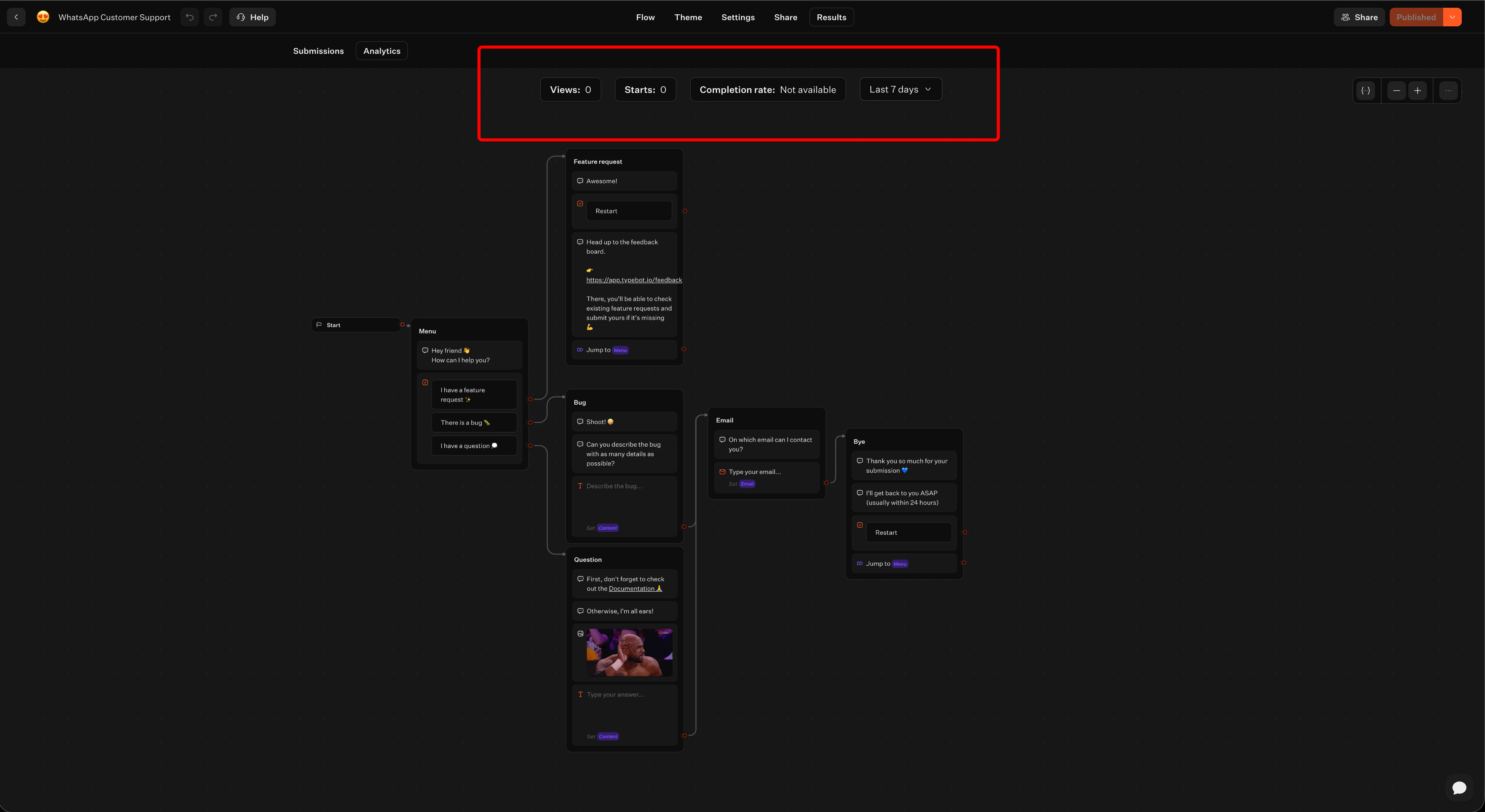
- Optimize with analytics: Use drop-off stats to find and fix sticking points in your bot. Higher completion rates mean you’re not paying for wasted conversations.
- Targeted messaging: Segment your audience carefully so you don’t blast marketing templates everywhere. That keeps Meta fees and possible SaaS overages down
The bottom line on WhatsApp chatbot costs
Your WhatsApp chatbot bill comes down to three layers: Meta's per-message fees, your platform subscription, and the effort to build and maintain your flows. Stay inside the 24-hour service window with inbound-only support, and Meta fees remain $0. On Typebot Cloud, the production WhatsApp channel costs $89 a month through Pro. Add marketing broadcasts or OTPs, and Meta's regional fees can push your total past $600 in markets like Brazil or Germany.
Since Meta updates its rate card every quarter, it's worth revisiting your numbers as you scale outbound campaigns. The fastest way to find your real cost is to start building: Typebot's free plan lets you design and test the flow in the browser before you commit to Pro for WhatsApp deployment.
Deliver real-time responses and boost engagement with Typebot's WhatsApp integration.
No trial. Generous free plan.
Frequently asked questions
Is a WhatsApp chatbot free?
You can build and test a basic chatbot for free using Typebot’s Free plan. Production WhatsApp deployment on Typebot Cloud requires Pro at $89/month. Meta does not charge for service replies sent within the 24-hour window after someone starts a conversation.
The WhatsApp Business App is also free, but it lacks the advanced logic, AI integrations, and analytics you get with a dedicated chatbot builder.
How much does a WhatsApp chatbot cost per month?
For a Typebot Cloud WhatsApp bot, your main cost is the platform subscription:
- Pro: $89/month, 10,000 chats, 5 seats
- Self-host: $0 SaaS fees, plus your server and maintenance costs
The Free and Starter Cloud plans do not include production WhatsApp deployment. Meta messaging fees are $0 if you only handle inbound service messages inside the 24-hour window. Outbound templates, like marketing or notifications, incur extra charges.
Do platforms add a markup on top of Meta fees?
Most BSPs and platforms add a 10% to 20% markup or "convenience fee" to Meta’s rates. Typebot keeps pricing flat and does not add markups.
Because Typebot mostly sends inbound service replies, which are free, most users do not see Meta charges at all. Still, it is smart to check whether a provider uses "Meta pass-through" pricing or adds hidden costs per message.
How do I estimate my monthly WhatsApp messaging cost?
- Identify message type: Figure out how many of your chats are inbound, which are free, versus outbound templates, which are paid.
- Check rates: For outbound templates, look up the recipient’s country and choose the right message category. For example, marketing templates in India cost around $0.012 each, but in Germany, they cost about $0.14.
- Pick a plan: Choose the platform tier that fits your monthly volume.
- Factor in seats: Decide whether you need more agent access than your base plan allows.
Example calculation:
Say you go with Typebot Pro ($89/month) for an inbound-only bot. You pay $89/month. If a separate outbound service sends a marketing broadcast of 10,000 messages to India, you add roughly $120 in Meta fees for a total of ~$209, plus any fee from that outbound service.
The same broadcast to Brazil would add about $630, totaling ~$719, plus any outbound-service fee.