
Think WhatsApp is just for family group chats and weekend catch-ups? Most businesses used to think so too. That misconception is exactly why the brands already using it for marketing are racing ahead while everyone else plays catch-up.
WhatsApp boasts a 98% open rate and delivers results that traditional channels can only dream of: 60% abandoned cart recovery, 64% lower cost per lead from click-to-chat ads, and up to 47% fewer missed appointments. This guide walks through 10 proven WhatsApp marketing strategies, shows you how to build a chatbot without code, and explains exactly what metrics to track so you can turn conversations into conversions.
What WhatsApp marketing is and why it delivers results
WhatsApp's conversational flows help businesses capture and qualify leads as they come in, even outside normal working hours.
Why do companies make the switch? The numbers are compelling:
- Reduced costs: Automation and quick replies tend to cut support costs by as much as 30%.
- High conversion: E-commerce brands often recover up to 60% of abandoned carts.
- Operational efficiency: NHS clinics saw their no-show rates drop by 47% after introducing WhatsApp appointment reminders.
It is not just text messages. WhatsApp lets businesses send documents, images, buttons, and carousels, giving users interactive ways to engage. Because phone numbers act as a persistent identity, no extra logins or apps are needed — and that accessibility is a major reason WhatsApp conversational marketing often outperforms traditional channels.
WhatsApp Business App vs WhatsApp Business API
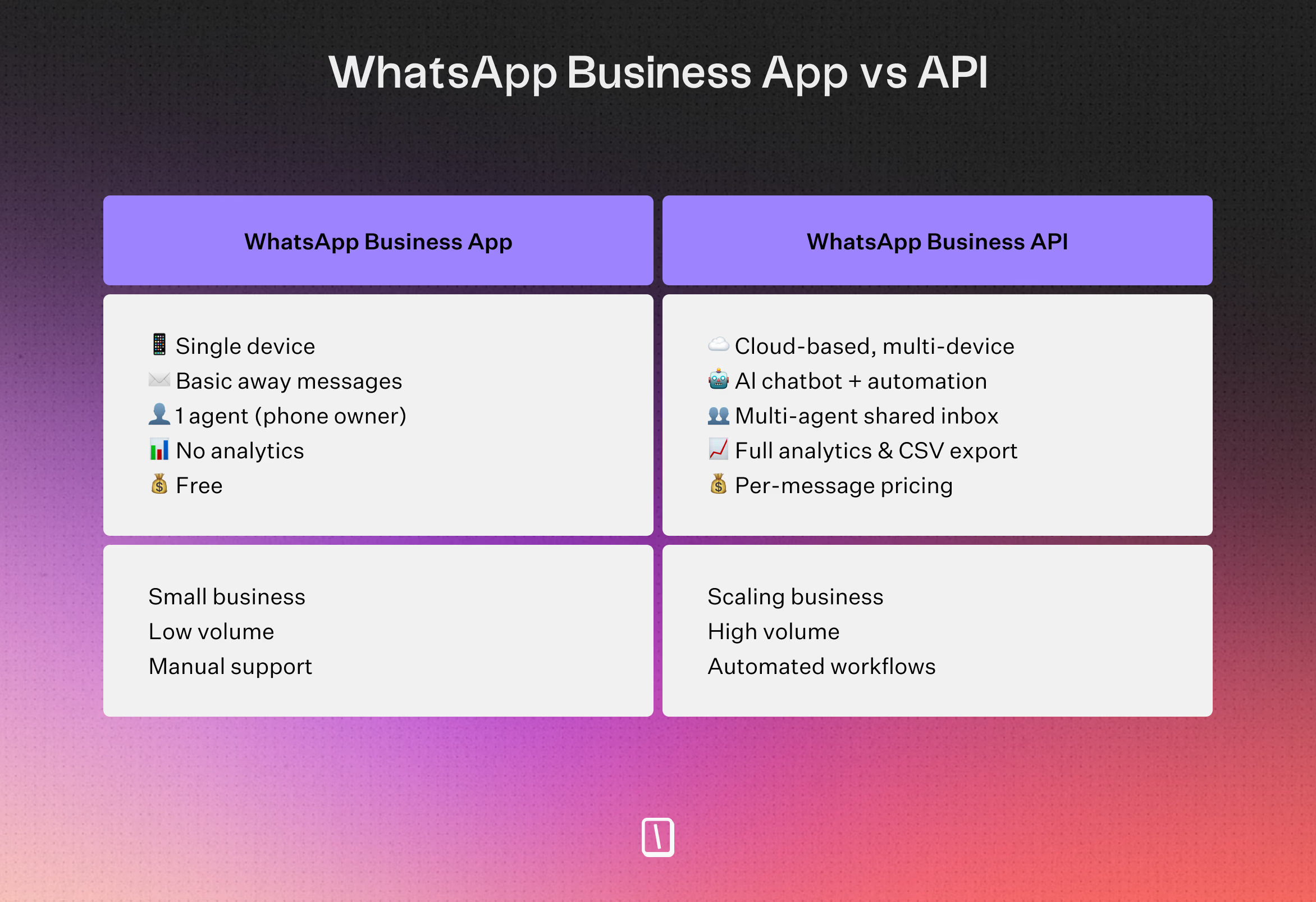
Deciding between the two comes down to scale. The free app works well for smaller setups with manual conversations and basic auto-responses. The API is built for automation, complex chatbots, and third-party integrations — and most businesses access it through a platform like Typebot, which lets you build message flows visually without writing any code.
| Feature | WhatsApp Business App | WhatsApp Business API |
|---|---|---|
| Cost | Free | WhatsApp fees only for template messages (marketing, utility) + Platform fees (Typebot has a free tier) |
| Automation | Basic auto-replies | Full chatbots, event triggers, sequences |
| Supported Devices | 4 linked devices | Unlimited |
| Multiple Admins | No | Yes |
| Chatbot Support | No | Yes |
| Third-Party Integrations | No | Yes (CRM, AI, Google Sheets, etc.) |
| Broadcast Messaging | Limited, manual only | Automated, template-based |
| Customer Data & Analytics | Basic | Advanced (drop-off, completions, export) |
| Compliance & Template Control | Manual | Automated, pre-approved template flows |
| Use Case Fit | Local shops, manual tasks | Growth, automation, scaled support |
| If you want to move beyond manual replies and automate conversations at scale, the API is the clear way forward — and with a platform like Typebot, you do not need a tech background to get started. |
Pricing note: Conversational bot replies within 24 hours are free on WhatsApp (Service messages). You only pay Meta for proactive template messages (broadcasts, marketing).
To build your setup, compare the best WhatsApp Business API providers to find your fit.
WhatsApp marketing strategies that drive conversions
1. Create automated chat flows and chatbots
Automated chat flows can turn everyday conversations into a steady source of conversions. With a drag-and-drop tool like Typebot, you can set up pathways for lead qualification, support, and sales, with no code required. These bots usually tackle around 70% to 80% of common questions.
They also often deliver conversion rates between 45% and 60%.
For example, if you set up a lead qualification bot, it can ask a few targeted questions. It then routes the best leads to your sales team right away.
You can try a lead qualification flow here:
2. Personalize conversations with conditional logic
Personalization is not just about using a name. It is about using conditional logic to adjust the flow based on what users say.
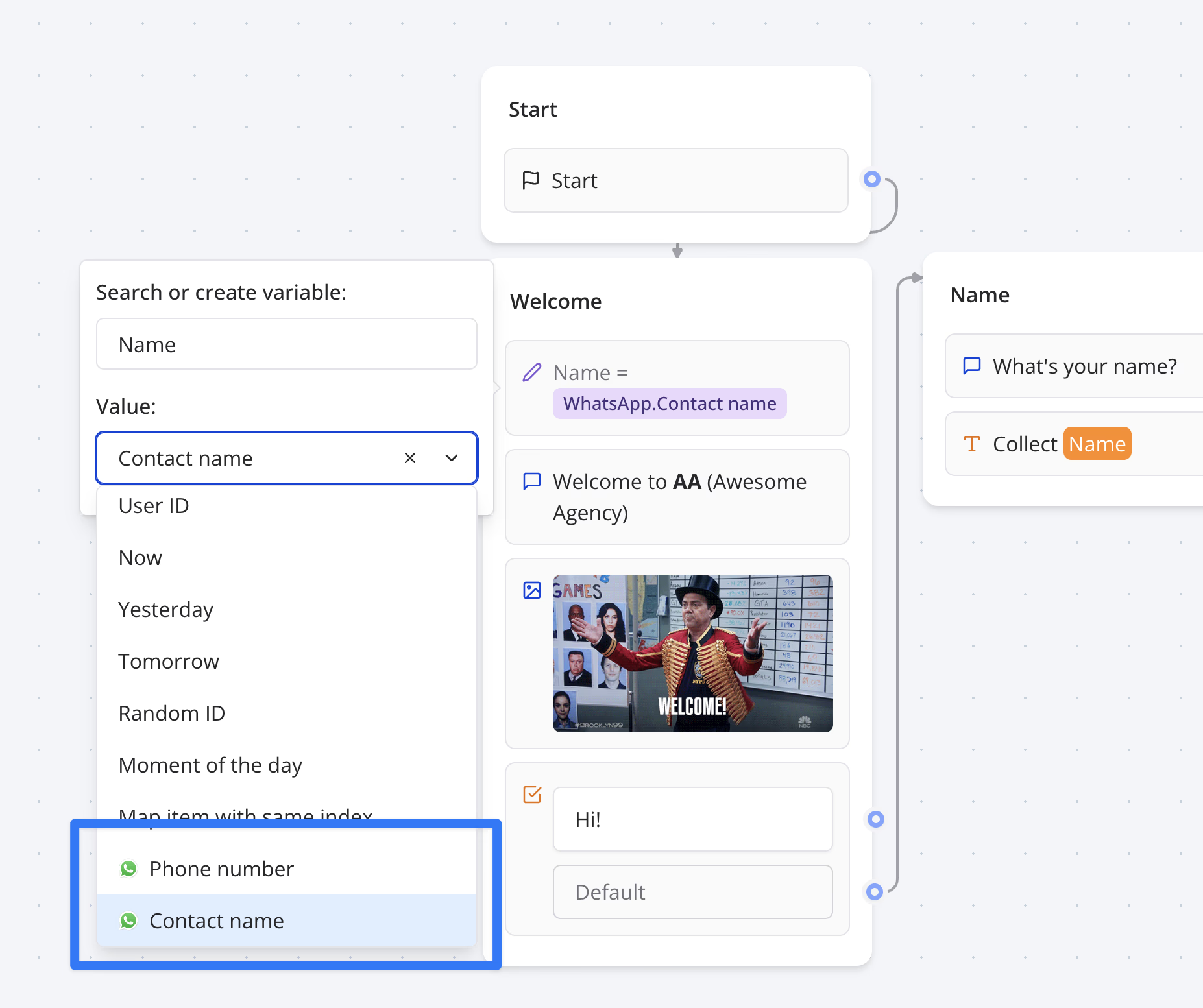
If someone shares details about their budget or what they are looking for, the bot can steer them toward the best fit. Add AI blocks, and you get dynamic messages that respond intelligently to customer intent and context.
This kind of personalization tends to pay off. For example, Tata CLiQ saw a 10x ROI and a 57% click-through rate using personalized recommendations.
3. Recover abandoned carts with automated sequences
WhatsApp works well for bringing back high-intent shoppers who have left items behind. By sending automated messages using a webhook one to four hours after cart abandonment, some businesses recover up to 60% of those sales.
A typical follow-up sequence might look like this:
- Reminder: Show the product image and include a quick checkout link.
- Incentive: If there is no response after 24 hours, offer free shipping or a similar perk.
- Urgency: After 72 hours, add a final discount code.
4. Run click-to-WhatsApp ads
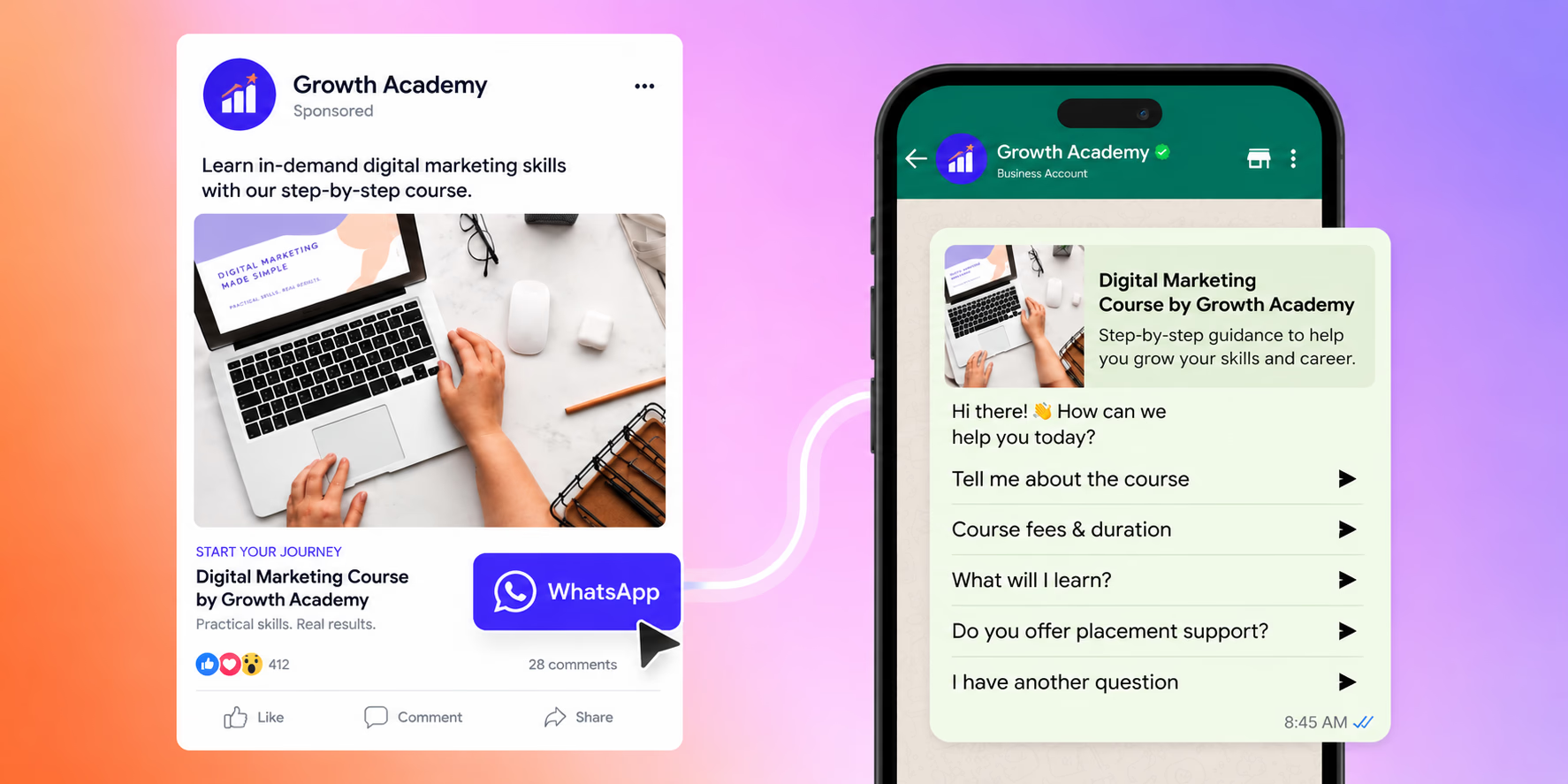
Click-to-WhatsApp ads send people straight from Meta platforms into a WhatsApp chat. In Meta Ads Manager, pick the “Messages” objective and set WhatsApp as your destination.
Once someone clicks, your automated bot can start qualifying them right away. Pediasure Indonesia, for instance, used this method and cut its cost per lead by 64%.
5. Send broadcast campaigns
Broadcasts let you reach a wide audience of opted-in customers at once, which is handy for promotions or product launches. Since WhatsApp limits you to two marketing broadcasts per user per day and requires Meta-approved templates, smart segmentation is key.
Typebot and similar tools can handle the responses and suggest the next best step. That initial broadcast also makes the most of WhatsApp’s 98% open rate.
6. Automate appointment reminders and transactional updates
Transactional messages cover things like order updates, shipping notifications, or receipts. Automated appointment reminders can be especially effective.
NHS clinics, for instance, saw a 47% drop in no-shows by using them. These flows use templates so customers can confirm, cancel, or reschedule straight from the chat.
You can test an appointment scheduler here:
7. Build re-engagement campaigns
Reactivating inactive customers takes a thoughtful approach. With tiered win-back campaigns targeting 30, 60, and 90 days of inactivity, you can gradually increase the incentive.
Often, you will start with a simple check-in. Then you follow up with personalized discounts that consider the customer's purchase history.
This context-aware strategy can turn possible churn into renewed loyalty.
8. Build welcome and onboarding sequences
First impressions matter, and a structured onboarding sequence can turn new contacts into engaged, long-term customers. Instead of sending a single welcome message, set up an automated drip sequence that gradually introduces your brand, highlights key features, and guides users toward their first conversion.
A typical onboarding flow might look like this:
- Day 0 — Welcome: Greet the new contact, reinforce the value they'll receive, and set expectations.
- Day 1 — Feature highlight: Share a tutorial video or tip that showcases your most useful feature.
- Day 3 — Check-in: Ask if they need help or have questions — this opens a two-way conversation.
- Day 7 — Social proof + CTA: Send a case study or testimonial with a clear call to action.
Banking apps like Nubank use WhatsApp to walk new users through account setup, identity verification, and their first transaction — all within the chat. With Typebot, you can build conversational onboarding flows that include rich media (images, videos), conditional next steps based on user responses, and CRM data capture to personalize future messages.
You can try a welcome and onboarding flow here:
9. Run seasonal and promotional campaigns
Peak shopping periods — Black Friday, Christmas, back-to-school, or your own anniversary sale — are perfect opportunities to leverage WhatsApp's high open rates. Broadcast targeted promotions to segmented, opted-in lists and watch engagement soar.
During Black Friday, many brands drive social traffic directly into WhatsApp chats where customers receive personalized deals. Over 50% of holiday shoppers discover brands through Meta technologies, including WhatsApp. With Typebot handling incoming promotional traffic, you can qualify shoppers with a few quick questions and route them to relevant product suggestions or discount offers.
Just keep compliance in mind: proactive marketing broadcasts require Meta-approved message templates. However, once a customer responds to your broadcast and an open conversation starts, you can use free-form messages to continue the dialogue naturally.
10. Launch new products with teaser campaigns
WhatsApp is an excellent channel for building anticipation around a new product launch. Create a teaser sequence that generates excitement, followed by an exclusive early-access window for your most engaged subscribers.
A product launch campaign could include:
- Teaser phase: Send behind-the-scenes content, countdowns, or "guess the product" interactions to spark curiosity.
- Launch announcement: Reveal the product with rich media — images, videos, and a direct purchase link.
- Exclusive early access: Reward your WhatsApp subscribers with early-bird pricing or limited editions before the public release.
With Typebot, you can build a "sneak peek" conversational flow where users answer a few questions to unlock exclusive pre-order access. Collect waitlist signups, capture preferences, and follow up automatically when the product goes live. The result is a launch that feels personal and exclusive — exactly what drives early adoption.
Beyond product launches, many other scenarios can be automated to grow your business. Check out our full list of WhatsApp API use cases to see how to scale your customer communications effectively.
How to build a WhatsApp chatbot with Typebot
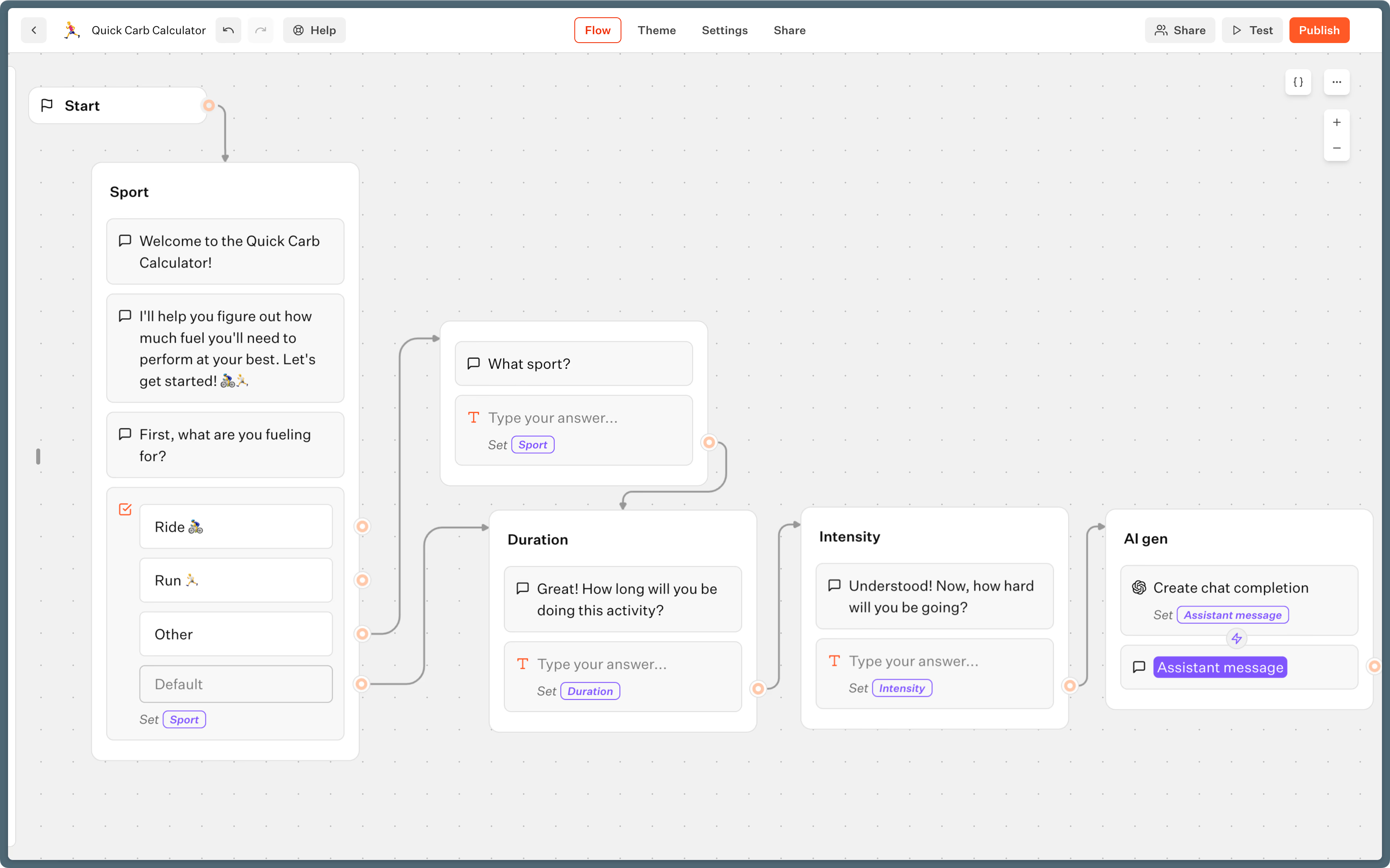
With Typebot, you can design a chatbot for WhatsApp, no coding required. The platform is visual, so you can build lead qualification, cart recovery, or support bots that work right inside WhatsApp and sync with the tools you already use.
Starting is free. Typebot offers a free plan that includes 200 chats per month — enough to test your WhatsApp bot with real users. Paid plans start at $39/month for higher volumes, and since Typebot is open-source, you can also self-host it for free (server costs only).
Set up your WhatsApp business account
If you want to do more than reply to messages by hand, you'll need the WhatsApp Business API. The regular Business App works well for tiny operations — it's free — but the API is what lets you automate conversations, qualify leads, and connect to tools like Typebot and your CRM.
Setting up the API takes two straightforward steps. Once these are done, you'll be ready to link everything to Typebot (we cover that in the next section).
Step 1: Create your Meta Business Account and app
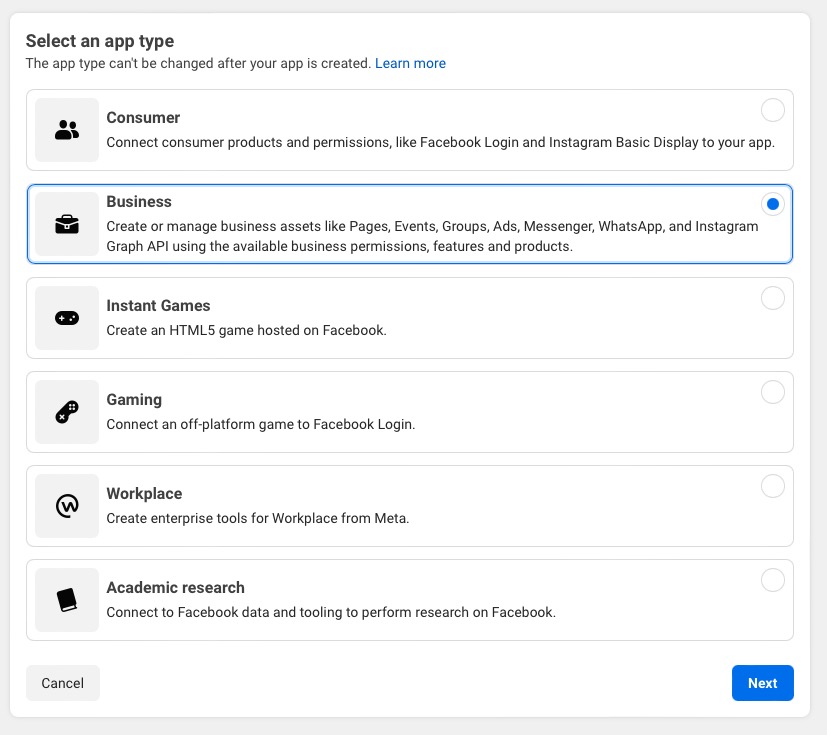
Start by registering on business.facebook.com if you don't already have a Business account. Then head over to developers.facebook.com/apps and click Create App. Choose Business as the app type and fill in your app name and contact email.
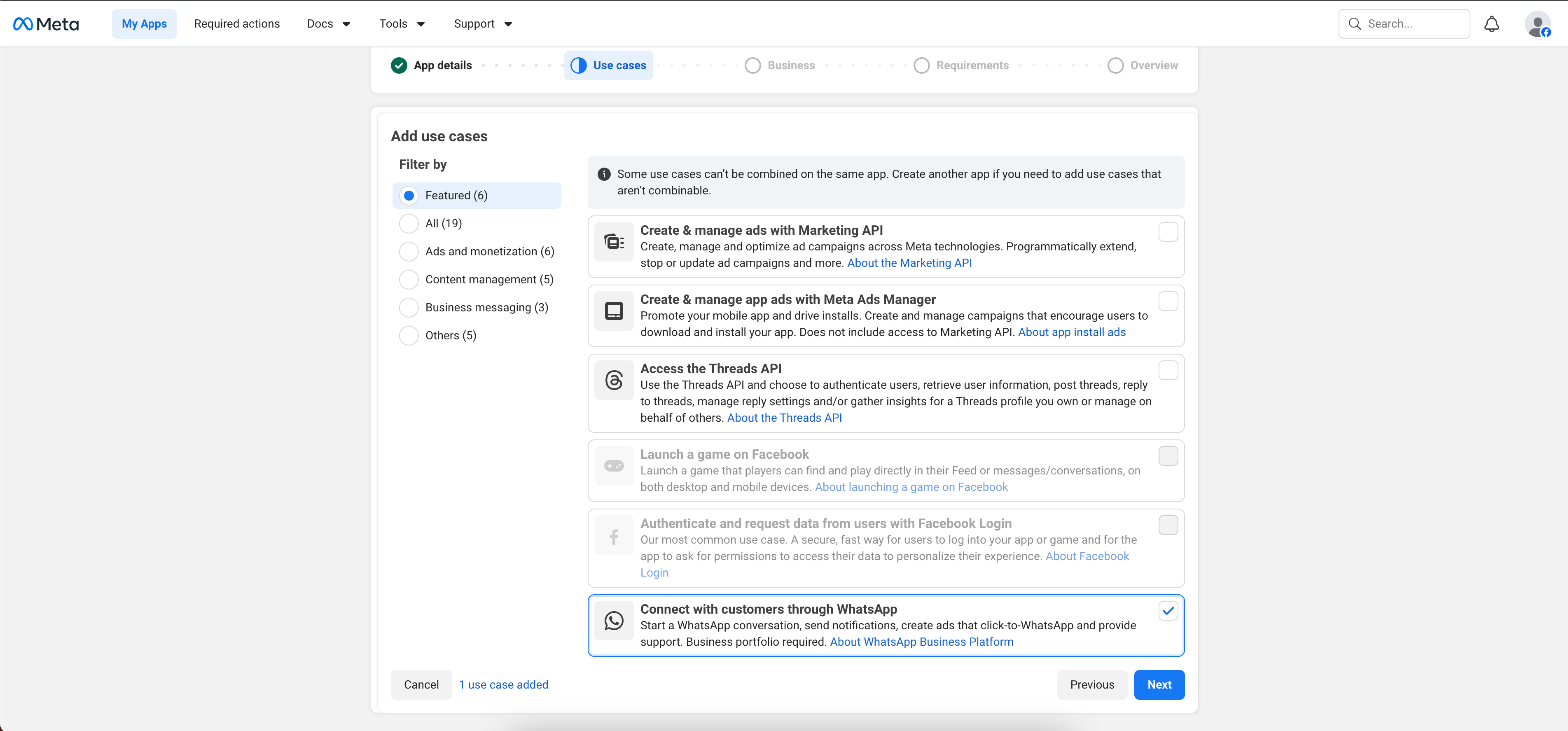
Once your app is created, you'll land on the app dashboard. Find the Add a Product section and click Set up on the WhatsApp product. This adds the WhatsApp Business API capabilities to your app.
Step 2: Generate your WhatsApp API credentials
With the WhatsApp product activated, you need to create a System User and generate an access token so external platforms can talk to your account. You'll need three pieces of information to connect later:
- Access Token — generated from a System User with WhatsApp permissions
- Phone Number ID — the ID of your registered WhatsApp number
- Business Account ID — your WhatsApp Business Account identifier
Head to your System Users page in Meta Business Settings to create your system user and token. You'll find your Phone Number ID and Business Account ID in your app's WhatsApp settings dashboard.
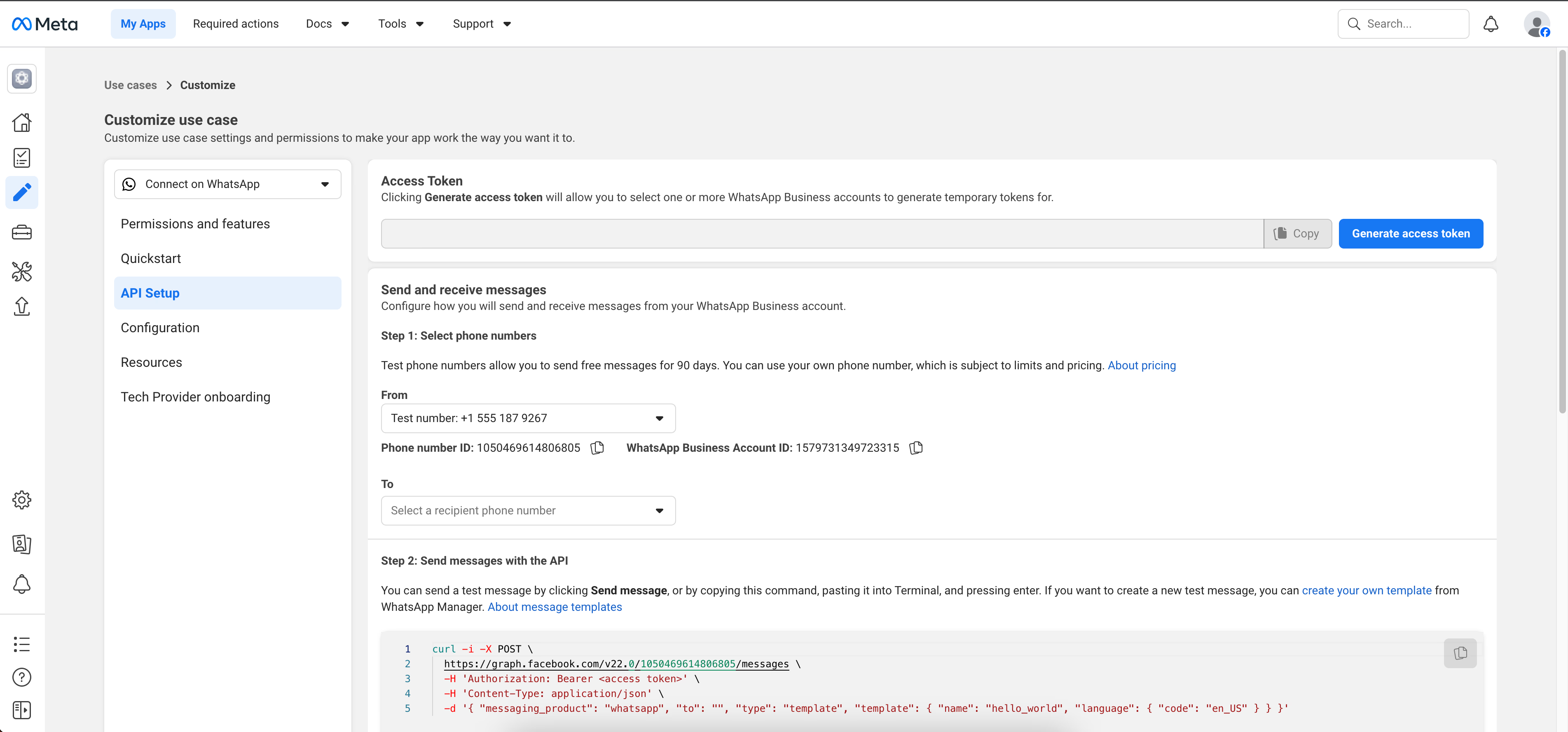
Don't forget to register the phone number you'll use for your bot under the WhatsApp section of your app dashboard.
Note on verification: You do not need to complete Meta Business verification to start using the WhatsApp Business API. Unverified accounts can serve up to 250 unique customers per 24 hours — plenty for getting started, testing, and running small campaigns. When you're ready to scale beyond that, you can pursue partner-led verification (fastest), self-serve Meta verification, or let high-quality messaging automatically unlock higher limits over 30 days.
Build your subscriber list with compliant opt-ins
Meta expects you to get clear consent before you send marketing or transactional messages. You can gather opt-ins in a few different ways:
- Website forms that include an unchecked consent box.
- Offering order updates on your checkout pages.
- QR codes that open an opt-in chat.
- In-chat confirmations, where users respond to a hidden welcome message.
The safest bet is a double opt-in. After someone signs up, send them a WhatsApp message asking for a simple “YES” reply to confirm. Be clear about what they’ll get, such as promotions, order updates, or something else. Keep timestamps and consent records in your CRM or with a tool like Typebot, since Meta may ask for proof.
Any marketing message should also make it easy for people to opt out. Unwanted messages and high opt-out rates can put serious limits on your account.
Segment your audience for targeted messaging
Meta doesn’t look kindly on generic blasts to your whole list. To keep your account in good standing, segment your audience. This also saves your subscribers from message overload.
You can group people by things like:
- Lifecycle stage: Are they new, actively buying, or slipping away?
- Behaviors: Do they reply often, like certain products, or abandon carts?
- Lead status: Are they ready to buy, or do they need more nurturing?
When you target groups precisely, your messages stay relevant. Think loyalty rewards for your best buyers, or win-back reminders for those who left something in their cart. With a visual builder, you can trigger automated flows for the right group based on their data. This kind of tailored messaging helps keep your Meta template quality score high and your engagement numbers healthy.
Design your conversation flow
Typebot works with modular blocks, letting you build interactive conversations step by step. Start with a simple flow, then add logic and integrations as needed.
- Welcome and data capture: Drop in
TextandInputblocks to greet your users and ask for details like their name or company. - Logic branching: Use
Conditionblocks to direct people based on their answers. High-budget leads can go straight to a priority follow-up. - Variable storage: Each answer gets stored as a variable. You can use these to personalize later steps or push info to your CRM.
- Integrations: Connect with outside tools like Google Sheets or Zapier in real time by adding
WebhookorHTTP Requestblocks.
Connecting Typebot to WhatsApp
Once your Meta Business account and WhatsApp app are ready, you’re set to go live.
- Generate a token: In Meta Business settings, create a system user access token.
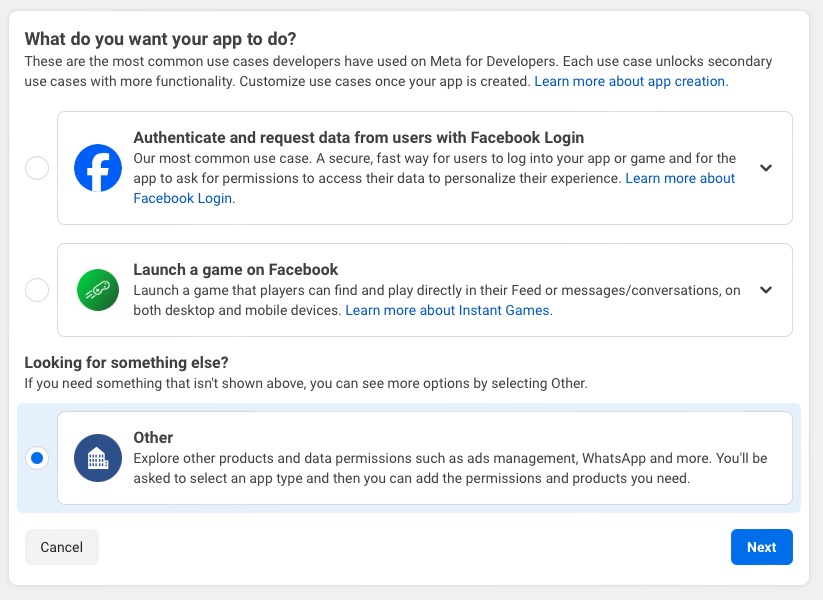
- Here's the detailed process for creating a permanent access token:
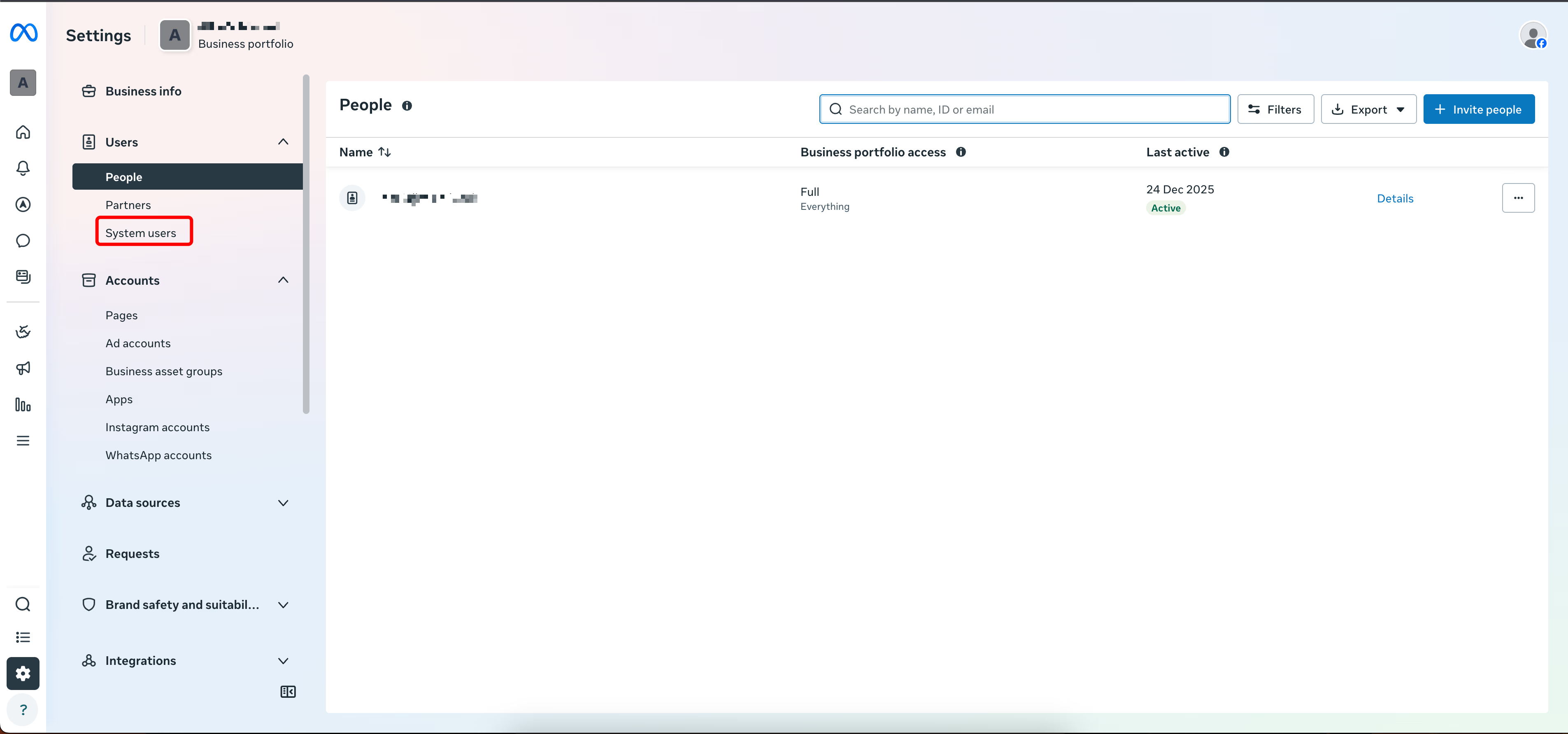
- Go to your Meta Business Settings and navigate to Users > System Users. Click Add to create a new system user.
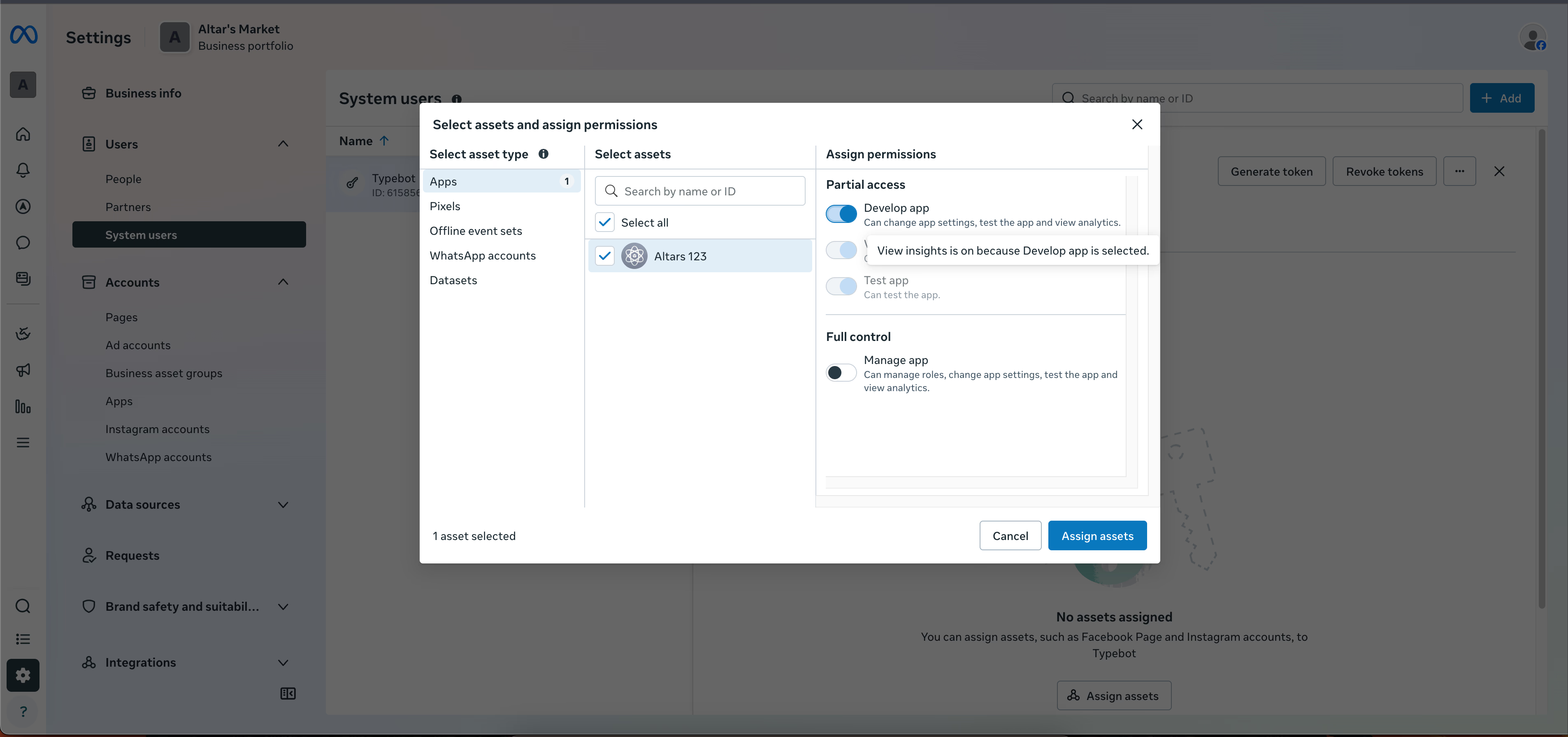
- Name it "Typebot" (or similar), set the role to Admin, then click Assign Assets. Select Apps, find your app, and toggle on Full Control.
- Click Generate New Token and select these two permissions:
whatsapp_business_messagingwhatsapp_business_management
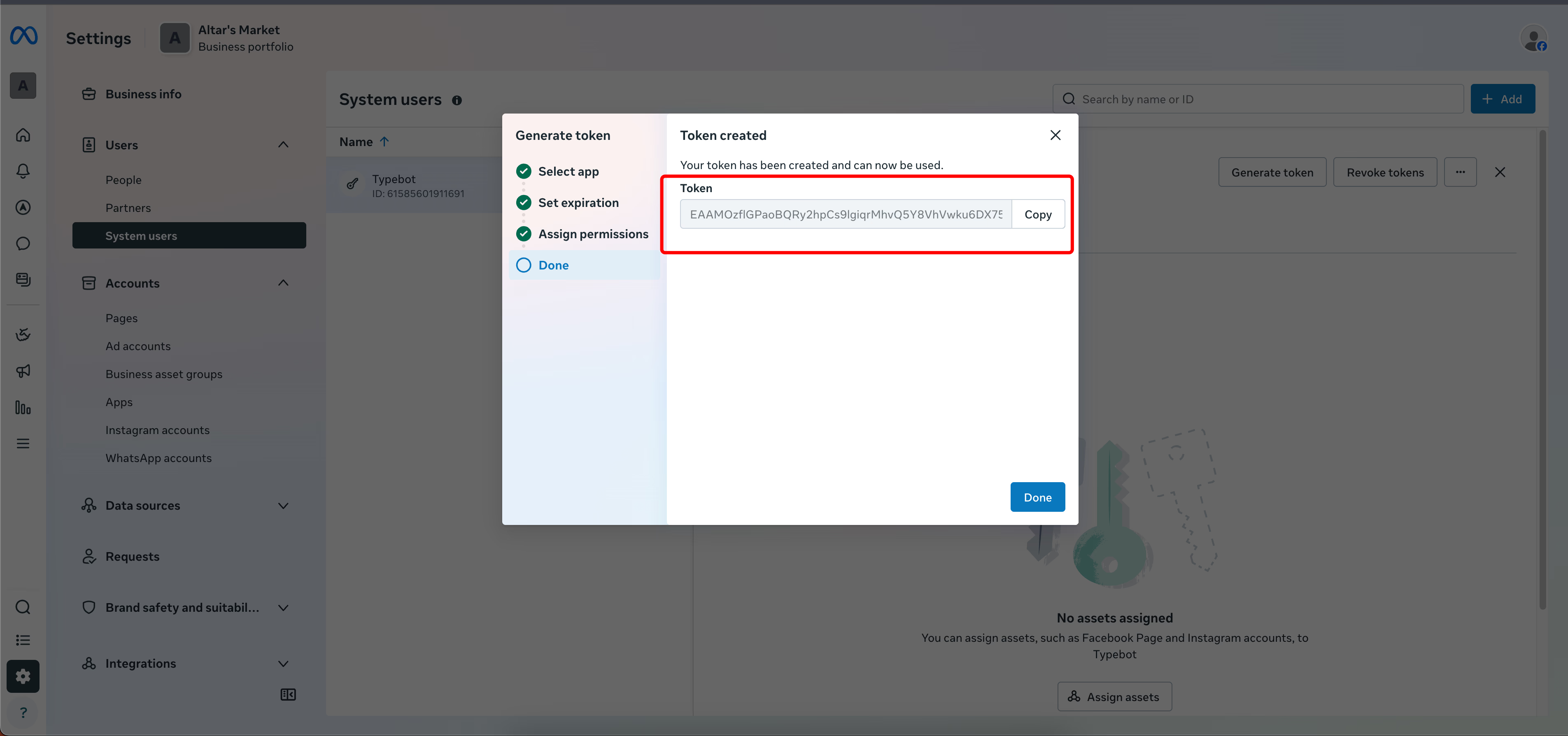
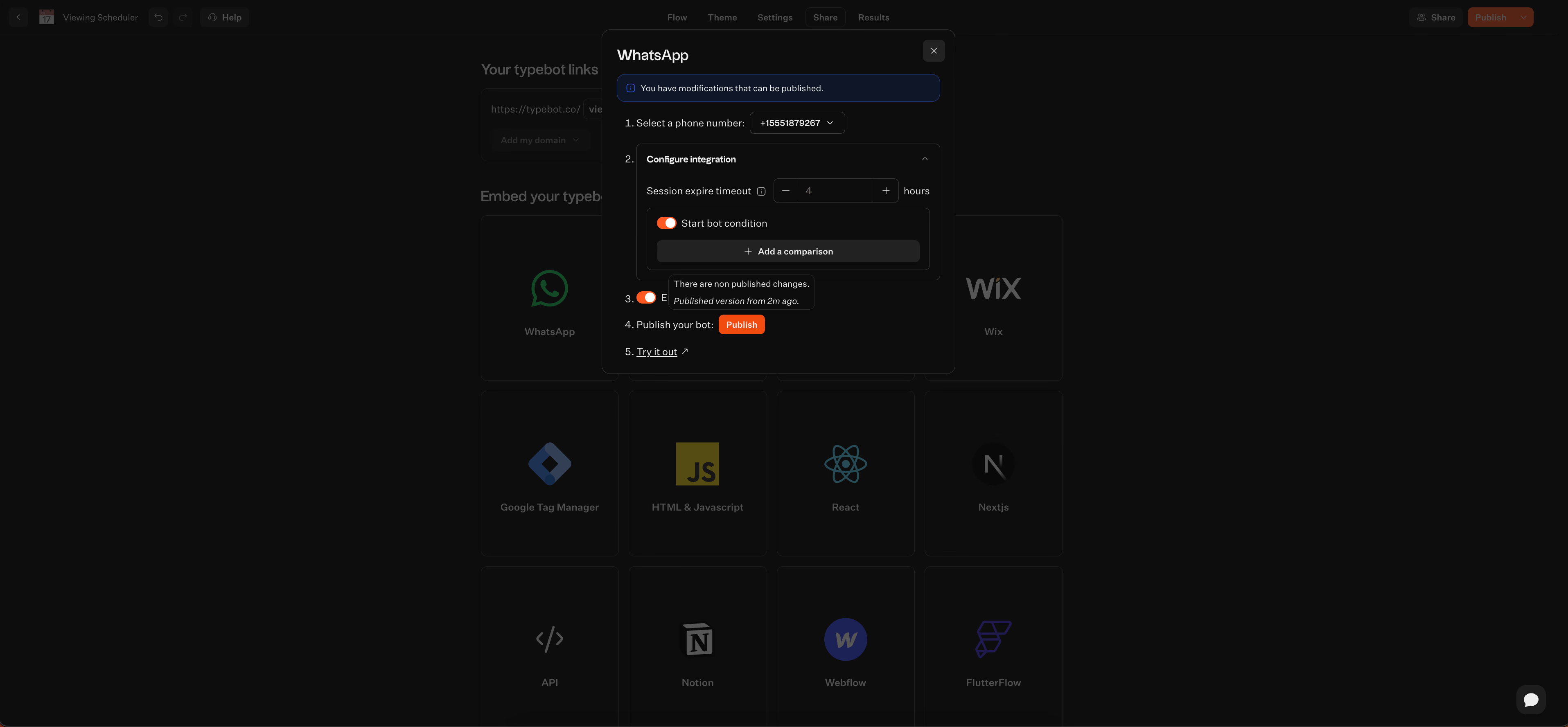
Configure the webhook: Paste this token into Typebot. Then copy the Webhook URL and Verify Token that Typebot gives you back into the WhatsApp Developer Console.
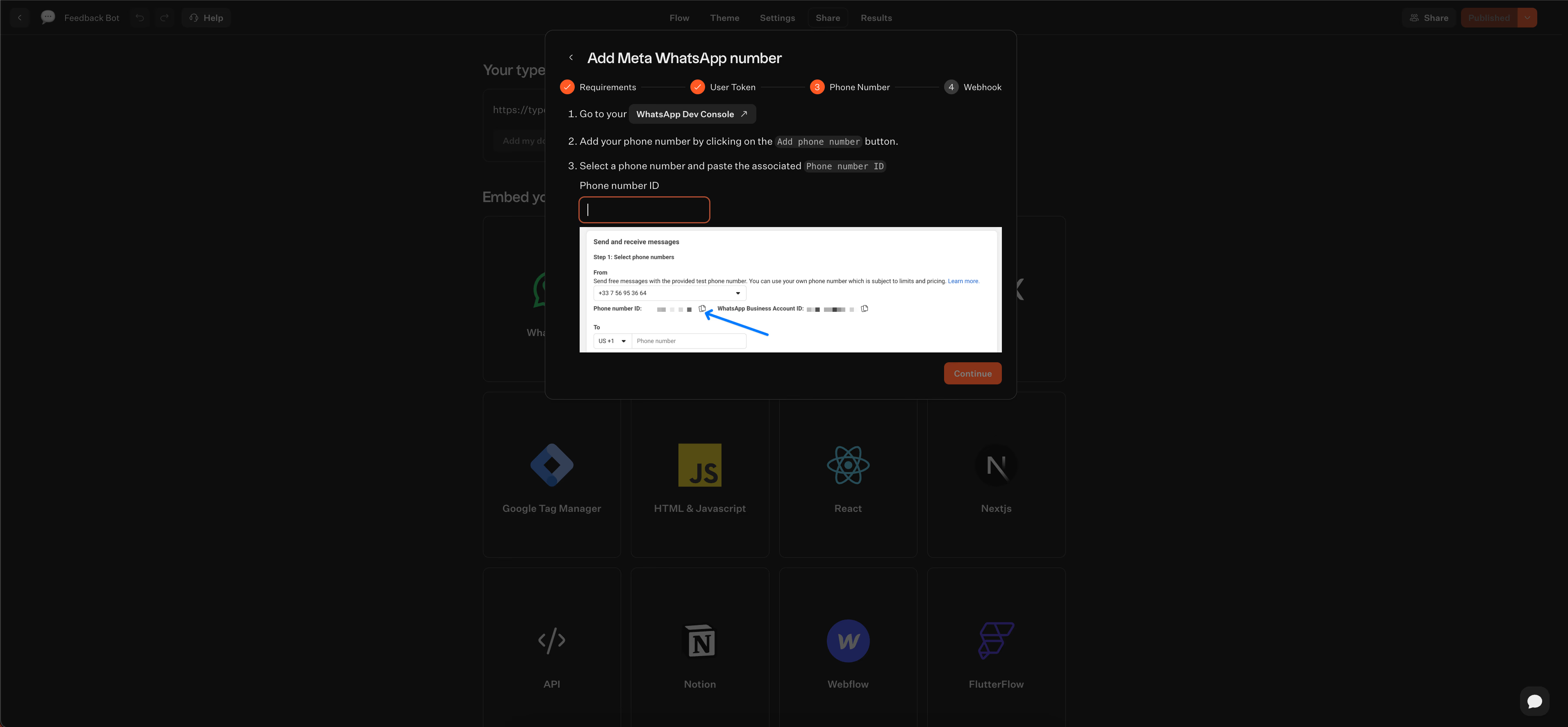
- Add your number: Register your WhatsApp phone number in the console.
That’s it, now your Typebot conversation runs right inside WhatsApp. Users can tap buttons, view images, or interact with whatever logic you’ve set up.
Refine and personalize
The visual editor lets you keep improving the chatbot experience.
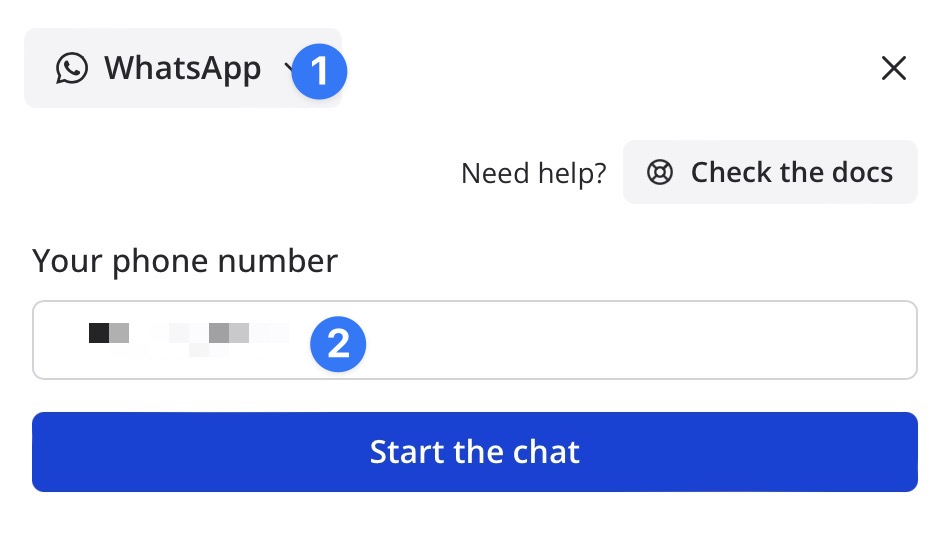
- Rich media: Add visuals like images or audio for a more engaging brand feel.
- Buttons: Insert buttons, up to three at a time, to make things easier for users.
- Testing: Use the WhatsApp preview mode in the editor to make sure everything works before going live.
- Advanced logic: Make your bot smarter by nesting sub-flows or adding loops, like for automated Q&A with AI.
Deploy and scale
Once your bot is live, you can manage everything from one dashboard.
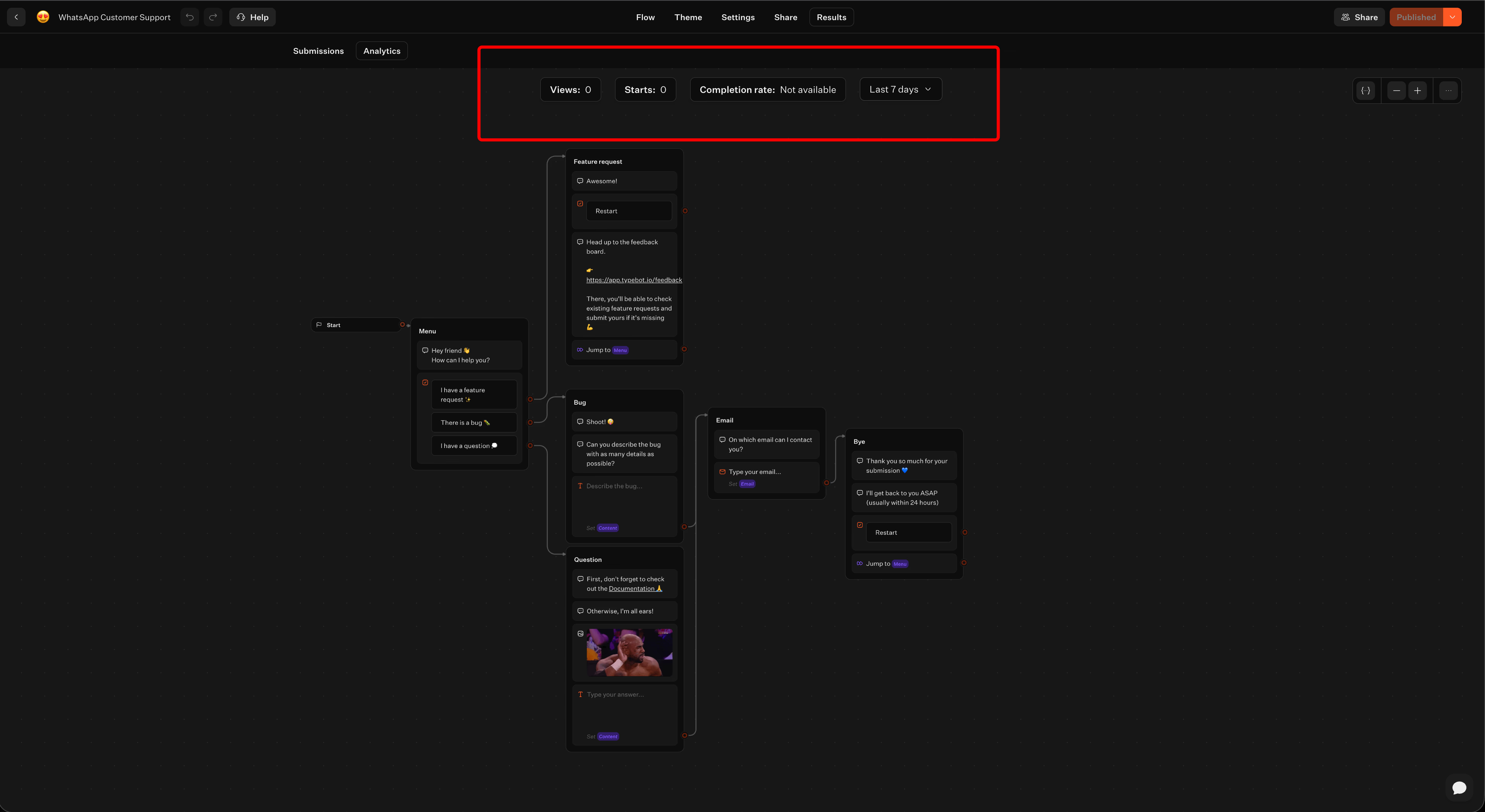
Because Typebot works across multiple channels, you can reuse the same flow on your website as a popup or bubble. Any updates you make in the editor roll out everywhere at once. Built-in analytics and lead labeling help you track performance and see where users might drop off.
See the finished product in action
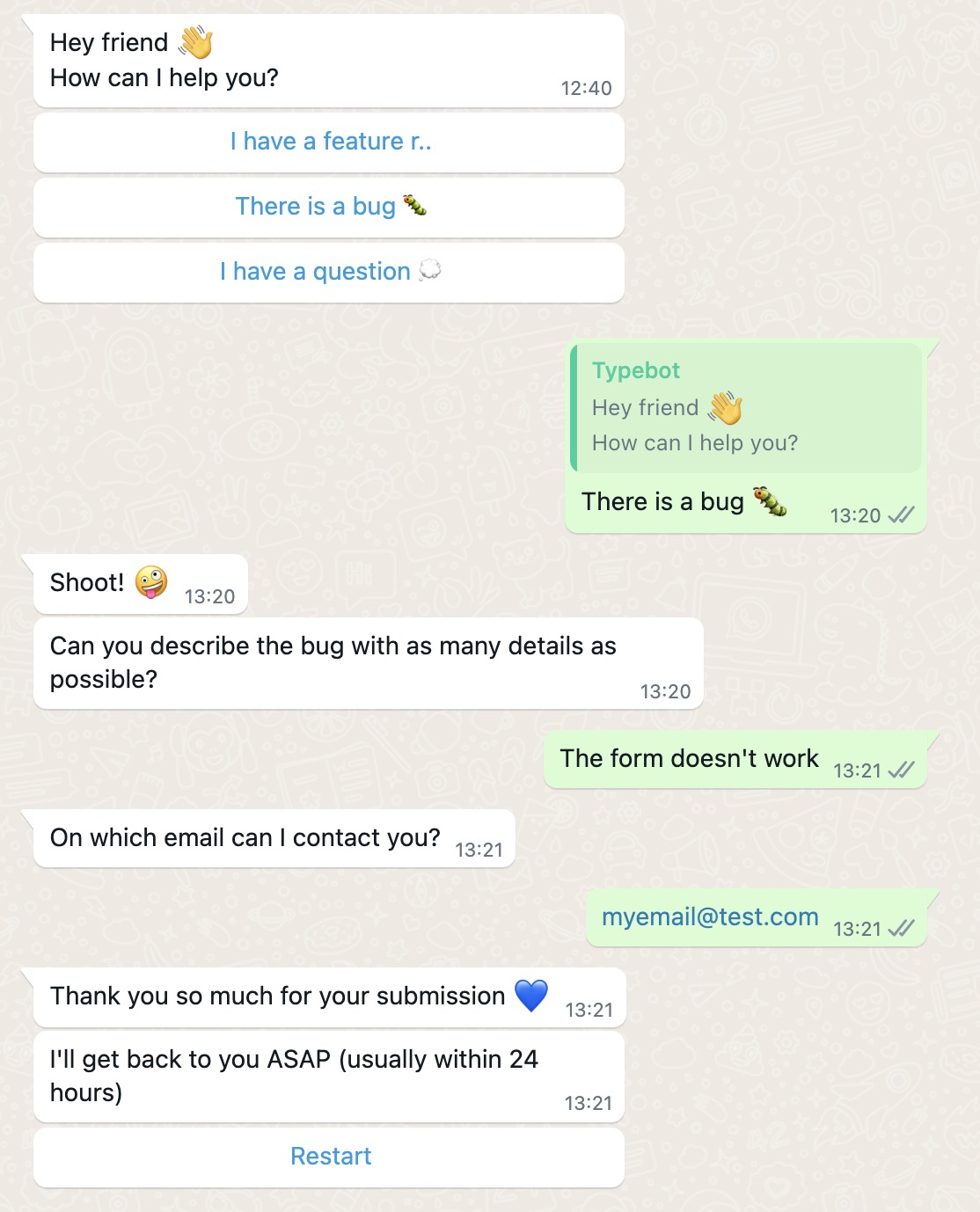
Curious what this looks like? Here’s a working WhatsApp customer support bot made with Typebot. You can see dynamic answers, data capture, and real-time logic in practice:
Reach your audience where they are. Integrate Typebot with WhatsApp for seamless, personalized communication.
No trial. Generous free plan.
Measuring and Optimizing Your WhatsApp Marketing Performance
Key metrics to track
Tracking the right numbers shows you what’s working, and what isn’t, with your automated WhatsApp flows and broadcast campaigns. The metrics that matter most depend on the kind of campaign you’re running.
- Broadcast campaigns: Keep an eye on delivery rates, aim for above 95%, open rates, close to 98%, and click-through rates. Watching your opt-out rate helps catch message fatigue early. If you can keep it under 1%, you're in good shape.
- Conversational flows: Completion rates tell you if your flows are easy to follow. Noticing where users drop off shows you where things get confusing. Lead qualification rate and human escalation rate will help you spot when bots need backup. Try to keep typical response times under 30 seconds.
- Transactional messaging: The focus here is on actual customer actions, like fewer missed appointments after your reminders go out.
- Retention: For dormant users, reactivation rates matter. For current customers, repeat purchase rates are worth tracking.
So, what does all this look like in practice? A monthly dashboard can help you stay on top of these metrics.
| Metric | Current Month | Change | Target |
|---|---|---|---|
| Completion Rate | 73% | +5pp | 75% |
| Lead Qualification Rate | 42% | +4pp | 45% |
| Human Escalation Rate | 18% | -4pp | <15% |
| Average Response Time | 12 sec | -33% | <15 sec |
| Cost Per Lead | $4.20 | -27.6% | <$5.00 |
| Opt-Out Rate | 0.4% | -0.2pp | <0.5% |
Using analytics to improve results
Typebot gives you a clear picture of how users move through your flows. If lots of people drop off at the same step, you may need to tweak or reorder your questions.
Here are a few practical ways to get more value from your data:
- Data analysis: Export results as a CSV for deeper analysis, or match new leads against your CRM to check quality.
- A/B testing: Try out different greetings, calls to action, or question orders. Keep the version that gets more people to finish.
- Continuous iteration: Reviewing every time a conversation is handed to a human will highlight gaps where your bot needs an upgrade. Adjust conversation flows based on what you see.
- Source attribution: Split out results by entry method, like Meta ads versus QR codes, to figure out which channels are driving the best results.
Checking these insights regularly helps you improve your WhatsApp marketing, so you can keep the return on investment strong and offer a positive user experience.
Your WhatsApp marketing playbook starts here
WhatsApp is no longer just a messaging app. It is a high-conversion channel that combines the intimacy of a one-to-one conversation with the scalability of automation. From recovering abandoned carts and running click-to-WhatsApp ads to building personalized onboarding sequences and measuring every step with analytics, the strategies in this guide give you a complete roadmap.
The technology to make it all happen is already here. With a no-code platform like Typebot, you can build a WhatsApp chatbot, connect it to your CRM, and start qualifying leads in hours not months. The brands that act on these strategies today will be the ones defining the standard for conversational marketing tomorrow.
Create, customize, and deploy your first Typebot today. No coding required.
No trial. Generous free plan.