
Picture this: you spend thousands on Facebook ads, email campaigns, and a sleek website. Yet 68% of online orders get abandoned before checkout, and 95% of your app users disappear within a month. There is a better way, and 3 billion people already have it on their phones.
WhatsApp marketing for restaurants is not just about higher open rates. It is about turning everyday conversations into reservations, orders, and repeat visits, all while keeping margins intact and guests happy.
Why WhatsApp marketing works for restaurants
WhatsApp delivers a 98% open rate, far outperforming email (~25%) and SMS (~60%). With over 3 billion monthly active users, your customers are already there, checking the app multiple times a day.
The results speak for themselves:
- Domino’s Indonesia saw sales jump 72% with a 6.3x ROI.
- Berco’s achieved a 204x ROI from a single campaign.
- Pista House boosted order volume by 45% with WhatsApp ordering.
WhatsApp also helps restaurants avoid the 20–30% commissions charged by third-party aggregators by bringing orders directly to you.
A templated message costs as little as $0.05–$0.10, click-through rates reach 80%, and automated bots handle ~80% of routine questions.
WhatsApp Business app (free, limited)
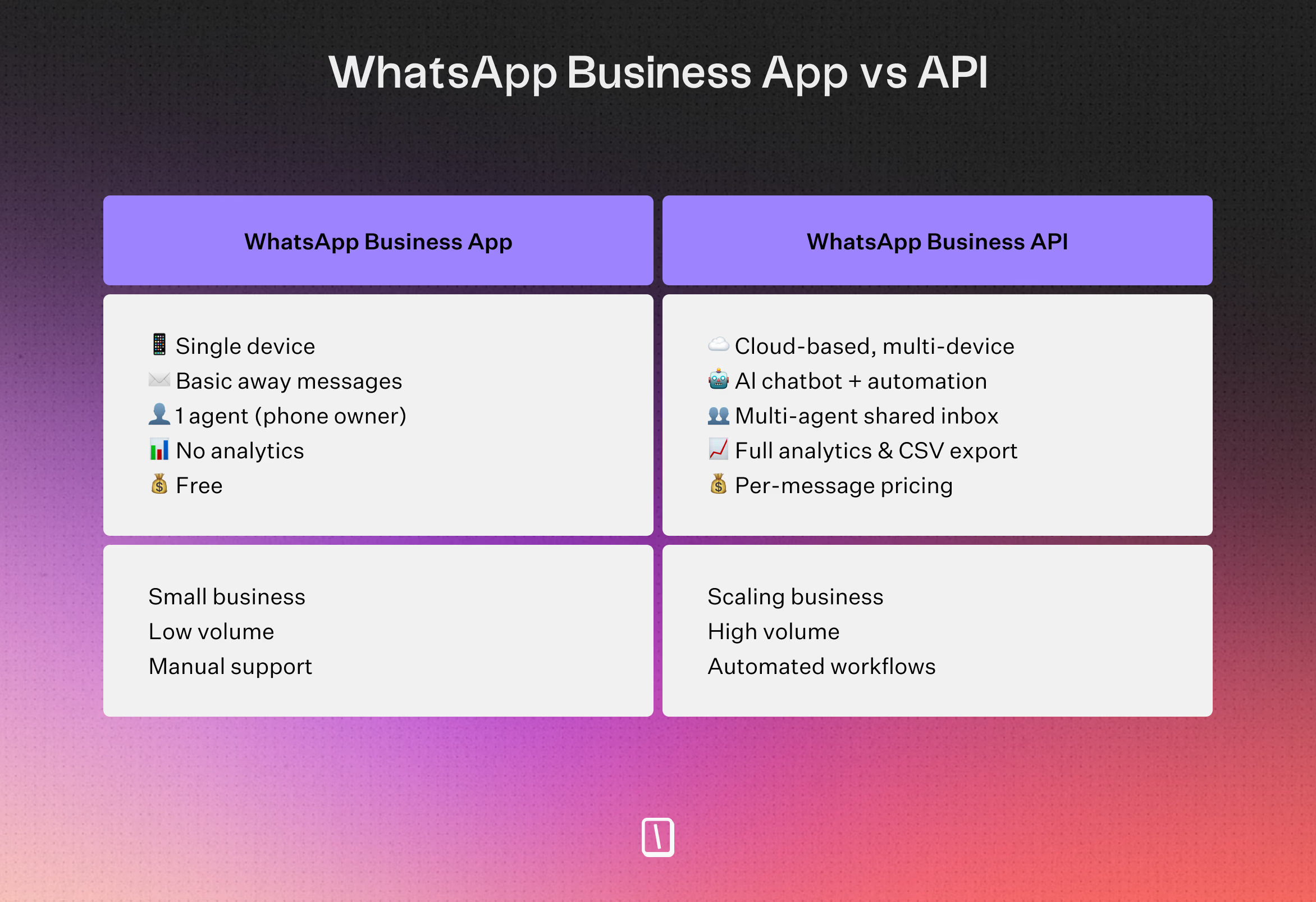
Best for small, owner-operated restaurants. Limitations include: contacts must save your number, no analytics or scheduling, no chatbot support, no personalization, and a high risk of account bans when bulk messaging.
In short, the WhatsApp Business app is very manual — every message, every list, every follow-up requires hands-on effort, making it impractical for any restaurant looking to scale.
WhatsApp Business API (scalable, compliant)
Built for restaurants ready to scale. Key advantages: unlimited opt-in lists, full analytics (delivery, open, CTR), personalization with customer data, rich media (menus, images, videos), chatbot/AI integration, and compliant high-volume messaging.
When to upgrade to the API
Switch when manual outreach becomes unwieldy: if you serve over a hundred customers, need data-driven promotions, automated reservation reminders, or AI-powered responses.
The API unlocks broadcasts, audience segmentation, and automated flows.
Top WhatsApp marketing use cases for restaurants
Try out our live restaurant chatbot below to see how WhatsApp automation works in action and the different use cases:
1. Reservations and table management
A WhatsApp Business chatbot can handle bookings much faster than old-school phone calls or online forms.
Guests simply message the restaurant to see what’s available, pick their party size, or ask for a window seat.
To cut down on no-shows, the system sends reminders with easy buttons to confirm or cancel, no back-and-forth needed.
One Dubai restaurant group made the switch from SMS to WhatsApp reminders and saw no-shows drop by 31%.
You can also prompt guests to sign up for loyalty programs or buy a gift card right after confirming their reservation.
2. Ordering and delivery without aggregator fees
Running ordering directly through WhatsApp helps restaurants skip the 20% to 30% commissions from third-party channels.
Guests browse photo menus, mention any dietary needs, and pick delivery or pickup, all from the chat.
The bot collects details, sends payment links like UPI or Stripe, and keeps everyone updated throughout the order.
Some places already see results: a Mumbai cloud kitchen handles 18% of its daily orders through WhatsApp.
Because guests stay inside the messaging app they already use, the process is usually faster and less frustrating than switching to a restaurant website.
3. Loyalty programs and retention campaigns
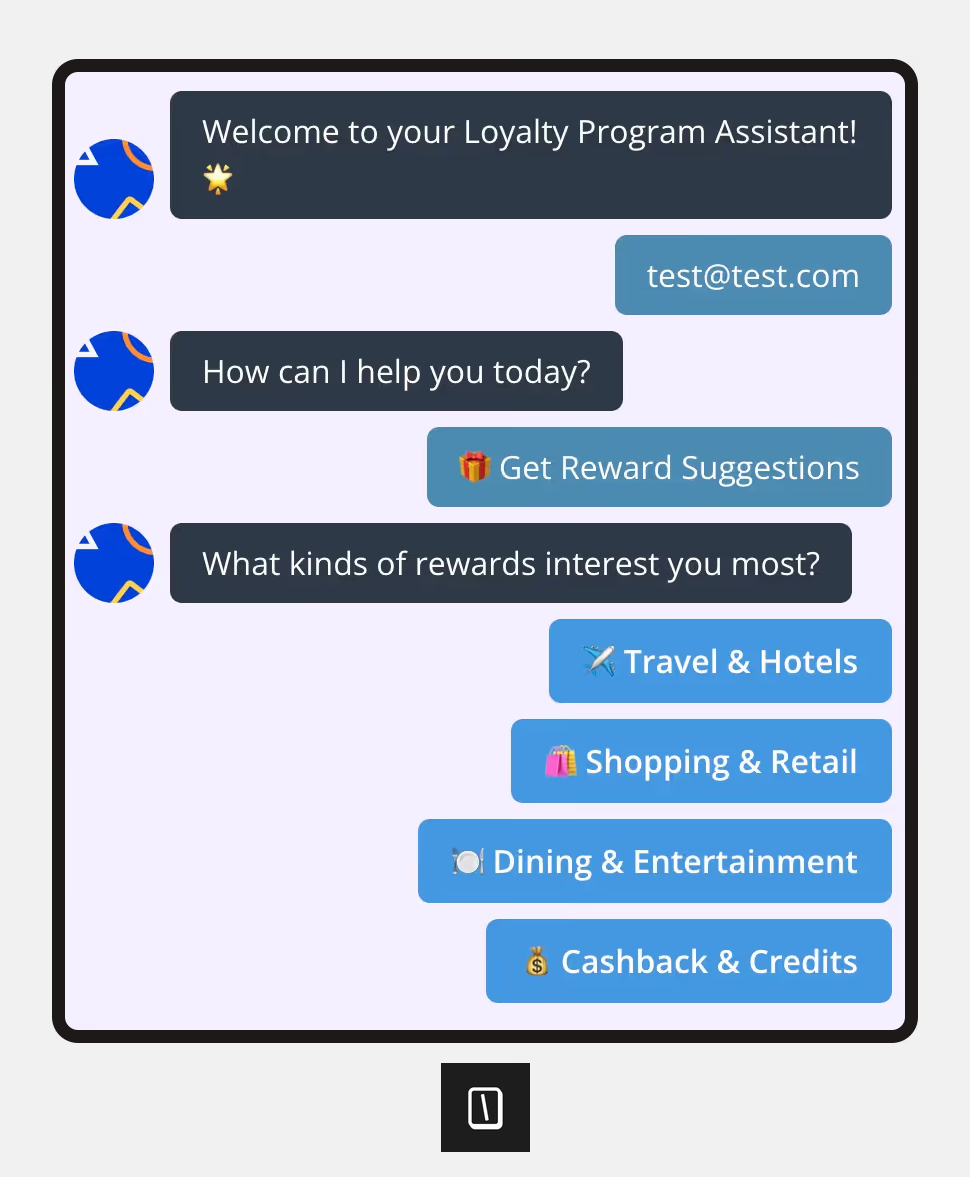
WhatsApp is a solid way to keep guests coming back, with automated triggers like:
- Milestone rewards: Letting guests know they just earned a freebie, with up to 60% to 80% click-through rates.
- Birthday offers: Sending customized discounts for their special day, often seeing 30% to 50% CTR.
- Win-back campaigns: Nudging guests who haven’t visited in a while, such as 30 days or more.
Automation means these touches scale easily, so VIPs and regulars can get personalized messages without extra staff time.
4. Promotional broadcasts and seasonal offers
You can catch guests right as they’re deciding where to eat, for example, by sending lunch deals between 10 AM and noon.
Segmenting these blasts helps ensure relevance, whether it’s by:
- How often, and when, someone orders.
- Menu preferences, from vegan to meat-lovers.
- Location, if you run more than one site.
Timing matters here, because a time-sensitive deal usually gets more traction than a generic bulk email.
5. Customer support and FAQs
Bots can handle most standard questions, think opening hours, parking, or allergens, so staff aren’t tied up answering the phone all day.
Guests get answers instantly, which tends to keep everyone happier.
If a question gets tricky or a complaint comes up, the bot can bring in a real person without losing any conversation history.
To finish things up, the bot can send a quick survey or loyalty reminder after any guest support chat, helping you get feedback or drive future visits without extra staff time.
Reach your audience where they are. Integrate Typebot with WhatsApp for seamless, personalized communication.
No trial. Generous free plan.
How to set up WhatsApp Business for your restaurant
Connect your WhatsApp Business API account
If you want your restaurant’s operations to grow smoothly, you’ll need a Business Solution Provider (BSP) like Brevo, Wati, or WANotifier.
These platforms handle the WhatsApp Business API for you.
For automated reservations and order workflows, you can plug in a visual builder like Typebot right into these platforms.
Here’s the basic process:
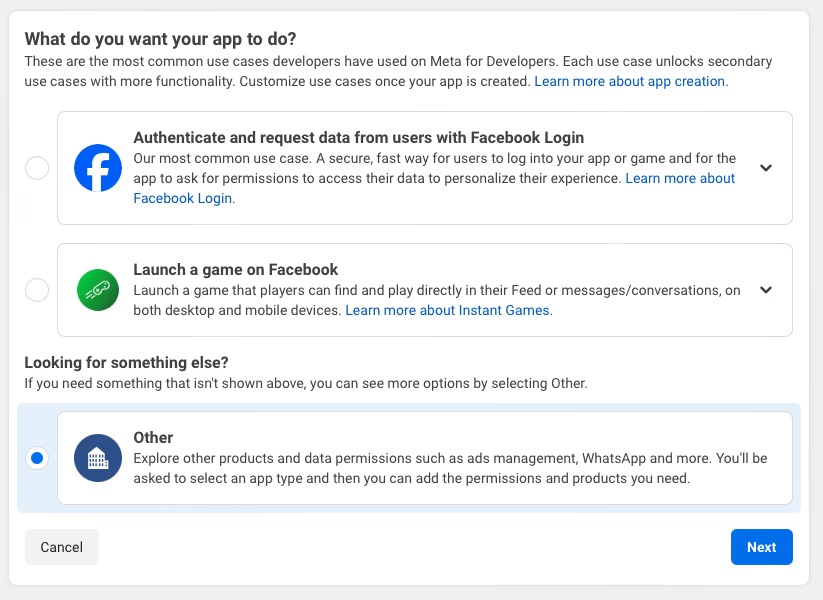
- Meta business setup: Start by creating a Meta Business account. Then set up a new app in the Meta Developers portal and make sure the WhatsApp product is enabled.
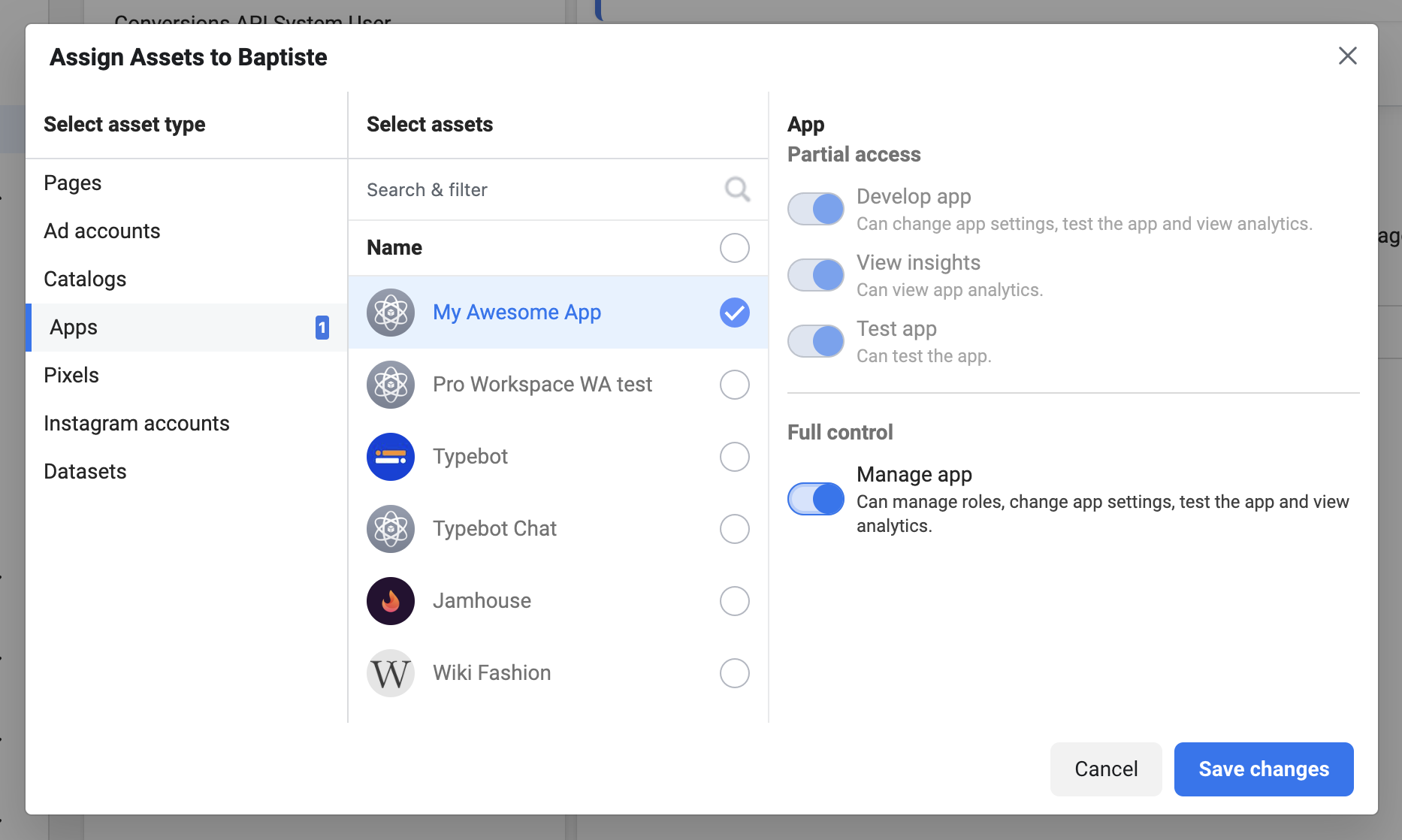
- Generate access: In Meta Business Settings, generate an access token. This lets your chosen platform talk to the API.
- Webhook configuration: Connect your WhatsApp Business account (WABA) to your platform. In the Meta developer console, paste in the webhook URL and verification token your platform gives you, for example Typebot.
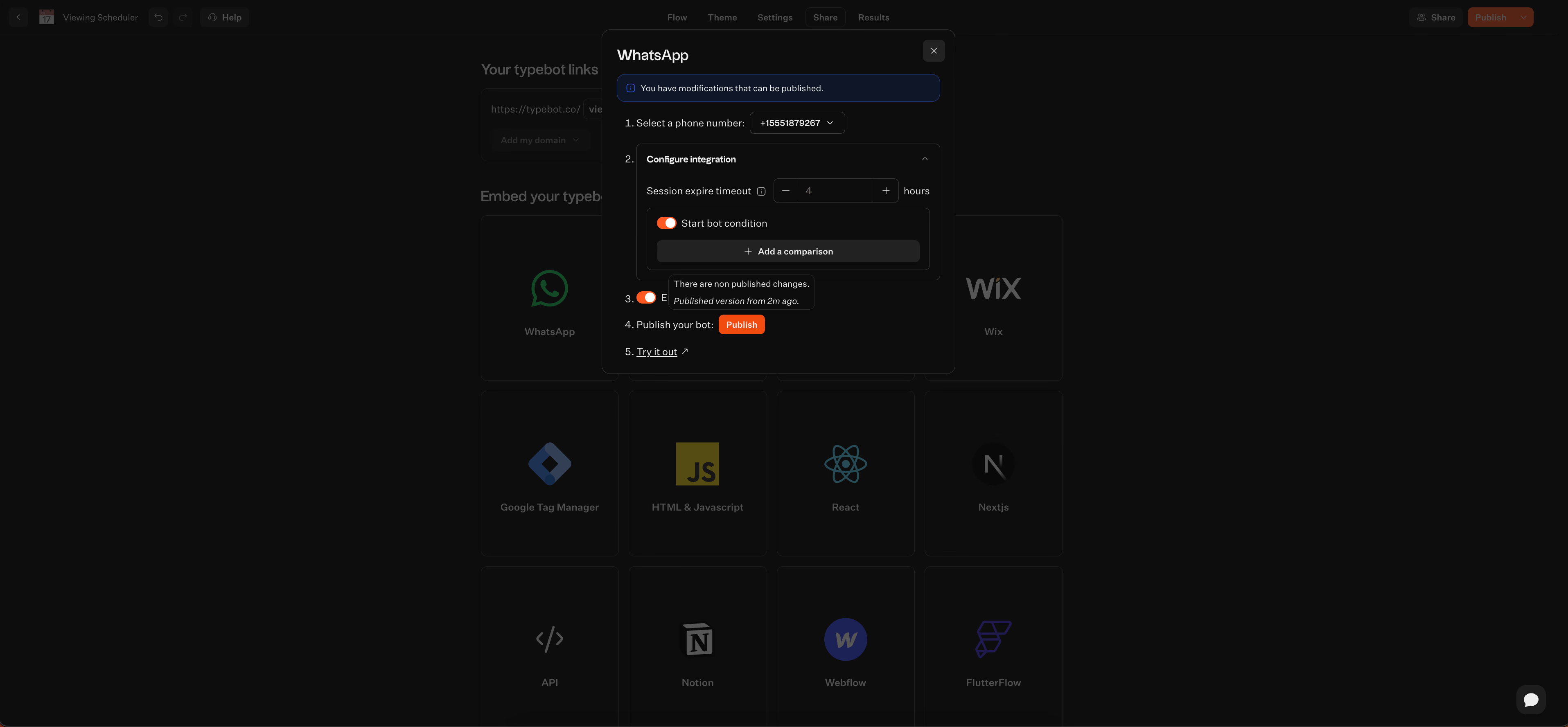
- Verification: Add your restaurant’s phone number and verify it. This unlocks complete automation and access to analytics.
Build your opt-in contact list
WhatsApp is strict about consent. You have to collect opt-ins before sending messages.
Get people to opt in where they already like to interact with your business:
-
In-store: Put QR codes on tables, menus, or receipts.
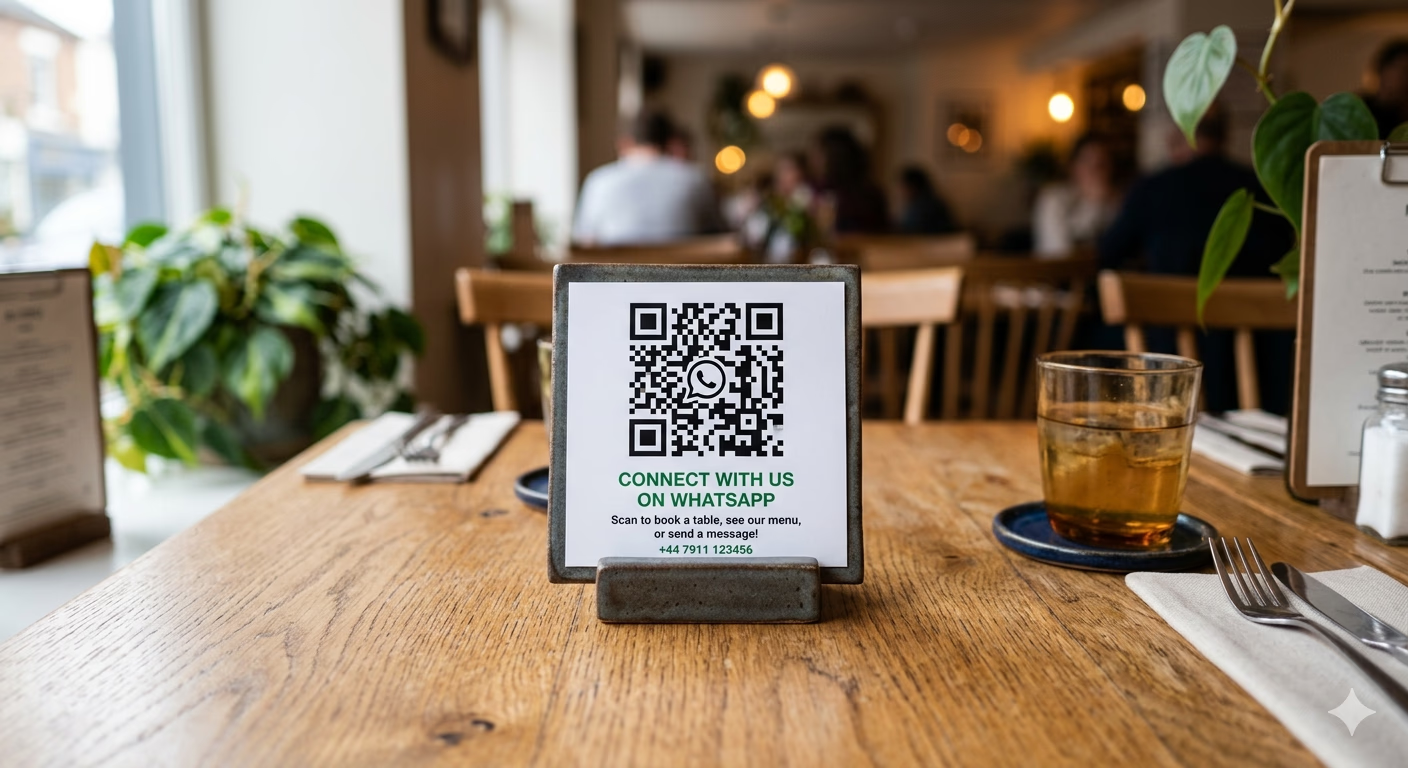
A QR code on a restaurant table lets guests scan and start a WhatsApp conversation instantly -
Online: Add “Click to WhatsApp” buttons on your website or social media pages.
-
Ads: Run Meta’s Click-to-WhatsApp ads. These ads start chats right from your campaigns.
It’s tempting to buy contact lists, but don’t.
WhatsApp prohibits unsolicited messaging and will ban accounts that break the rules.
Keep track of every opt-in with clear records, including a timestamp for each contact.
Create and submit message templates
Any message sent outside the 24-hour customer service window needs to use a pre-approved template.
Templates come in several categories:
- Marketing: Promotions, new menu launches, and special offers.
- Utility: Order receipts or reservation reminders.
- Authentication: Verification codes.
Templates have a set format. They include a header, which can be text or media, a body that uses variables like \{\{name\}\} for personalization, and up to three action buttons.
All marketing broadcasts must include an opt-out button that customers can easily find.
To submit templates, use your BSP platform or Meta dashboard.
Most templates get approved quickly, usually in minutes. Sometimes manual reviews can take up to 24 hours.
Automating WhatsApp conversations with a chatbot
As restaurants grow, managing WhatsApp outreach by hand just isn’t sustainable anymore.
Handling dozens of bookings, orders, and common questions at once calls for automation. Tools like Typebot make this process simpler with a visual, drag-and-drop builder, no coding required.
Building reservation and ordering flows
Think of a WhatsApp bot as your digital maître d’ and server, all rolled into one.
With Typebot, you build these flows in blocks, each focused on a specific task:
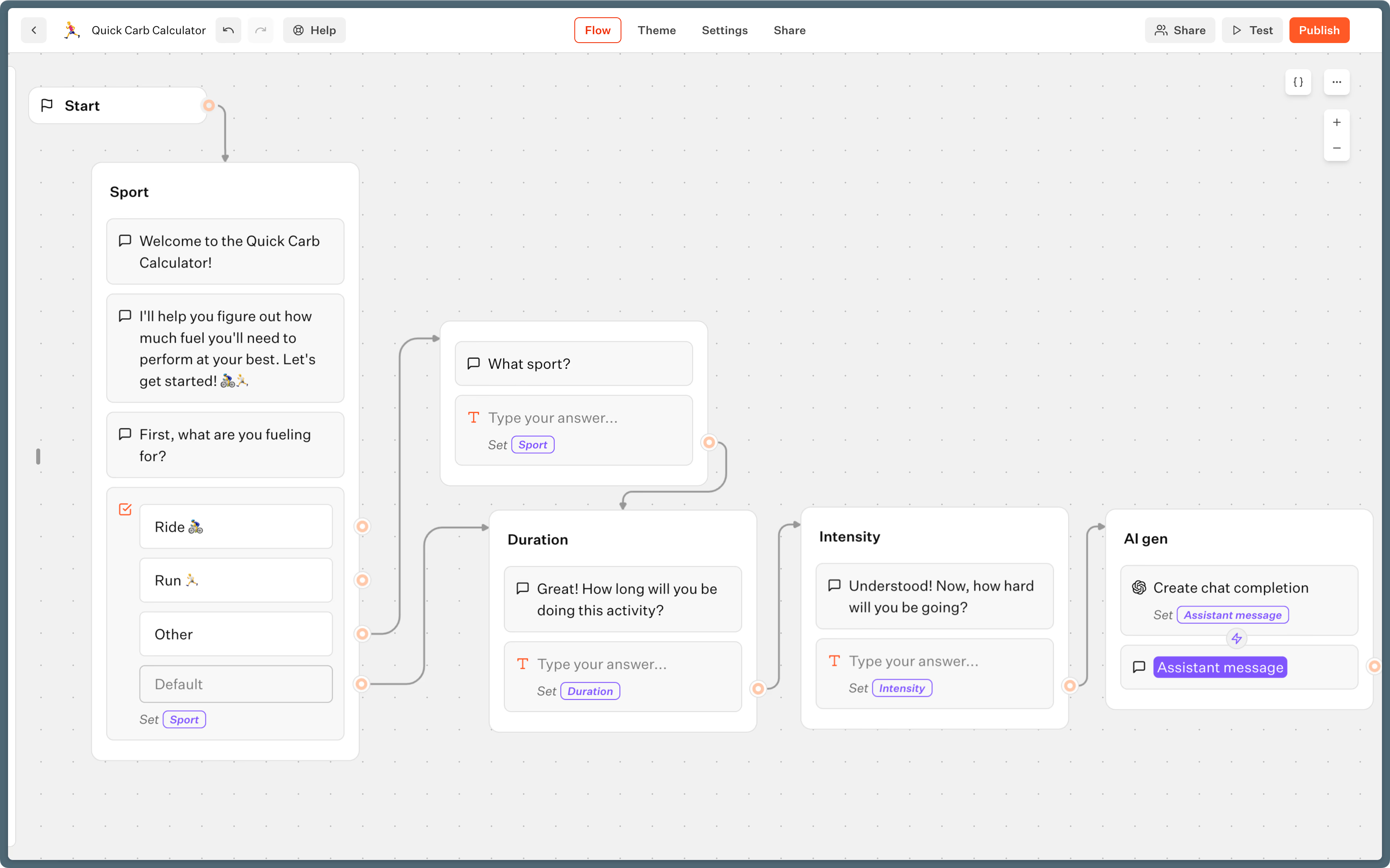
- Reservations: The bot walks guests through each step, like picking a date, party size, and seating area, such as the patio or bar. It saves these details for your records.
- Direct ordering: The conversation splits to show menu images and gather dietary notes. Guests choose delivery or pickup, then review their order right in the chat.
- Engagement: Once a booking or order is finished, the bot can gently nudge guests to sign up for loyalty perks or highlight a special offer.
This conversational style cuts down on long web forms, so more guests finish booking, and you get better data.
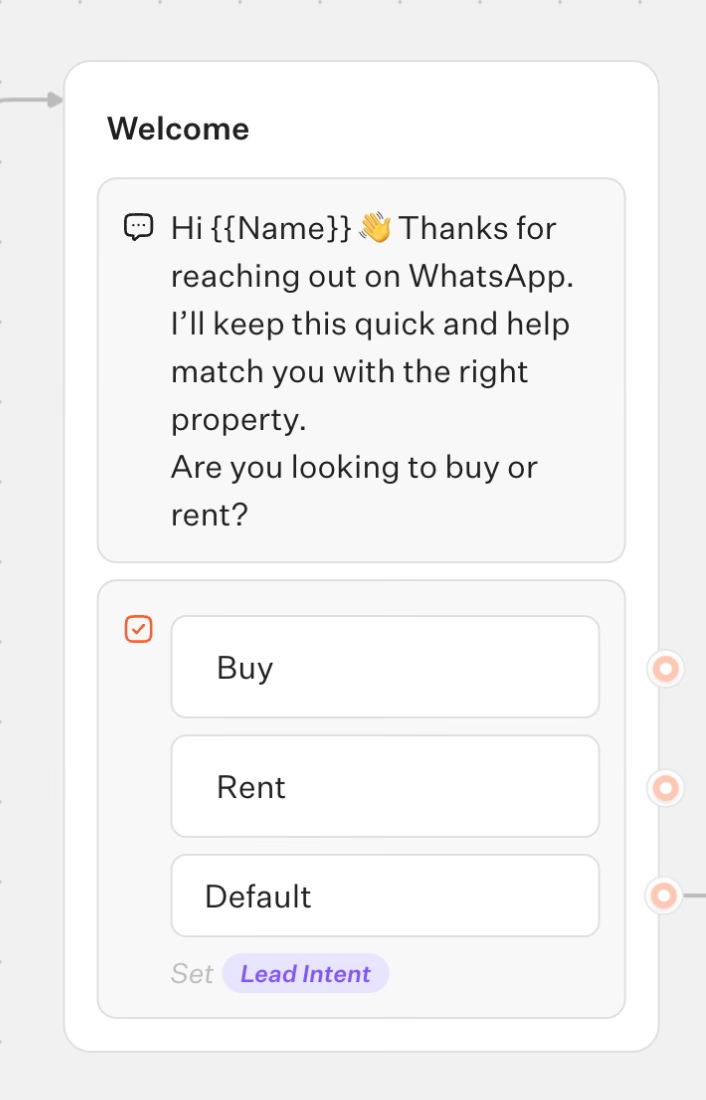
Adding AI-powered responses
Questions about parking, allergies, or hours often take up staff time.
By adding AI blocks using OpenAI or Anthropic, the bot handles natural language questions:
- Dynamic information: If someone asks, “Do you have vegan options?” the bot checks your menu and gives a relevant answer.
- Personalized hospitality: AI can suggest dishes based on past orders or preferences guests mention.
- Smart escalation: When the bot spots a complaint or a tricky issue, it captures the details and passes the conversation to a manager, complete with a transcript.
This keeps routine questions moving while making sure complex issues reach the right person quickly.
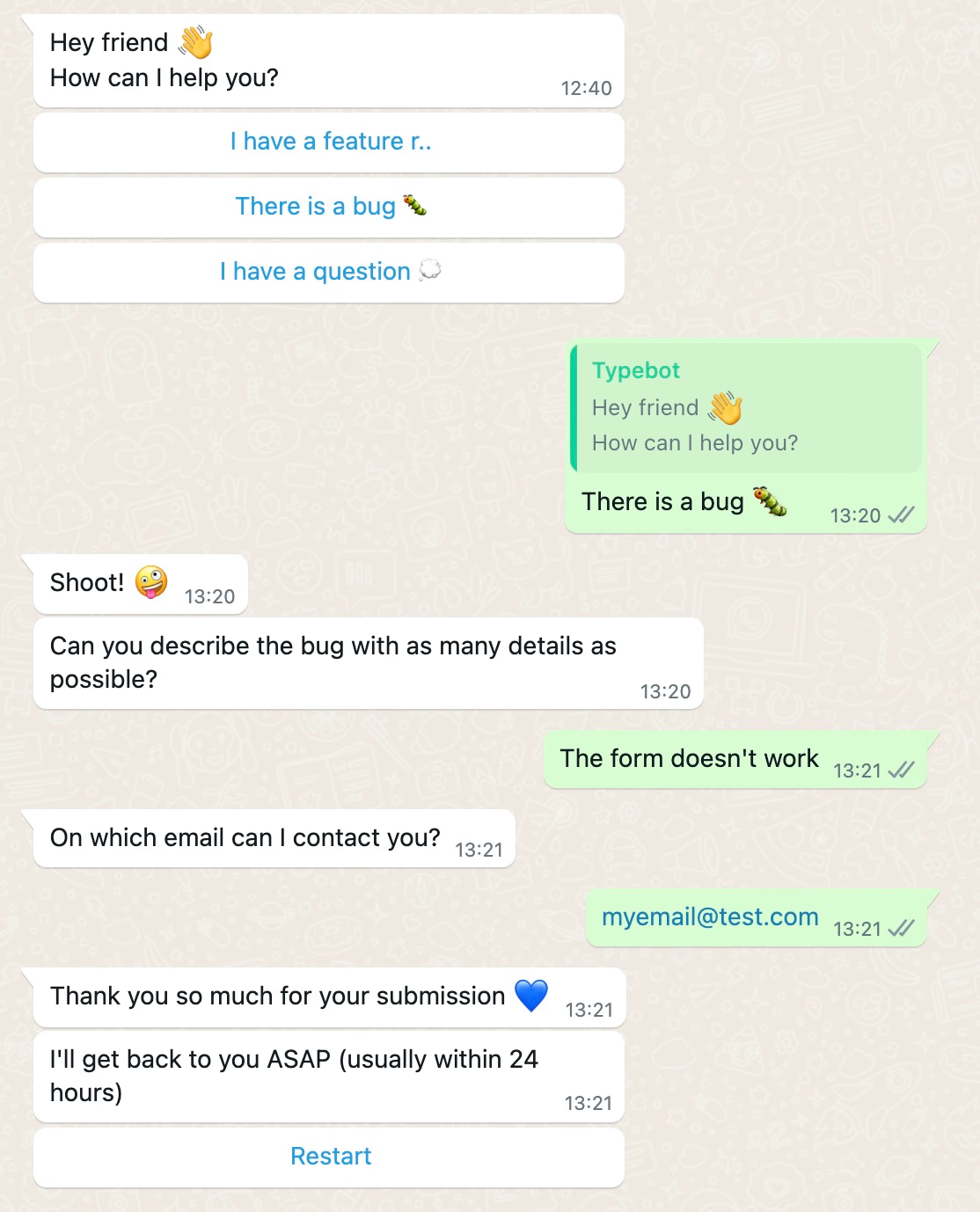
Dive deeper into the capabilities of a best WhatsApp AI chatbot and how it can elevate your restaurant's customer service.
Deploying your bot
Ready to launch?
Typebot lets you use the same flow across different channels.
The WhatsApp API is great for mobile engagement, but you can also:
- Embed the flow as a widget or floating bubble on your website.
- Connect it to Facebook Messenger.
- Share a direct URL for social media profiles or in-store digital kiosks.
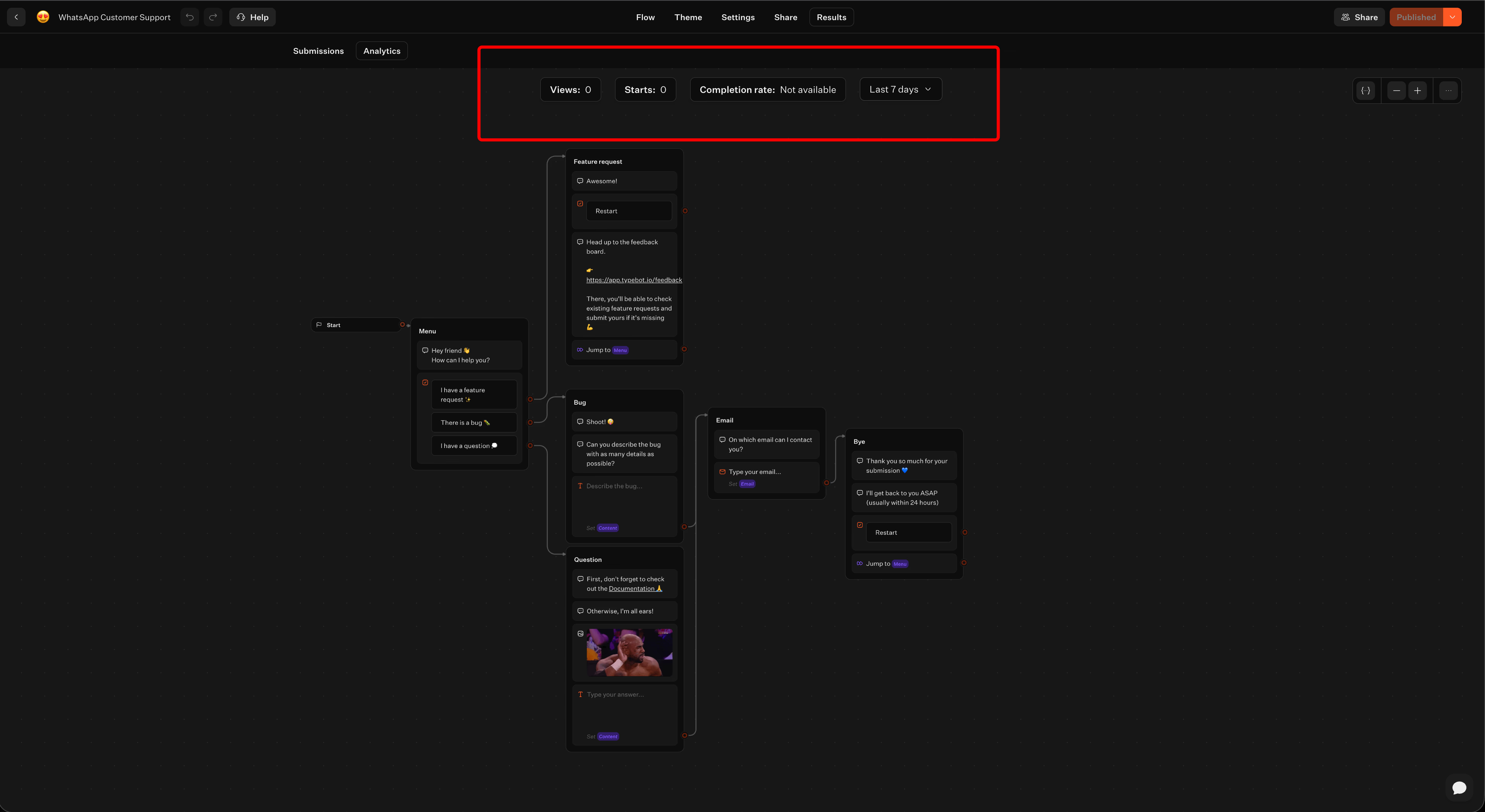
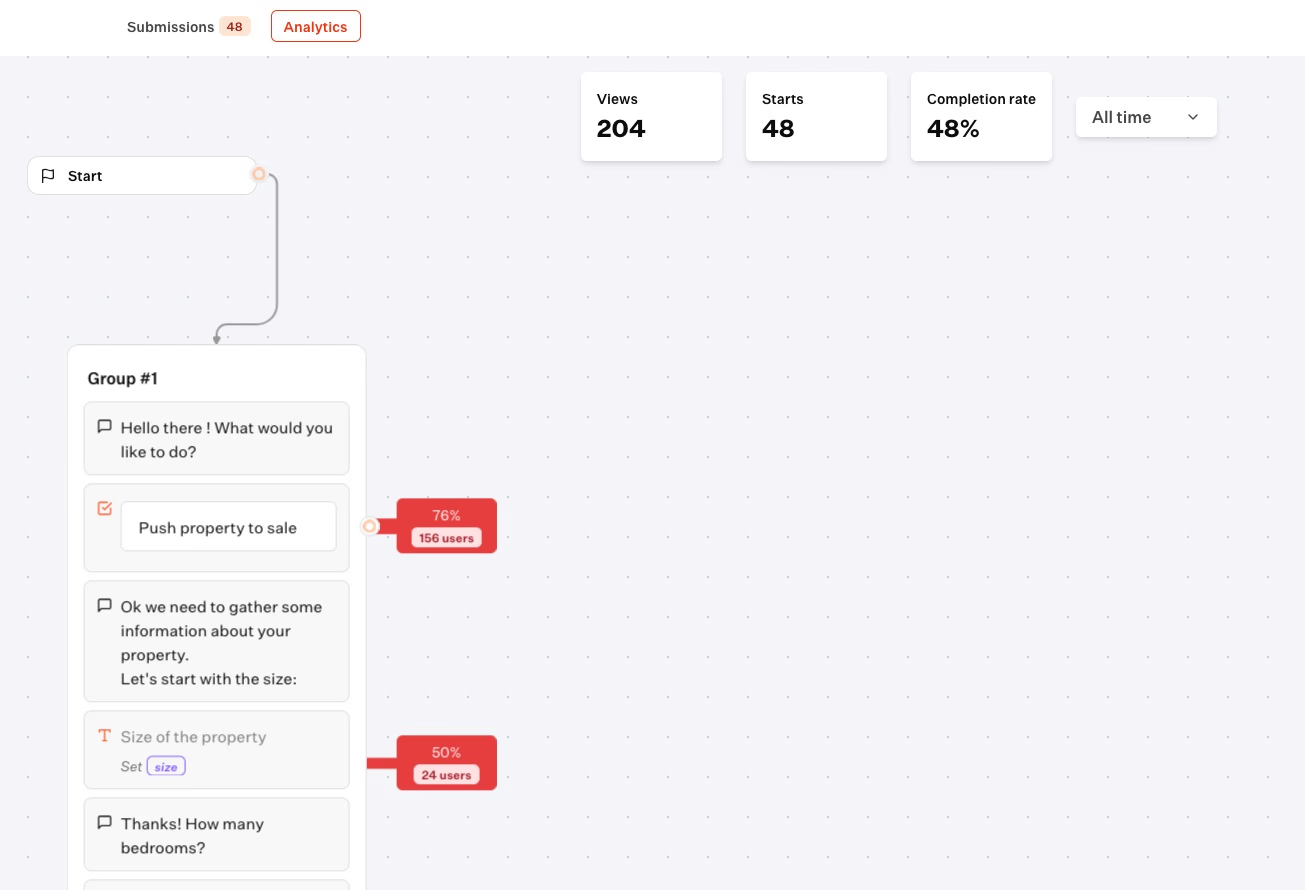
Track your restaurant chatbot's performance with Typebot's built-in analytics dashboard
Guests get instant, around-the-clock service that feels natural and personal, and your team can spend more time on the floor instead of fielding phone calls.
Integrating WhatsApp with your restaurant's tech stack
Connecting to CRM and Google Sheets
Typebot grabs contact info and conversation data as variables. You can send them to Google Sheets or your CRM using webhooks and HTTP requests.
This lets you monitor guest behavior as it happens. You can spot which customers jump on lunch deals or which ones need a reminder after a few weeks without visiting.
For more complex workflows, Typebot’s webhook blocks let you send data to loyalty platforms or marketing dashboards.
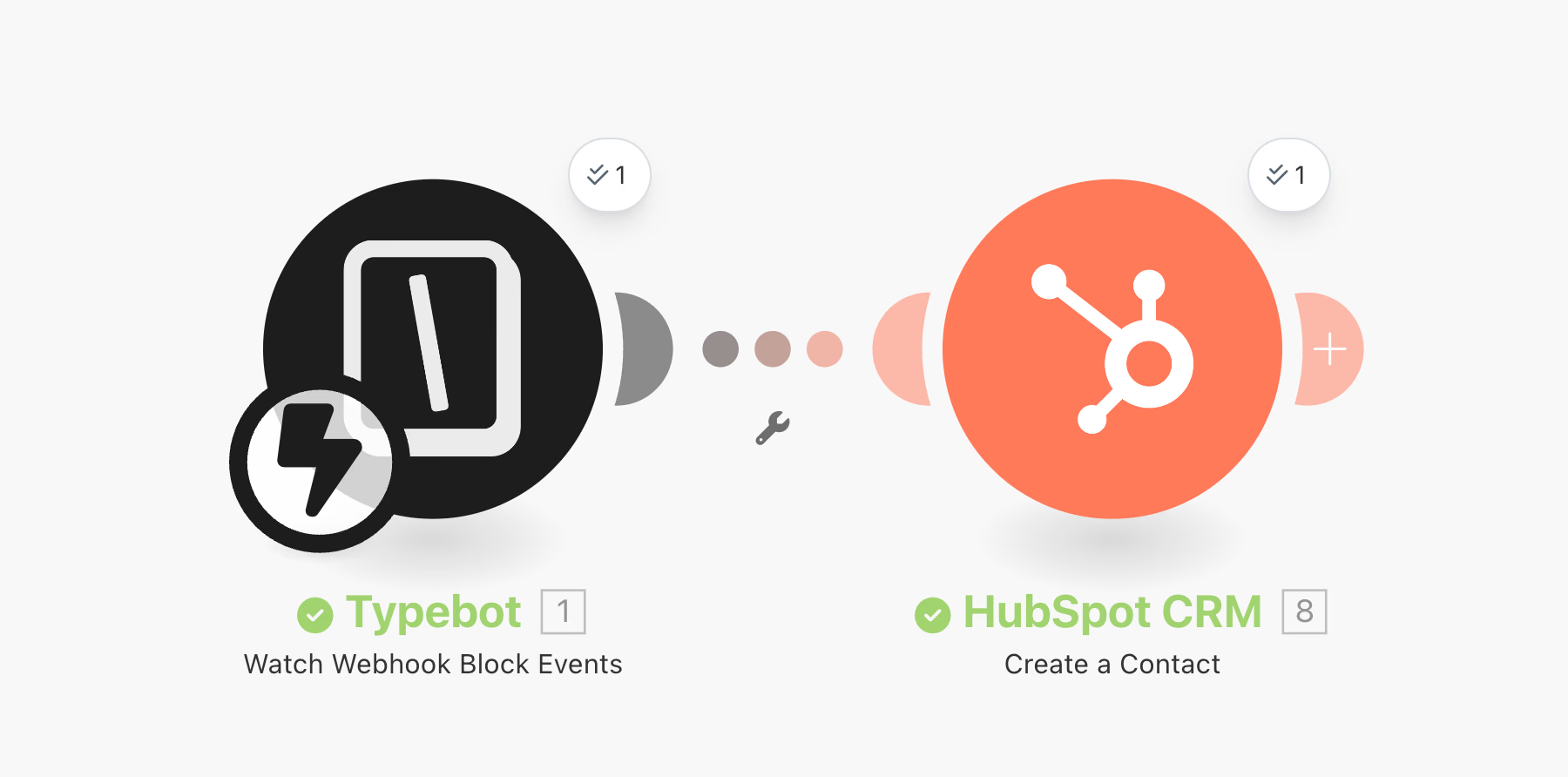
Linking POS and reservation systems
Bringing WhatsApp together with your Point of Sale (POS) and reservation system connects guest conversations directly to your sales data.
So, when a customer books a table or orders via WhatsApp, that info can be synced straight into platforms like Toast, Square, or your digital booking calendar.
- Real-time Inventory: The bot checks current availability through your booking engine before confirming a seat. This helps avoid double-bookings.
- Order Management: For delivery or pickup, WhatsApp sends instructions to your team and pushes status updates, like "Order is out for delivery," straight to the guest.
- Automatic Loyalty Tracking: When guests redeem offers or check in, their actions are logged in your POS. Rewards and points update automatically, so you keep accurate records without extra effort.
Syncing these tools means WhatsApp becomes your conversational hub.
It helps make sure every guest interaction is tracked and acted on, all aimed at helping you drive real results.
Measuring WhatsApp marketing performance
To get the most out of WhatsApp marketing, it's important to keep an eye on engagement and conversion numbers.
Tracking these metrics helps you adjust each guest flow and protect your margins.
Key metrics to track
WhatsApp tends to beat traditional channels in hospitality. Email and SMS often struggle with low engagement.
For most restaurants, WhatsApp sets a different benchmark:
| Metric | Typical WhatsApp benchmark |
|---|---|
| Open rate | 98% |
| Click-through rate, milestone rewards | 60–80% |
| Click-through rate, birthday offers | 30–50% |
| Click-through rate, broadcast promotions | 15–35% |
| Conversion rate, engaged users | 45–60% |
| Milestone triggers and loyalty rewards are usually where engagement is strongest. |
Personalized offers usually perform best, but even broad broadcasts still outperform most email campaigns.
New menus and specials may get fewer clicks than targeted messages. Still, their click-through rates are often much higher than traditional channels.
Tracking drop-off and completion rates
Clicks are only part of the story. It’s also useful to see how guests progress through conversations, like reservations or orders.
Tracking where people bail out helps you figure out what needs fixing.
Typebot’s analytics dashboard lets you visualize each step in your WhatsApp journey:
- Completion rates: See how many users actually finish making a booking or placing an order.
- Friction points: Spot the steps where people drop out. For instance, lots of guests leaving at checkout might mean a payment issue. Losing people during menu browsing could point to vague dish descriptions.
- Data export: You can pull engagement data into CSV or Google Sheets for deeper trend analysis over time.
These insights make it easier to find weak spots and improve the full customer journey.
Calculating campaign ROI
Measuring how well your WhatsApp marketing is working means looking at message costs, acquisition costs, and what you save on commissions.
- Message cost: API campaigns usually run about $0.05–$0.10 per message.
- Cost per visit: Well-run campaigns often get visits for as little as $0.50 each, much lower than what you’ll pay for a click on Facebook or Google.
- Aggregator savings: Pushing orders through WhatsApp, rather than third-party apps, reduces your commissions by around 20–30% per transaction.
To figure out your ROI, compare your total message costs to the extra revenue you make from visits and orders.
Don’t forget to factor in the savings from avoiding aggregator fees.
A more data-driven approach like this makes it easier to focus your marketing spend and see the real financial impact.
Start turning conversations into customers
WhatsApp marketing gives restaurants something rare in the hospitality industry: a direct, low-cost channel that guests actually love to use.
Start small with one flow, maybe a reservation bot or a lunch promo blast. Measure what works, refine your templates, and scale from there. The tools are affordable, the compliance rules are clear, and your customers are already waiting on the other end of that green chat bubble.
Deliver real-time responses and boost engagement with Typebot's WhatsApp integration.
No trial. Generous free plan.