
Imagine a lead fills out your website form, then waits. Three hours later, they have already bought from a competitor who answered on WhatsApp in thirty seconds. This is the new standard for customer service, not a rare exception. You do not need engineers or months of development to compete. In 2025, no-code builders let you launch a WhatsApp chatbot in a single afternoon.
What is a chatbot for WhatsApp Business and why it matters
What can a WhatsApp Business chatbot actually do?
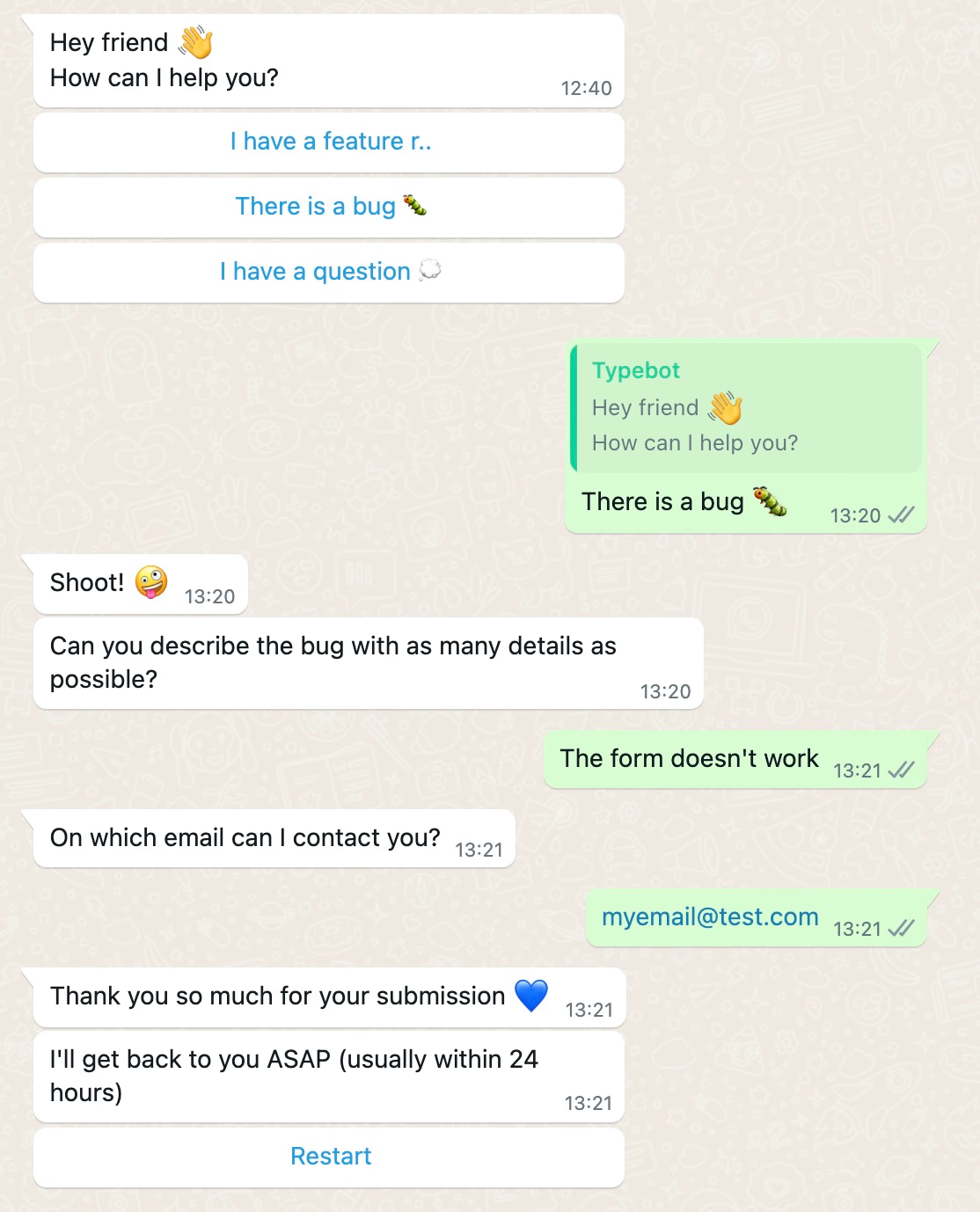
A WhatsApp Business chatbot is an automated conversation flow that answers customers, collects information, and moves people to the next step inside WhatsApp.
Instead of making users fill out a form or wait for a reply, the bot guides them through a conversation. It can qualify leads, answer FAQs, book appointments, send order updates, collect feedback, or route complex questions to a human agent.
With a builder like Typebot, those conversations can also connect to your CRM, Google Sheets, payment tools, or internal workflows, so WhatsApp becomes more than a messaging inbox.
For basic greetings and quick replies, the WhatsApp Business App may be enough. But to build a real chatbot with Typebot, automation, and integrations, you will use the WhatsApp Business API, which we will cover in the setup section.
Why WhatsApp beats email and web forms for customer engagement
Web forms get abandoned about two-thirds of the time, and email often gets ignored.
WhatsApp reduces friction because people already use it every day. Around 83% of its 3+ billion users open the app daily, often checking messages many times. Chat replies on WhatsApp usually arrive within minutes, which helps turn cold leads into real conversations.
Unlike forms, WhatsApp bots do not ask visitors to create accounts or remember passwords. Phone numbers also give businesses a consistent ID, which makes support and lead capture simpler.
98% open rates and other statistics that make WhatsApp essential
WhatsApp messages are opened 98% of the time, which is far higher than most email campaigns.
That reach makes WhatsApp chatbots useful for both sales and support. Chatbots on this channel often drive conversion rates between 45% and 60% because the experience feels immediate and personal.
A few examples show the impact:
- NHS clinics used WhatsApp reminder messages and cut patient no-shows by nearly half.
- KFC in South Africa reduced support costs by 38% after moving routine queries to a chatbot.
- Many platforms report that bots can resolve up to 80% of incoming questions.
- Pediasure Indonesia used WhatsApp to cut cost-per-lead by more than half.
The takeaway is simple: WhatsApp chatbots reach people, start conversations, and help customers act faster.
Types of WhatsApp Business chatbots you can build
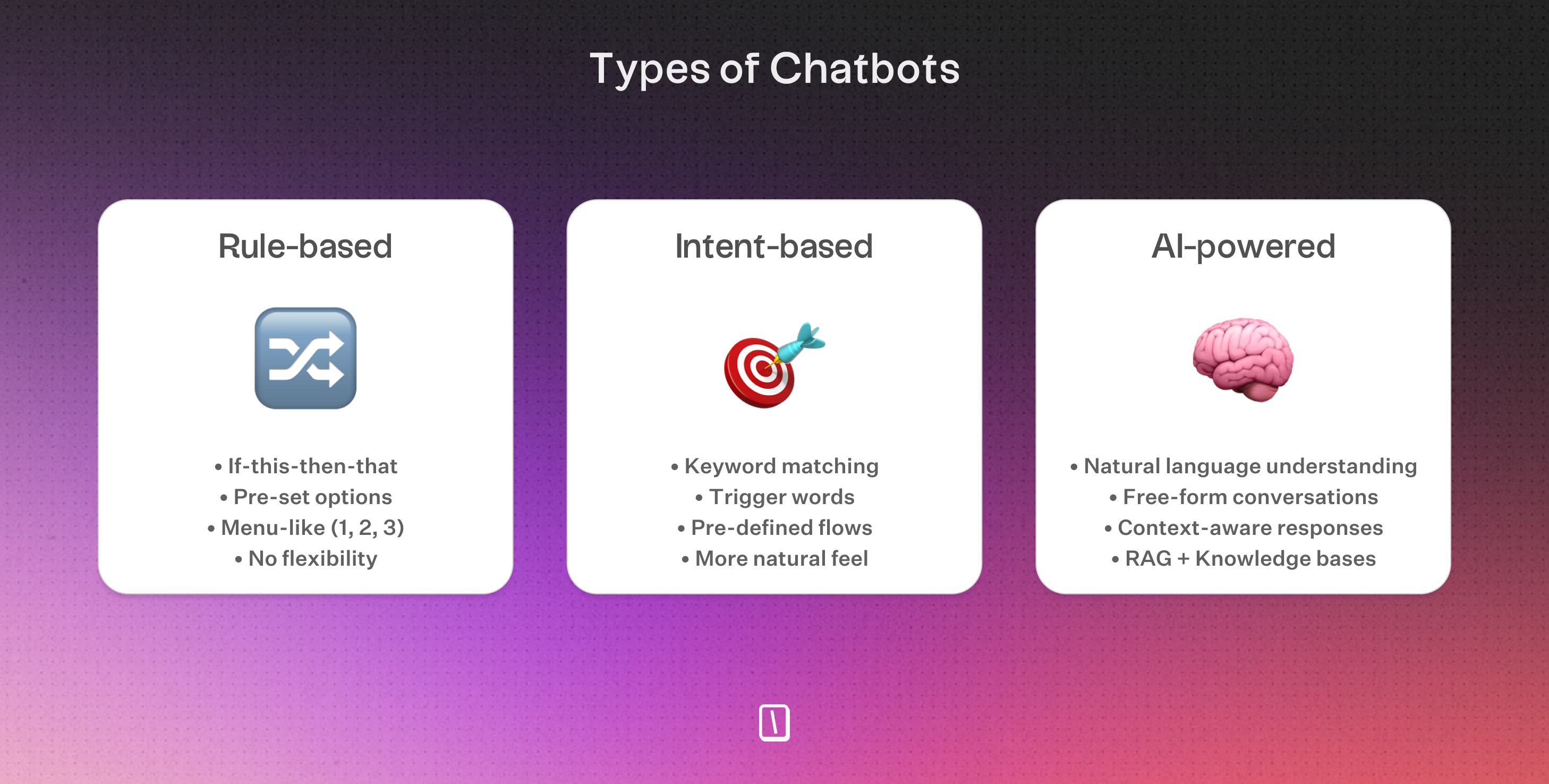
Rule-based chatbots with predefined conversation flows
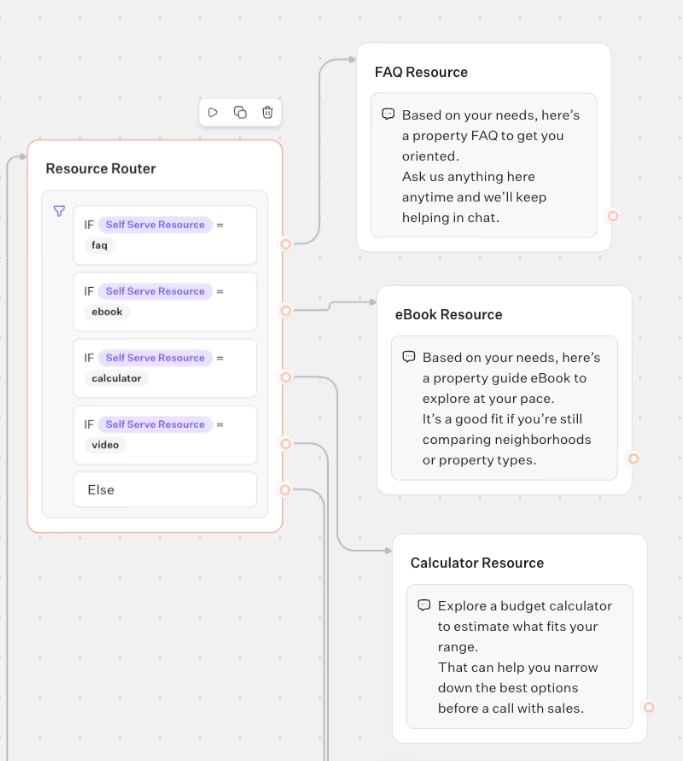
Rule-based chatbots lead users through structured paths using decision-tree logic—users pick buttons or reply with keywords, and the bot sends specific responses.
This setup works well for straightforward needs like business hours, starting a return, capturing leads, or scheduling appointments.
LLM-powered chatbots for open-ended conversations
AI-powered chatbots use large language models to parse free-form messages, manage multiple requests, and adapt answers as the conversation evolves. They don't need every flow mapped out—conversation history and training data handle the routing.ffzdf
These bots typically resolve around 80% of routine support before passing complex queries to human agents with full context. In 2026, this is the standard for natural, scalable WhatsApp automation.
Hybrid chatbots combining visual logic with LLM responses
Hybrid chatbots use structured flows for critical steps like lead qualification or booking, then switch to a large language model when users ask open-ended questions.
You get the accuracy of rules plus the flexibility of natural conversation.
The following bot shows how this works in practice:
On WhatsApp, which route to choose depends on how much structure, flexibility, and automation fits your business and customers.
Before diving into the setup, there is an important technical distinction to keep in mind: the standard WhatsApp Business App is not the same as the WhatsApp Business API.
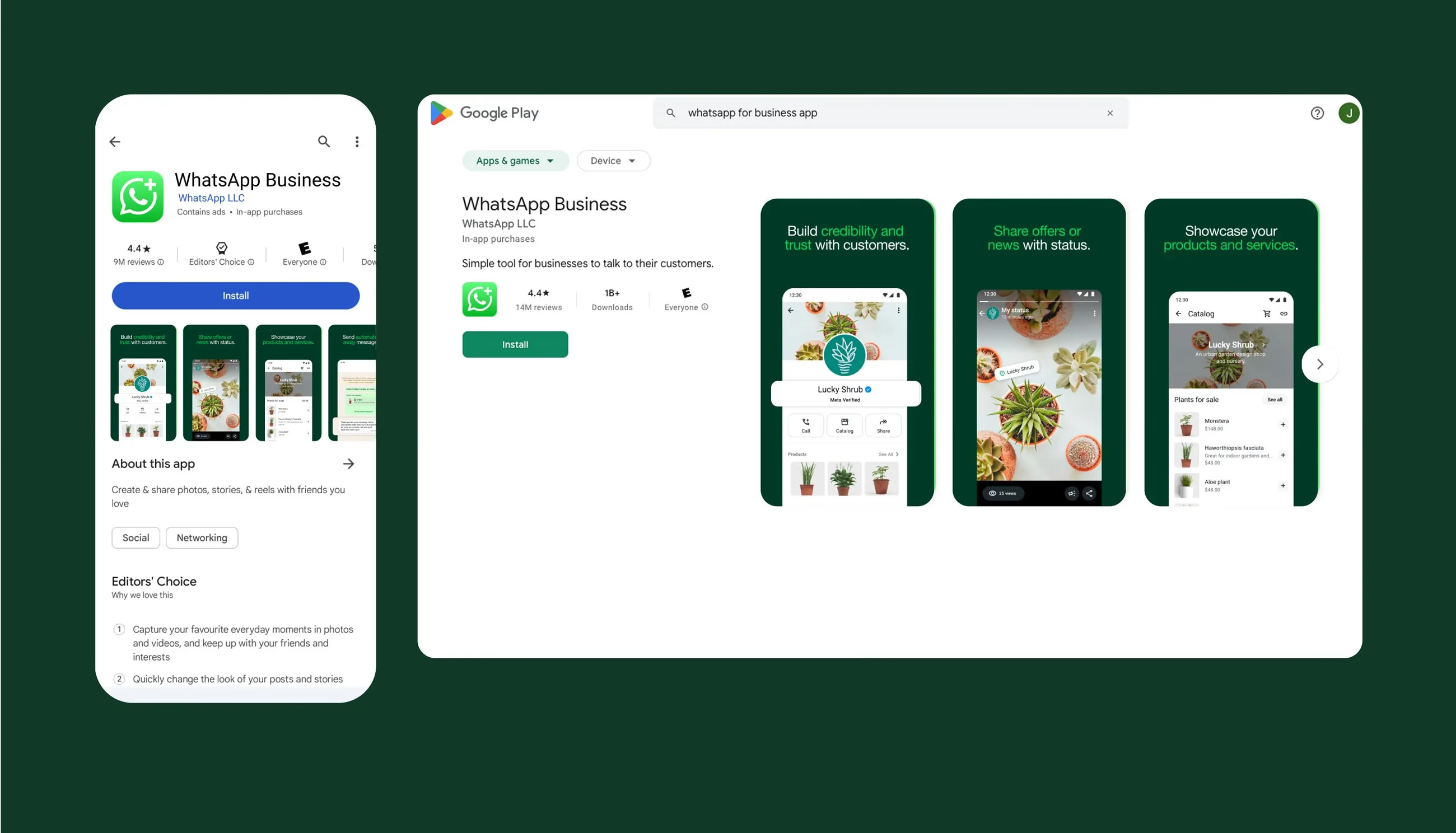
While the standard business app is free and great for manual replies or basic away messages, it does not support advanced automation. For real, interactive chatbots with custom logic and data integrations, you must use the WhatsApp Business API.
To get started, you will eventually need to register your business with Meta, link a WhatsApp phone number, and connect it to a chatbot builder. Here are a few quick things to keep in mind regarding requirements:
- Verification isn't immediately required: You can launch and test your chatbot with an unverified Meta business account (which limits you to messaging 250 unique customers per day). Whenever you need to scale, you can complete official Meta business verification.
- API pricing: While you can use free chatbot builders to design your flows, Meta charges separately for the WhatsApp Business API. It uses a pay-per-session model where you are billed for each 24-hour conversation window.
You don't need to worry about the technical registration steps just yet. We will walk through exactly how to build your WhatsApp automation and connect it to the WhatsApp API in the next section.
How to build a WhatsApp chatbot with Typebot step by step
Creating your first conversation flow with drag-and-drop blocks
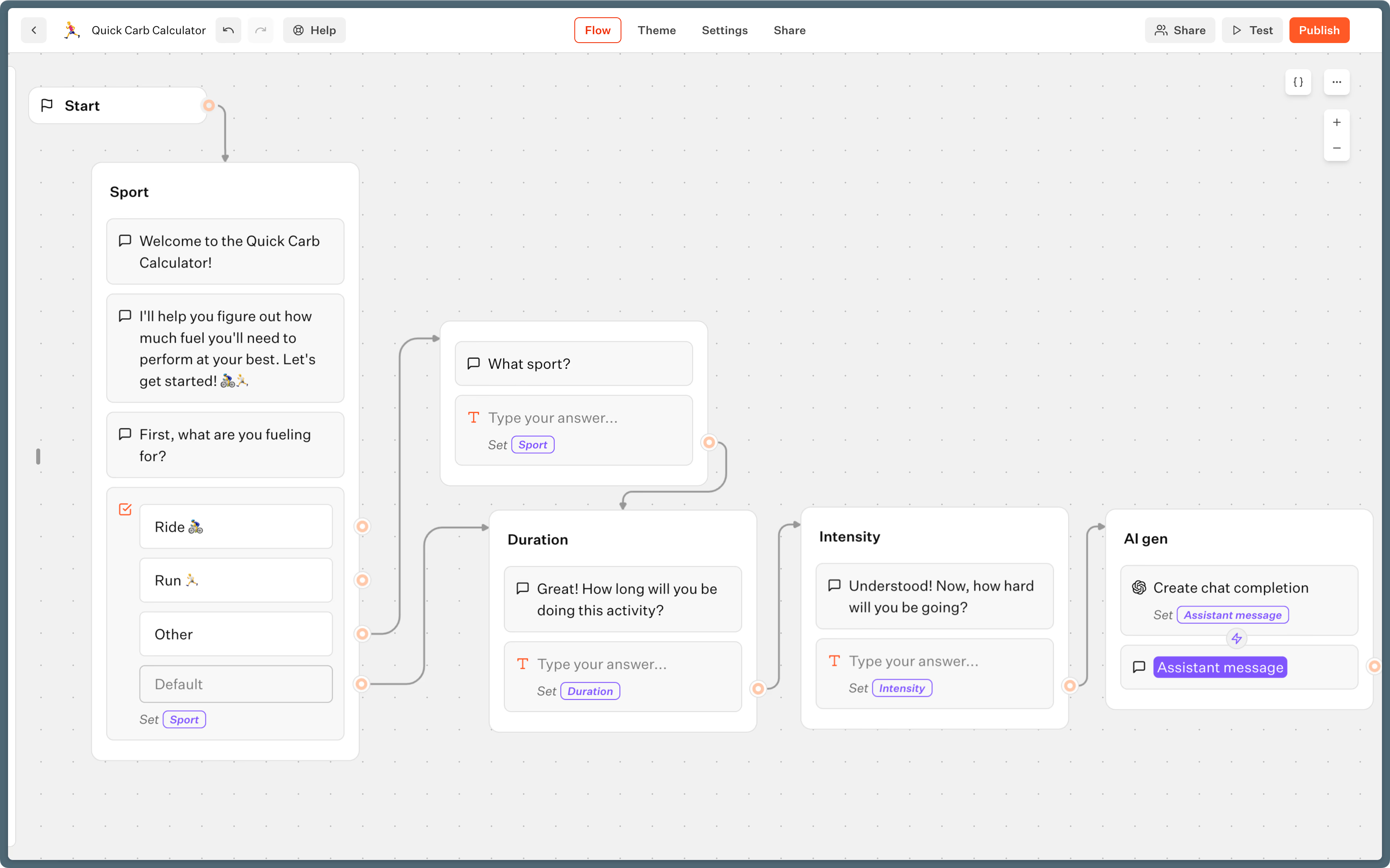
Typebot’s visual editor lets you build branching conversation flows, like a choose-your-own-adventure in chat form. Start with a Start event, then build your bot with blocks from the side panel.
- Add a
Textbubble to greet users and set the tone. - Add
Inputblocks for text, phone numbers, and emails to collect information. Each answer saves as a variable automatically. - Add media blocks, such as images, audio, or video, for richer interaction or visual explanations.
- Connect blocks with arrows to guide users through the conversation naturally.
For example, a lead qualification bot can greet visitors, ask for their names, ask about services, and collect their WhatsApp numbers in a simple flow.
Adding conditional logic, variables, and integrations
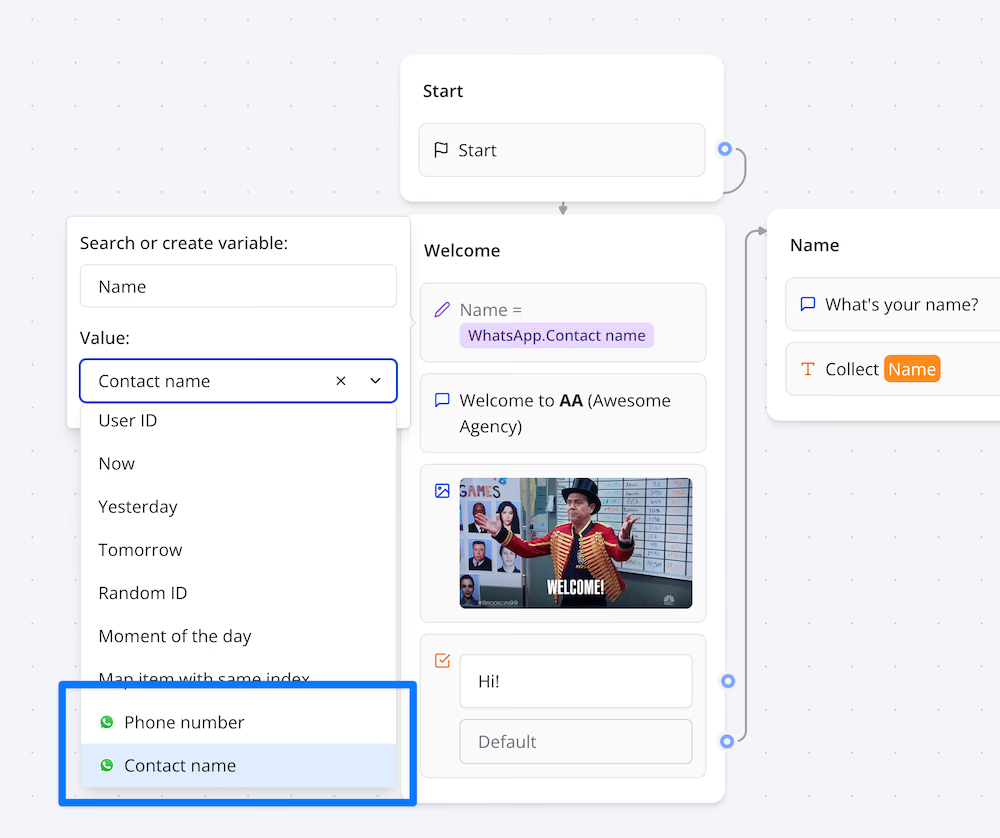
Personalization is what makes your WhatsApp bot useful. Typebot uses variables and condition blocks to do that.
- Store responses as variables, such as
\{\{user_email\}\}or\{\{lead_interest\}\}. - Use
Conditionblocks to branch into different paths or offers based on answers. - Clean up data or run calculations with
Set variableorScriptblocks. - Add an
OpenAIblock to create dynamic replies based on the conversation so far.
Need integrations? Typebot connects easily.
- Use a
WebhookorHTTP Requestblock to send data to your CRM, Google Sheets, or any API. - Connect automation tools like Zapier, Make, or Pabbly.
- Connect external calendar tools if you want appointment booking.
For example, if someone requests a quote, you can send their choices to Google Sheets and have the bot reply with a custom estimate.
With Typebot, you can deploy the same conversation flow on both your website and WhatsApp. That makes it easier to reuse logic, test faster, and keep lead capture consistent across channels.
Connecting your chatbot to WhatsApp via API token and webhook
To deploy on WhatsApp, you need access to the WhatsApp Business API. The process is structured, but manageable.
- Create a Meta app
- Set up your Facebook Business account.
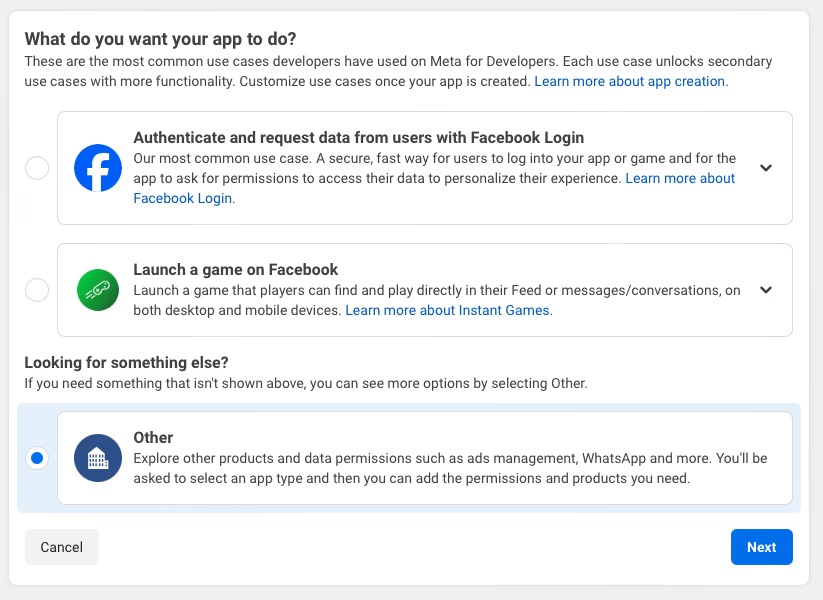
- Go to developers.facebook.com and create a Meta app with the “Other” use case and “Business” type.
- Enable WhatsApp.
- Generate an access token
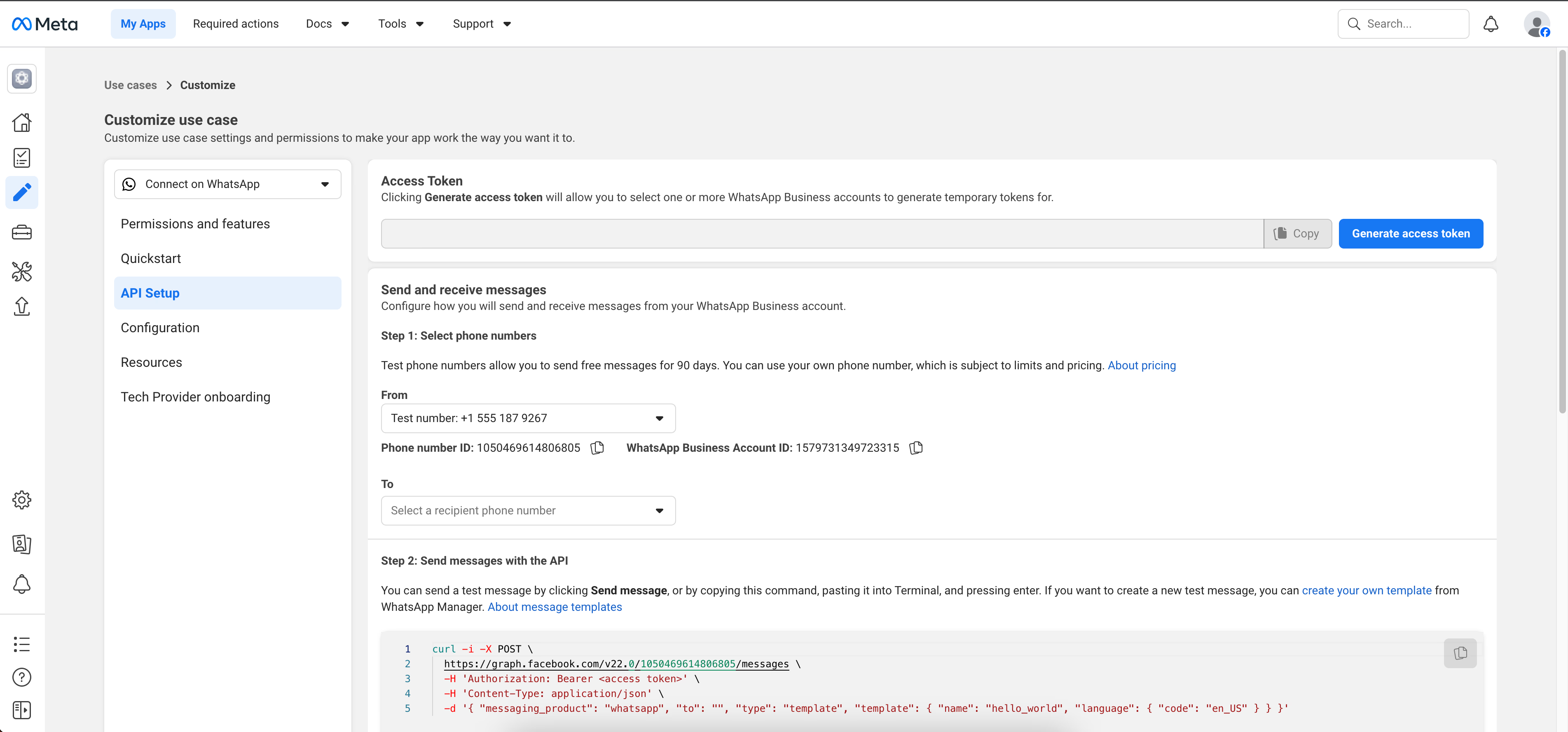
- Add a system user with admin rights in Meta Business Settings.
- Attach your Meta app as an asset, then generate your API token.
- Connect to Typebot
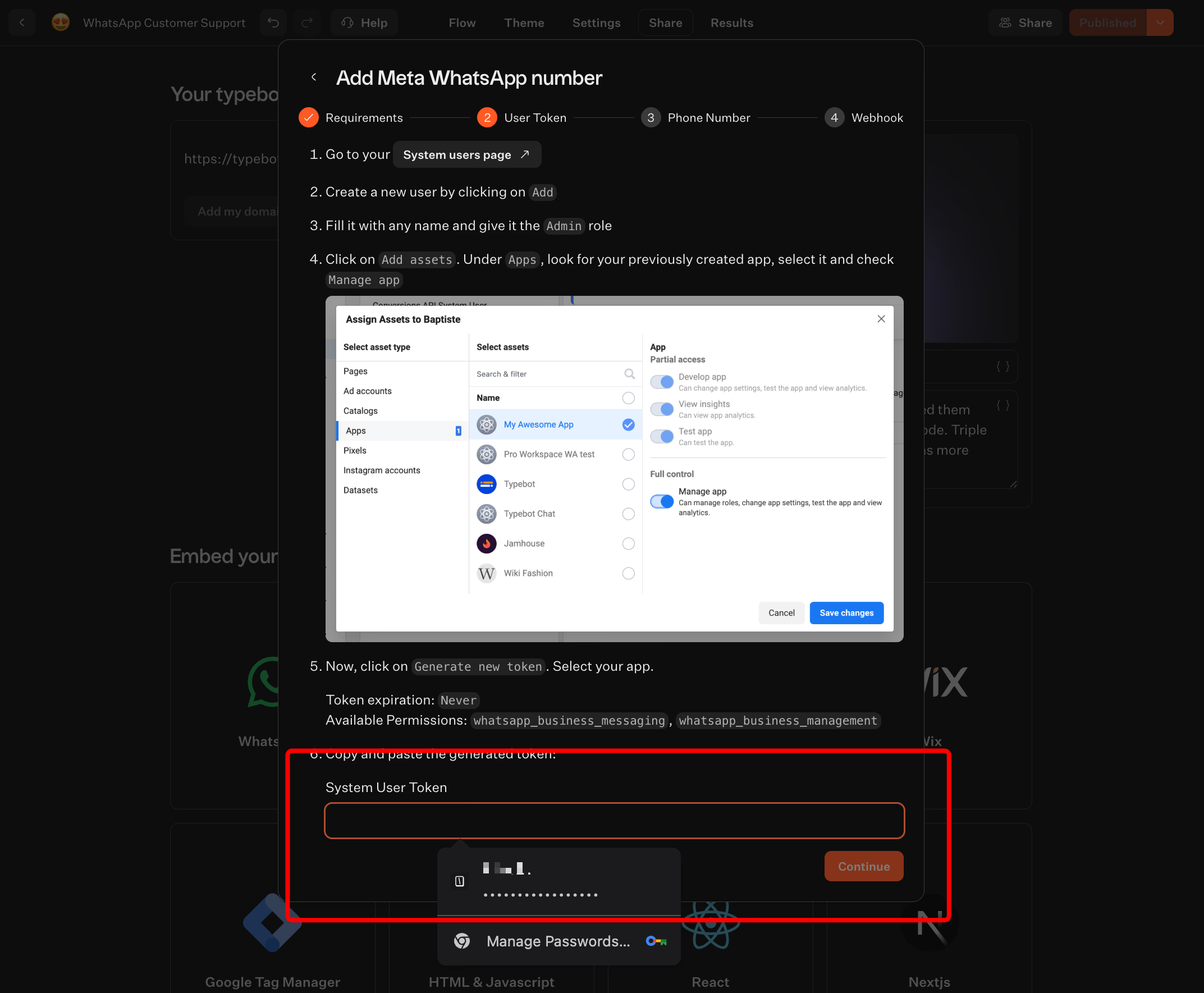
- In Typebot, go to Share > WhatsApp and paste your token.
- Get the webhook URL and verify token from Typebot.
- Add them to the WhatsApp Developer Console, verify the setup, and register your sender phone number.
Want to see a complete walkthrough of building a WhatsApp chatbot from start to finish? Create a WhatsApp chatbot covers the entire process with real examples.
This connects WhatsApp messages directly to your Typebot flow. Every user message goes through the Meta API, reaches your webhook, and gets a reply from Typebot right away.
Reach your audience where they are. Integrate Typebot with WhatsApp for seamless, personalized communication.
No trial. Generous free plan.
Testing and launching your WhatsApp Business chatbot
Testing matters, especially on WhatsApp, where context and UI quirks can affect the experience.
- Use the Test function in Typebot to preview the flow as it will appear on WhatsApp.
- Test with real WhatsApp accounts and share it with teammates through the test number or direct deployment.
- Track sessions, completion rates, and drop-off points with analytics. Export results or connect tools like Segment for deeper analysis.
When you are ready, publish. Typebot lets you launch in several ways.
- Through direct WhatsApp conversations using your business number
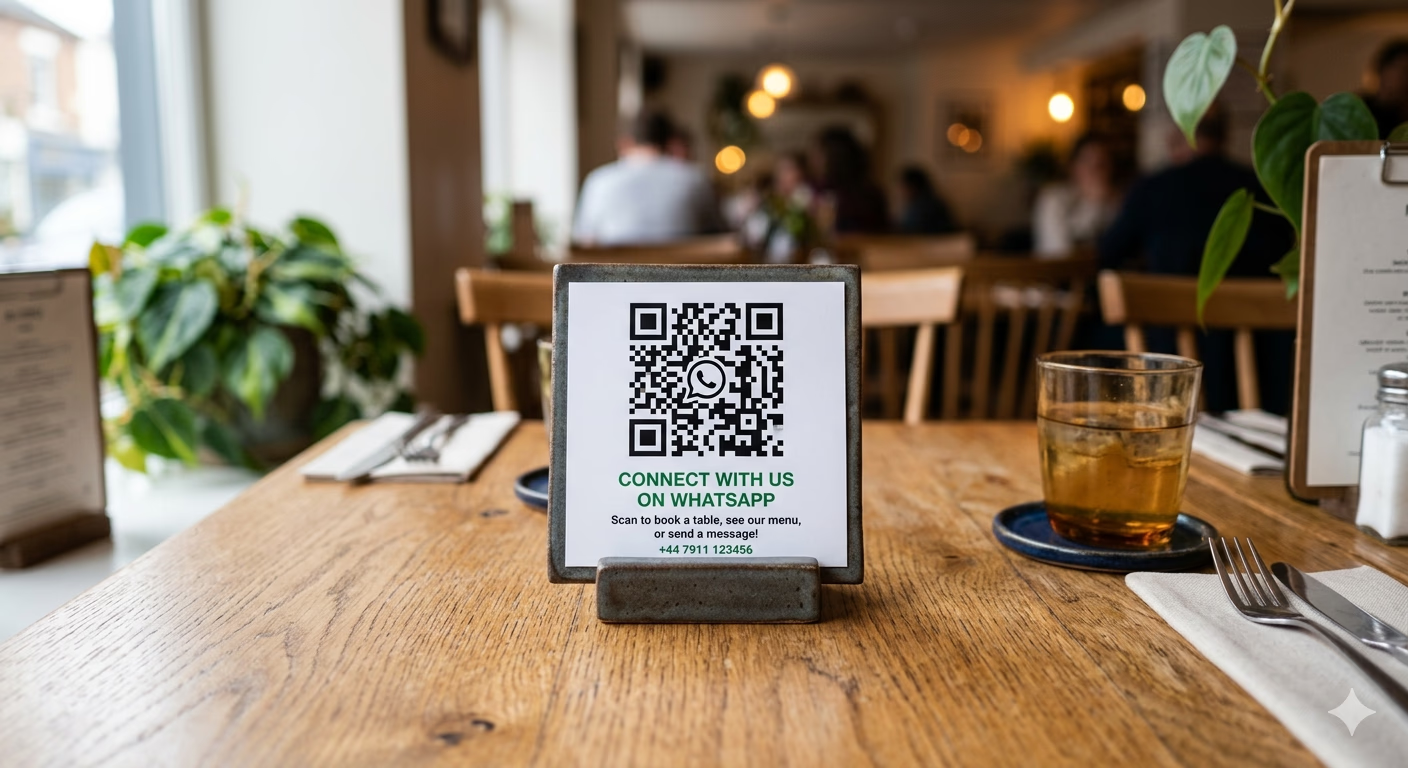
- Via QR codes and wa.me/ links for instant use at events or on websites
- From website popups or chat bubbles that send users to WhatsApp
Keep your flows concise. WhatsApp users expect quick, relevant replies, so avoid too much branching and make each step count.
Done right, a WhatsApp bot in Typebot is not just automation. It helps you deliver smooth, personal customer experiences where your users already are.
WhatsApp Business API does not support group chats, and interactive button messages are limited to 3 buttons at a time. If your flow depends on large menus or group interactions, you’ll need to redesign for one-to-one chat.
Best chatbot platforms for WhatsApp Business compared
Typebot vs ManyChat vs Chatfuel vs Landbot vs Wati
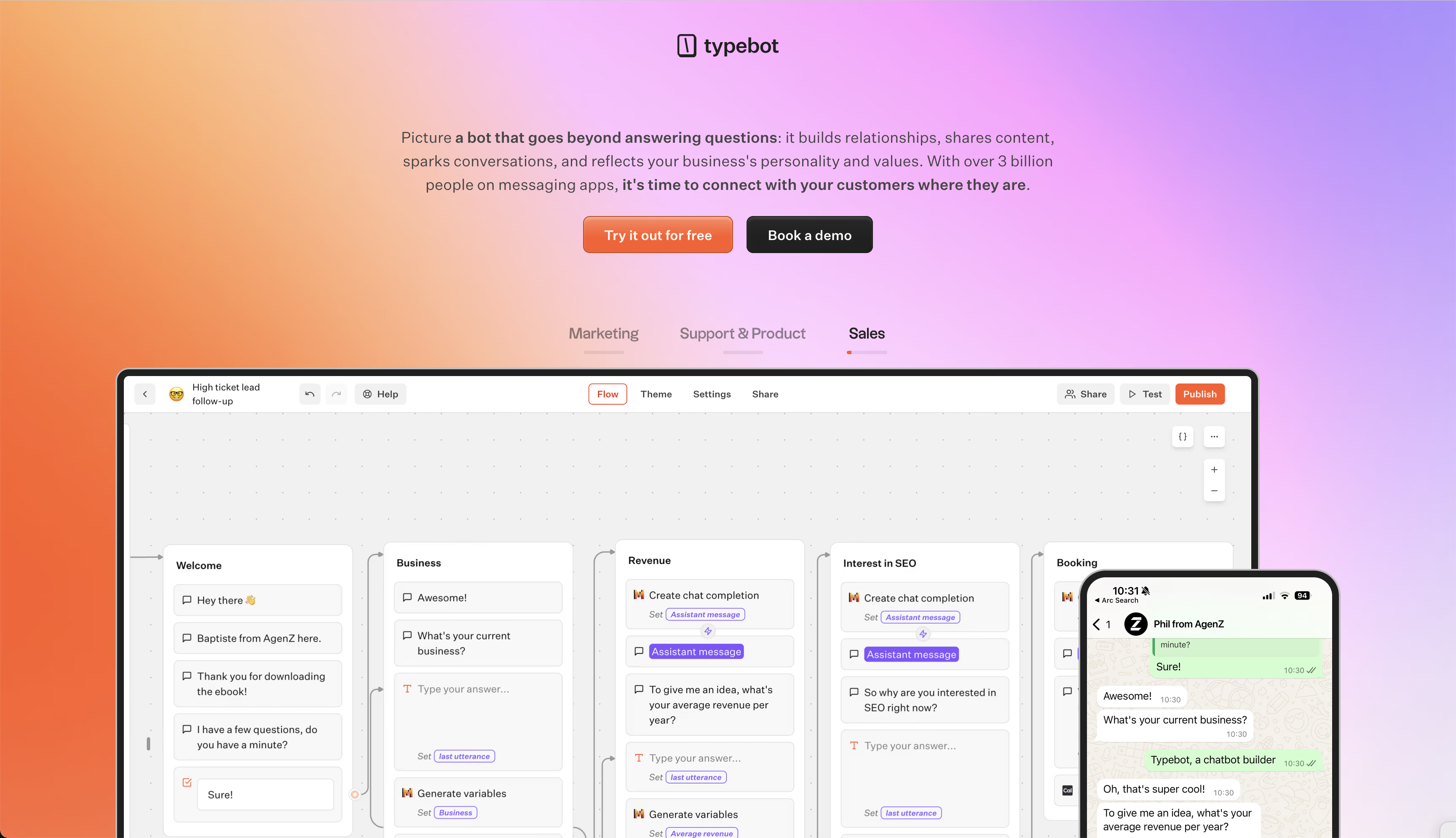
Picking a WhatsApp Business chatbot platform is not just about automation. It is about control, scale, and data ownership.
Here is a look at the top options, with their strengths and tradeoffs for teams managing WhatsApp conversations at scale.
| Platform | Builder type | WhatsApp deployment | Open source | Free plan | Analytics and data | AI/NLP | Best for |
|---|---|---|---|---|---|---|---|
| Typebot | No-code, visual drag-and-drop | Native integration via API token and webhook | Yes | 200 chats/mo | Drop-off, completion, CSV export | OpenAI integration | Teams wanting visual logic, open source, self-hosting, affordable scaling |
| ManyChat | No-code flow builder | Official Meta partner, supports WhatsApp and social channels | No | 1,000 contacts | Segmentation, campaign stats | Yes | Social commerce, e-commerce, broadcast and engagement |
| Chatfuel | No-code, drag-and-drop | WhatsApp, Messenger, Instagram, web | No | Free trial | Engagement, segmentation | ChatGPT-powered | Quick AI deployment, marketers, prototyping |
| Landbot | No-code block builder | Multichannel, including WhatsApp, pricier at scale | No | 100 chats/mo | Efficiency, cost reduction claims | New AI system | SMBs, live chat handoff, multichannel projects |
| Wati | Low-code workflow and shared inbox | Built on WhatsApp Business API | No | Trial, API not free | Routing, campaign analytics | Yes | Support, multi-agent teams, agencies managing at scale |
| Chatbase | No-code, RAG AI, no flows | Deployable via integration | No | 100 messages/mo | Confidence score, chat logs | Yes | Simple FAQ and support bots, AI question answering |
| Typebot is the only open-source option here. It suits teams that care about data ownership, custom logic, and self-hosting. Its visual builder handles API and webhook integrations, conditional logic, and OpenAI-powered responses. |
It also lets you deploy the same bot on web and WhatsApp. That gives marketing and support teams strong control, with full analytics.
ManyChat is built for high-volume chat marketing.
It handles broadcast campaigns, comments, and stories across multiple social platforms.
Many teams use it for e-commerce and engagement. Its AI assistants help manage replies across several channels.
Chatfuel focuses on quick AI chatbot deployment.
It links with ChatGPT for context-aware replies on Meta channels.
Its drag-and-drop interface and prebuilt templates help businesses prototype or automate WhatsApp workflows fast, sometimes within an hour.
Landbot stands out for user experience and multichannel automation.
It includes a visual block builder and built-in live chat for agent handoff.
It works well for SMBs, but pricing and feature limits make WhatsApp scaling harder for larger teams.
Wati runs directly on WhatsApp Business API.
It centers on team inboxes and multi-agent workflows, with broadcasting for large audiences and CRM connections such as HubSpot.
It fits support teams that need fast routing, canned replies, and campaign management, especially agencies or teams with multiple brands.
Chatbase takes a different approach with document-trained AI for simple FAQ and support bots.
It launches quickly, but it works best for rapid Q&A, not flow logic or marketing automation.
Pricing comparison and what you get at each tier
| Platform | Free plan | Starter or paid plan | Notable limitations on free |
|---|---|---|---|
| Typebot | 200 chats/mo, features unlocked | $39/mo, 2 users and 2,000 chats; $89/mo, 5 users and 10,000 chats | Core builder features are available, but scale requires a paid plan |
| ManyChat | 1,000 contacts | From $15/mo, unlimited features | Core automations and social channels only |
| Chatfuel | Free trial | From $19.99/mo, business; up to $300/mo, enterprise | Free trial only, paid plans required for WhatsApp bots |
| Landbot | 100 chats/mo | Paid plan required for WhatsApp at volume | No AI or advanced integrations on free plan |
| Wati | 7-day trial, API features paid | Growth, about $39/mo; Pro, $79/mo; Enterprise, $199/mo | No API bots on free access, trial is limited |
| Chatbase | 100 messages/mo, 1 bot | $19 to $399/mo, more messages, bots, and integrations | Limited bot logic, only Q&A messaging |
| Typebot’s free plan gives you 200 chats a month with advanced builder access. That makes it useful for MVPs and pilots. Paid plans scale with usage and team size, so it fits production use later. |
ManyChat offers automation for up to 1,000 contacts on its free tier.
Paid plans start at $15/month and unlock more channels and advanced campaigns.
Chatfuel has a free trial, but WhatsApp bots and larger volumes require paid plans.
Landbot limits users to 100 chats per month on the free version. WhatsApp also requires a paid tier.
Wati provides a short free trial, but API-powered WhatsApp bots are always paid.
That makes it a stronger fit for bigger teams that need a shared inbox and campaigns.
Chatbase’s free plan works only for basic Q&A bots at low volume. More features require an upgrade.
Choosing the right platform comes down to your needs:
- Want open source, deep analytics, and a true no-code visual builder, plus a solid free plan for prototyping? Typebot is the best fit.
- Looking for social marketing and broadcast reach? ManyChat or Landbot make sense.
- Running support teams or agencies that handle large volumes and multiple brands? Wati is the strongest match.
- Need a simple, fast AI bot for FAQs? Chatbase is the quickest option, but it lacks flow logic and robust automation.
The best WhatsApp Business chatbot solution depends on which features, pricing, and level of control fit your workflow.
Eliminate the need for developers—build your bot in minutes.
No trial. Generous free plan.
WhatsApp Business chatbot use cases with real results
cLead generation with 45 to 60% conversion rates
WhatsApp chatbots outperform email forms and landing pages for lead capture.
They work 24/7 and collect contacts through Click-to-WhatsApp ads, QR codes, or website widgets. They also qualify leads by asking about budget, timing, or specific needs.
High-intent prospects go straight to sales. Others enter nurturing flows that keep the pipeline active.
A lead qualification flow typically looks like this:
Click-to-WhatsApp bots consistently convert 45 to 60% of engaged users, which is much higher than typical web form rates.
Customer support automation cutting costs by 38%
Routine queries like order tracking or policy questions rarely need human help.
WhatsApp chatbots handle up to 80% of these support tickets and escalate only the complicated cases. This reduces labor costs and speeds up responses.
KFC South Africa cut support costs by 38% after automating customer service on WhatsApp.
The company also kept response times quick and gave agents full chat histories.
Appointment booking reducing no-shows by 47%
Booking is easier in chat.
WhatsApp chatbots let users book, reschedule, or cancel appointments in seconds. They also send reminders automatically. That lowers admin work and helps people remember their appointments.
NHS clinics that switched to WhatsApp reminders reported a 47% drop in missed appointments.
That change made scheduling smoother for everyone involved.
E-commerce order updates and abandoned cart recovery
Abandoned carts hurt revenue, but WhatsApp can help recover lost sales.
Personalized reminders bring shoppers back. Chatbots also send order confirmations, shipping updates, delivery alerts, and follow-up recommendations. Customers see these messages in a channel they already check often.
That creates stronger engagement from the first click to repeat purchase.
Onboarding, surveys, and user feedback collection
Helping new users get started works better in chat.
WhatsApp chatbots deliver micro-surveys and onboarding steps directly in the app, which often leads to higher completion rates than web forms. People reply faster and finish more often, so you collect better feedback.
This also helps guide users through each stage of the experience.
Event and webinar registration
Event logistics get easier with chatbots.
They handle registration, send reminders, and share key links or schedules at the right time. That keeps everything in one place and reduces confusion.
It also helps lower no-shows.
Internal team operations
WhatsApp chatbots do more than customer service.
Employee helpdesks for HR, IT, or office policies can use the same approach. They resolve routine team questions quickly, escalate detailed issues, and handle shift swaps or internal updates. Teams get answers in a channel they already use regularly.
All told, WhatsApp chatbots deliver real results across lead generation, support, scheduling, commerce, feedback, events, and internal communication.
Start Building Your WhatsApp Chatbot Today
WhatsApp is no longer just a messaging app. For businesses, it is a direct line to customers who actually read and reply.
This guide covered what a WhatsApp Business chatbot can do, from lead generation to support automation. You learned the three types of bots you can build. You saw how to create one in Typebot without writing code. You also discovered how the top platforms compare.
The data is clear. WhatsApp messages reach 98% of recipients. Bots convert leads at 45 to 60%. Support costs can drop by 38%.
Start small. Pick one use case. Build a simple flow. Launch it in an afternoon. Then scale as you see results.
The businesses that automate first will be the ones that win.
Deliver real-time responses and boost engagement with Typebot's WhatsApp integration.
No trial. Generous free plan.
FAQ about chatbots for WhatsApp Business
Does WhatsApp Business have chatbots built in?
The WhatsApp Business App doesn’t include built-in chatbot features.
It supports basic auto-replies, greetings, away messages, and quick replies. These are simple responses triggered by keywords or schedules, not real conversational AI.
It also does not support:
- Conditional logic
- CRM integration
- AI integration
- Multi-step workflows
To build a real chatbot, you need the WhatsApp Business API.
This API connects to platforms like Typebot for configurable flows, AI responses, integrations, analytics, and scalable customer management.
How do you use AI on WhatsApp Business?
You can only use AI on WhatsApp through the Business API, not the standard app.
Platforms like Typebot make this process simple. You add AI blocks that connect to large language models such as OpenAI, Anthropic, Mistral, and others inside your flow.
These blocks can:
- Answer FAQs
- Triage requests
- Search knowledge bases
- Handle free-text replies
They work alongside your standard blocks and decision trees.
Once your WhatsApp number is connected through an API token and webhook, Typebot listens for user messages and sends AI-powered, personalized replies.
This setup combines rule-based flows with flexible AI while keeping your conversations under control.
Can you automate WhatsApp Business messages?
Yes, but the level of automation depends on your setup.
- With the free app, you only get simple auto-replies and scheduled messages.
- With the API, through platforms like Typebot, you can build full conversation flows, send personalized follow-ups, connect to CRMs or Google Sheets, trigger external actions, use AI for intent recognition, and track analytics.
If you need to handle thousands of users, qualify leads with complex logic, or offer 24/7 support, you need the API and a chatbot platform.
What is the difference between a chatbot and an AI agent?
A WhatsApp chatbot automates conversations by following rules or scripts.
It can handle:
- Predefined flows
- Buttons
- Data capture
- Basic automations, like booking or qualifying leads
In Typebot, you build these flows visually by dragging blocks and setting paths.
An AI agent adds adaptive, contextual understanding to those flows.
It can:
- Respond more like a human
- Interpret free text
- Search knowledge bases
- Reason across facts
In Typebot, AI blocks, or LLM integrations, let you manage structured interactions and open-ended tasks in the same bot.
The key difference is simple: chatbots follow scripts, while AI agents can converse, interpret, adapt, and keep context.
Reference table: WhatsApp automation at a glance
| Feature | WhatsApp Business App | WhatsApp Business API + Typebot |
|---|---|---|
| Auto-replies | ✔️ | ✔️ |
| Chatbot flows with logic | ❌ | ✔️ |
| AI-powered answers | ❌ | ✔️ (OpenAI, etc. in Typebot) |
| External integrations (CRM, API) | ❌ | ✔️ |
| Multi-channel deployment | ❌ | ✔️ (Web, WhatsApp, embed, QR) |
| Analytics and exports | ❌ | ✔️ (built-in in Typebot) |
| User limits | 4 devices linked | Scalable (200–10,000+ users) |
| Support for buttons/media | Some | Full (with API constraints) |
| Platforms like Typebot make it easier to build and deploy WhatsApp Business chatbots, even if you are not a coder. |
They combine visual flows, AI, and API connectivity in one place.
The real question is which automation setup fits your business goals and scale.