
Your next B2B buyer has WhatsApp open right now, yet most outreach still runs through channels they ignore. About 68% of web forms get abandoned, and cold calls convert only 2% of the time.
WhatsApp flips those numbers. Messages see 80 to 98% open rates, usually within minutes, and 82% of buyers expect an immediate reply to sales questions.
Why WhatsApp works for B2B
WhatsApp beats email, forms, and cold calls for immediate B2B engagement

It’s getting harder to reach B2B buyers through the usual routes.
Sales emails only see open rates in the 20–25% range. Cold calls result in meetings just about 2% of the time. Web forms? Close to 68% get abandoned before anyone hits submit.
But WhatsApp handles things differently. Messages see worldwide open rates between 80% and 98%, and people usually read them within minutes.
WhatsApp is quick and practically friction-free.
Most professionals are already in the habit. 83% open the app every day, and on average, they check their chats 47 times daily. That consistent use makes WhatsApp a smart fit for B2B work. Whether you’re qualifying leads, booking calls, or sharing content, you’re meeting people where they’re already focused.
Let’s look at how WhatsApp stacks up against other B2B outreach methods:
| Channel | Open Rate | Speed to Reply | Typical Lead Drop-off | Meeting Booking Rate |
|---|---|---|---|---|
| 80–98% | Minutes | Low | High (up to 2x vs forms) | |
| 20–25% | Hours to days | Medium | Low | |
| Web forms | 32% (completion) | ~47h avg; only 27% ever contacted | 68% abandonment | Low |
| Cold calls | ~10% (answer rate) | Immediate if answered | High (unanswered) | ~2% |
Conversational messaging builds trust, qualifies leads faster, and boosts demo attendance
WhatsApp’s main strength in B2B is fast feedback.
Buyers don’t want to wait around. 82% expect an immediate reply to sales or marketing questions. On WhatsApp, bots can handle qualification questions on budget, pain points, and timeline right there in the chat.
And when someone agrees to a demo, an external scheduler or campaign tool can send an approved automated reminder template 30 or 5 minutes before. That noticeably boosts attendance. Some benchmarking shows that WhatsApp reminders perform up to ten times better than old-school calendar emails.
Here’s where WhatsApp shines for B2B teams:
- Qualifying leads with quick back-and-forth in a mobile chat instead of making people slog through long forms.
- Booking demos on the spot, connecting leads directly with the right sales rep while their interest is fresh.
- Keeping relationships warm with content, think videos, case studies, or webinar invites, all right there in the conversation.
WhatsApp Business App vs API: Where automation and scale come in
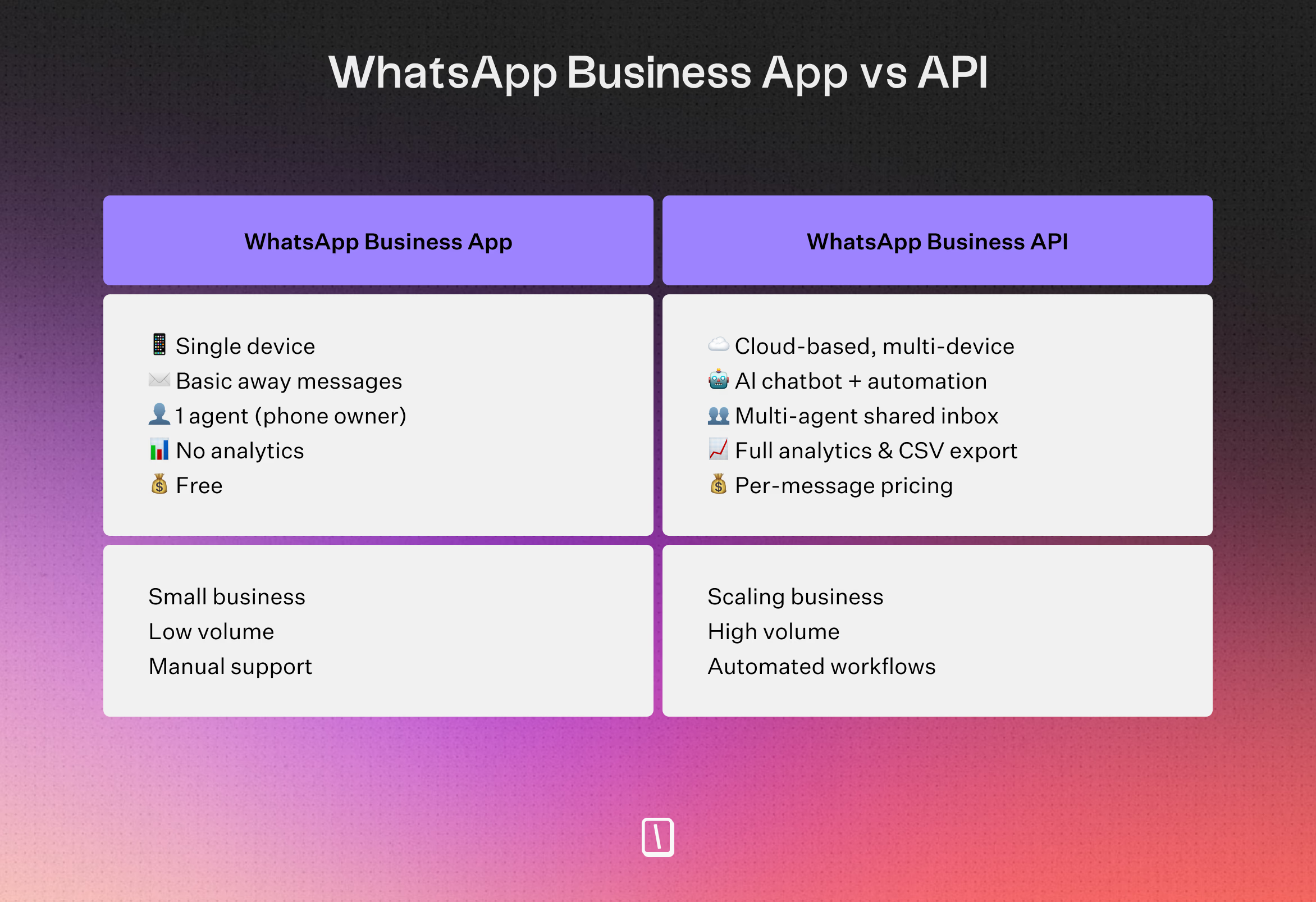
WhatsApp gives businesses two main ways to use its platform:
- The WhatsApp Business App is built for smaller teams and shops. It lets you set up basic auto-replies, greetings, and away messages, with support for up to four linked devices.
- The WhatsApp Business API opens up more automation. You can build custom bots, route messages to agents, work as a team, and plug WhatsApp into tools like Zapier, Google Sheets, or Slack.
Typebot works with the WhatsApp API, so you can design and test robust automated flows, no developer needed.
You can sync to your CRM and connect an external scheduler or template sender for reminders and nurture campaigns. If your contact replies to a WhatsApp message within 24 hours, you get a free service window to keep the conversation moving.
To use WhatsApp automation at scale, you’ll typically need a business website, a Meta Business account/verification, and a phone number not already tied to an existing WhatsApp account. For scheduled broadcasts or proactive reminders, you need approved templates and an external scheduler or template sender; a Typebot WhatsApp flow does not wake itself at a scheduled time.
WhatsApp B2B Marketing Strategies That Convert
1. Customer feedback and NPS surveys
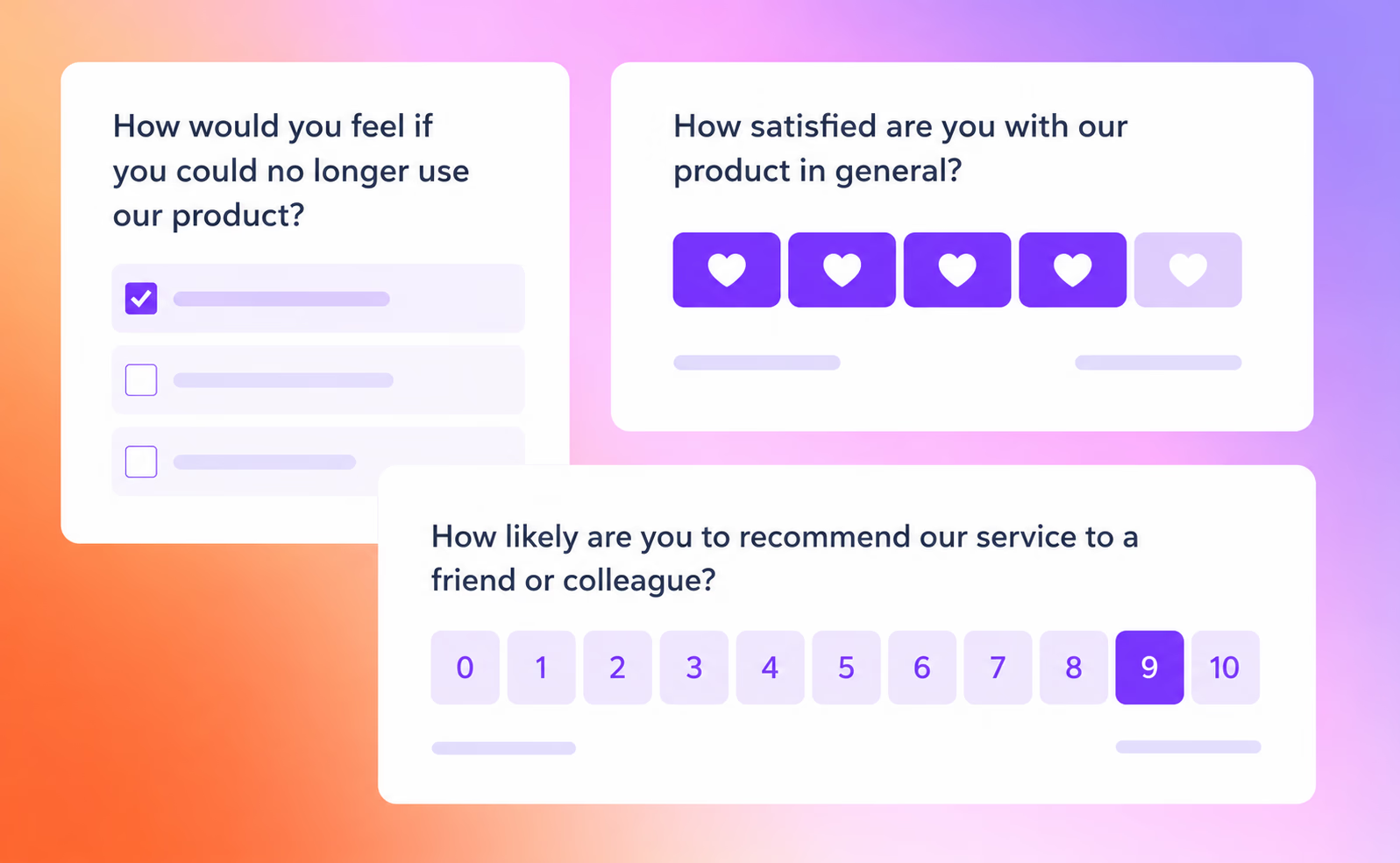
Static feedback forms get ignored in B2B — response rates often stay in the single digits. Running the same survey inside WhatsApp changes that: one question at a time, quick taps on score choices, and follow-ups that adapt to the answer, all inside a thread your customers already have open.
Here's how a typical Typebot feedback flow works:
- On WhatsApp, the bot asks a short NPS or CSAT question with the Buttons block for tappable scores. A Rating block can collect a typed score, but it does not render rating buttons there.
- Conditional logic branches the conversation — a low score triggers "What went wrong?", while promoters are routed to a review or referral request.
- Every answer is logged to Google Sheets or sent to your CRM with an HTTP Request block, and negative feedback can alert your team on Slack in real time.
- For contacts with a recorded WhatsApp opt-in, pass the post-purchase or post-demo survey timing to an external scheduler or template sender. Outside the 24-hour service window, it must initiate the survey with an approved template; Typebot can continue the flow after the contact replies.
Conversational channels like WhatsApp see 45–60% response rates, and completion rates jump from single digits to well above 50% when a survey is chat-based instead of a static form.
Here's a live NPS survey flow built in Typebot:
On WhatsApp, recreate the score step with the Buttons block for tappable options, or ask users to type a number. Conditional follow-ups and result logging still work inside the chat thread.
Feedback collected in a conversation is more honest and more actionable — and it doubles as a re-engagement touchpoint for your best accounts. Better insights, less survey fatigue.
2. Lead qualification chatbots
Qualifying leads around the clock is tough, especially if you are relying on web forms and emails.
Here’s what that looks like:
- The bot asks direct questions about challenges, who is involved in decisions, and when buyers plan to move forward.
- Every answer scores the lead in real time. If they are qualified, the flow sends them straight to demo scheduling. If not, they are added to a nurture track.
- Before syncing, add a Set Variable block with the
Transcriptpreset to save the entire chat history in a variable. Map that transcript variable, the score, and the lead details into an HTTP Request block or automation platform for your CRM, like HubSpot or Salesforce. When someone is hot, Slack notifies your reps so they can jump in.
Buttons and branch logic make conversations personal. That keeps people engaged and helps you spot high-potential leads with less guesswork.
Here's how an AI-assisted lead qualification flow plays out as a web chat. Typebot can reuse this same logic when you deploy it on WhatsApp:
On WhatsApp, the AI qualification questions, scoring, and routing behave the same way, inside the chat thread.
3. Content and proof in-chat
Sometimes prospects stall because they do not have the info they need, such as case studies, spec sheets, or ROI calculators. Sharing content right inside WhatsApp solves that problem on the spot.
With Typebot, you can:
- Attach PDFs, whitepapers, or checklists directly in the chat.
- Share Cards showing solutions, company logos, or product previews. WhatsApp sends each Card as a separate interactive message; carousel-style galleries are limited to web embeds.
- Send direct MP4 video explainers or testimonials, all under 60 seconds, so they play inside the WhatsApp thread. Videos from YouTube, Vimeo, TikTok, Gumlet, and other embedded services are sent as links instead.
The result is proof in front of prospects when they are most interested. That means no long waits for follow-up emails.
Here's how a Typebot can surface useful content and answers right in a chat, so prospects get proof without leaving the thread:
On WhatsApp, the same content-sharing logic works in the chat thread, delivering case studies and links on demand.
4. Webinar and event invites
Let’s be honest, most email invites for events get lost or ignored. WhatsApp gives you a direct line to boost attendance:
- For leads with a recorded WhatsApp opt-in, have your external campaign system send an approved marketing template inviting them to webinars or live demos with RSVP buttons.
- Confirm details and share event info, calendar links, and access instructions.
- Use an external scheduler or campaign tool to send approved reminder templates an hour and then 10 minutes before the event starts.
- Have an external scheduler or template sender follow up after the event to collect feedback or suggest next steps. Outside the 24-hour service window, start with an approved template.
The flow qualifies interest, recommends sessions, and registers attendees inside a WhatsApp Business API thread. To initiate proactive reminders, pass the event timing to an external scheduler or template sender.
5. Retarget non-converters
Lots of site visitors or ad clickers will not convert right away. You can follow up with smart, context-based conversations tied to what they did last only after they have explicitly opted in to receive WhatsApp messages. Record when and where each contact consented, and honor every opt-out.
For example:
- If an opted-in contact does not finish booking a demo, have your external campaign system select and send an approved follow-up template based on that website or booking event.
- After the contact replies, route them through the appropriate Typebot path using the context your campaign system passes into the conversation.
This kind of targeted retargeting tends to win back interested leads better than batch-and-blast reminder emails.
This abandoned-cart style recovery flow shows how to re-engage someone who stalled mid-journey. It re-opens the conversation with a personalized offer instead of a generic blast.
6. CRM-connected personalization
Typebot allows you to sync your CRM with an HTTP Request block or an automation platform so every reply, like company size, pain points, or timelines, lands in the right place, think HubSpot, Salesforce, or Google Sheets.
This lets you:
- Route hot leads to sales in real time, with instant Slack alerts when someone is ready to buy.
- Keep your CRM up to date with full chat histories, quote requests, and deal blockers.
- Tap AI lead scoring with Typebot’s LLM blocks to segment and prioritize for fast follow-up.
Every reply gets logged and personalized automatically. That makes follow-up faster and more relevant.
7. wa.me, QR, and deep links everywhere
Get prospects into WhatsApp from wherever they are, email, your site, social posts, event booths, even pitch decks, using these easy entry points:
- wa.me links that launch a Typebot flow with ready-to-send pre-filled messages.
- QR codes on anything printed, like swag, business cards, or banners.
- “Talk to us on WhatsApp” buttons and website widgets.
Every entry point steers leads into a structured flow. That keeps qualification, nurture, and scheduling measurable, scalable, and focused on conversions.
For more inspiration on how businesses use WhatsApp automation, explore these WhatsApp chatbot use cases across different industries.
Build the B2B Flow in Typebot
Plan the flow: core steps and design principles
A good B2B WhatsApp flow should do one thing well: qualify leads quickly and get the right prospects in front of sales.
Most B2B flows for WhatsApp stick to a few core steps:
- Welcoming the user
- Figuring out their needs
- Branching logic to separate good fits from others
- Scheduling a demo, or nudging less-qualified leads into nurture paths
- Syncing the data to your CRM or Google Sheets
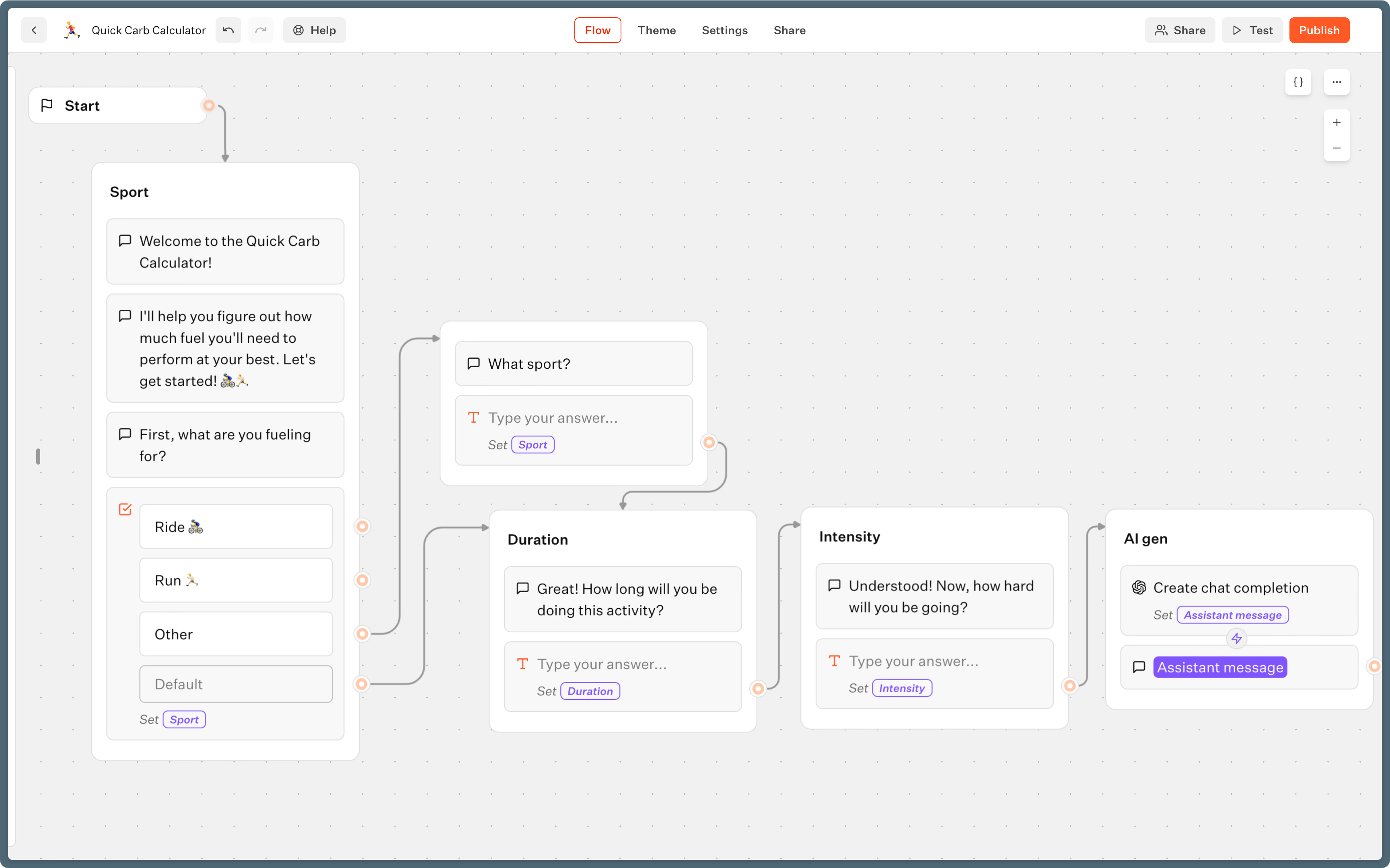
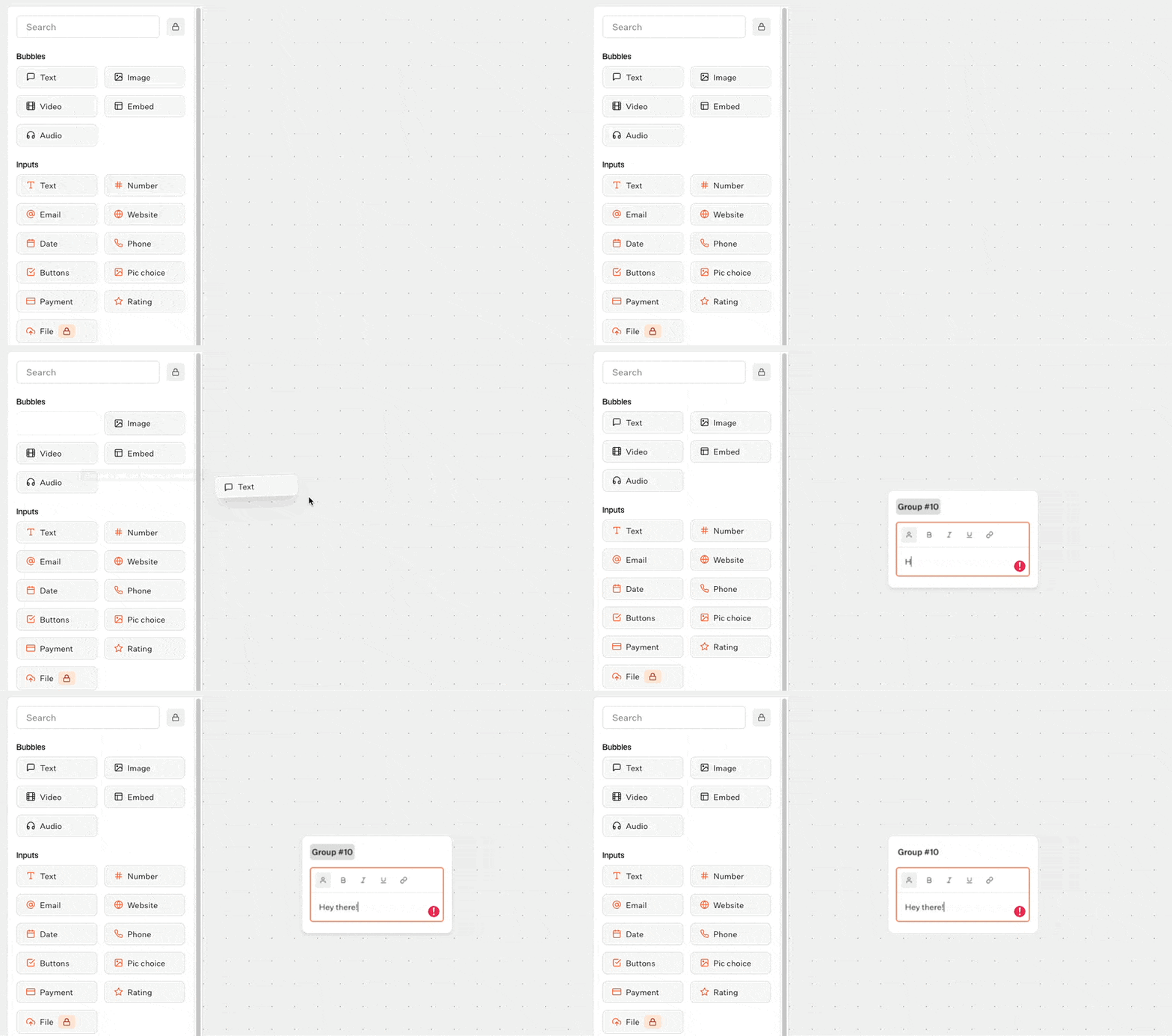
Typebot’s interface is built around connecting visual blocks. Each block displays info, asks a question, saves an answer, checks a condition, or triggers outside actions.
Here’s a look at how a typical lead flow might look in the Typebot editor:
Each step, block by block
- Welcome
Start with a Text block greeting. You can personalize it using variables, like “Hi, {{Name}}”.
- Company and need qualification
Use Input blocks to gather details, think company name, main challenge, timeline. Each response goes into its own variable. - Branching by fit (conditional logic)
Add a Condition block to check the answers. Strong leads go straight to scheduling, while others get routed to helpful content or a softer follow-up. - Book demo or nurture
Show clear options using Buttons blocks. If they want to book a demo, send them to a link. If not, offer case studies or queue up a polite follow-up message. - Push data to CRM or Sheets
At the end, use the Google Sheets integration, an HTTP Request block, or an automation platform to send the collected data to your CRM or a team Slack channel. - AI qualification (optional)
You can optionally drop in an OpenAI or Anthropic block if you want to assess open-ended responses or get a quick summary of what the lead wrote.
Typebot can access WhatsApp system variables like the user’s name and phone number, which makes greetings, lead records, and CRM matching easier without asking for the same details repeatedly.
Analytics: see where your flow works or fails
Typebot records completion data on every plan. On Pro, the analytics view also shows the drop-off rate beside each input block, so you can see exactly which step makes leads leave. A step with a high exit rate is a clear signal to reword the question, cut an option, or add context.
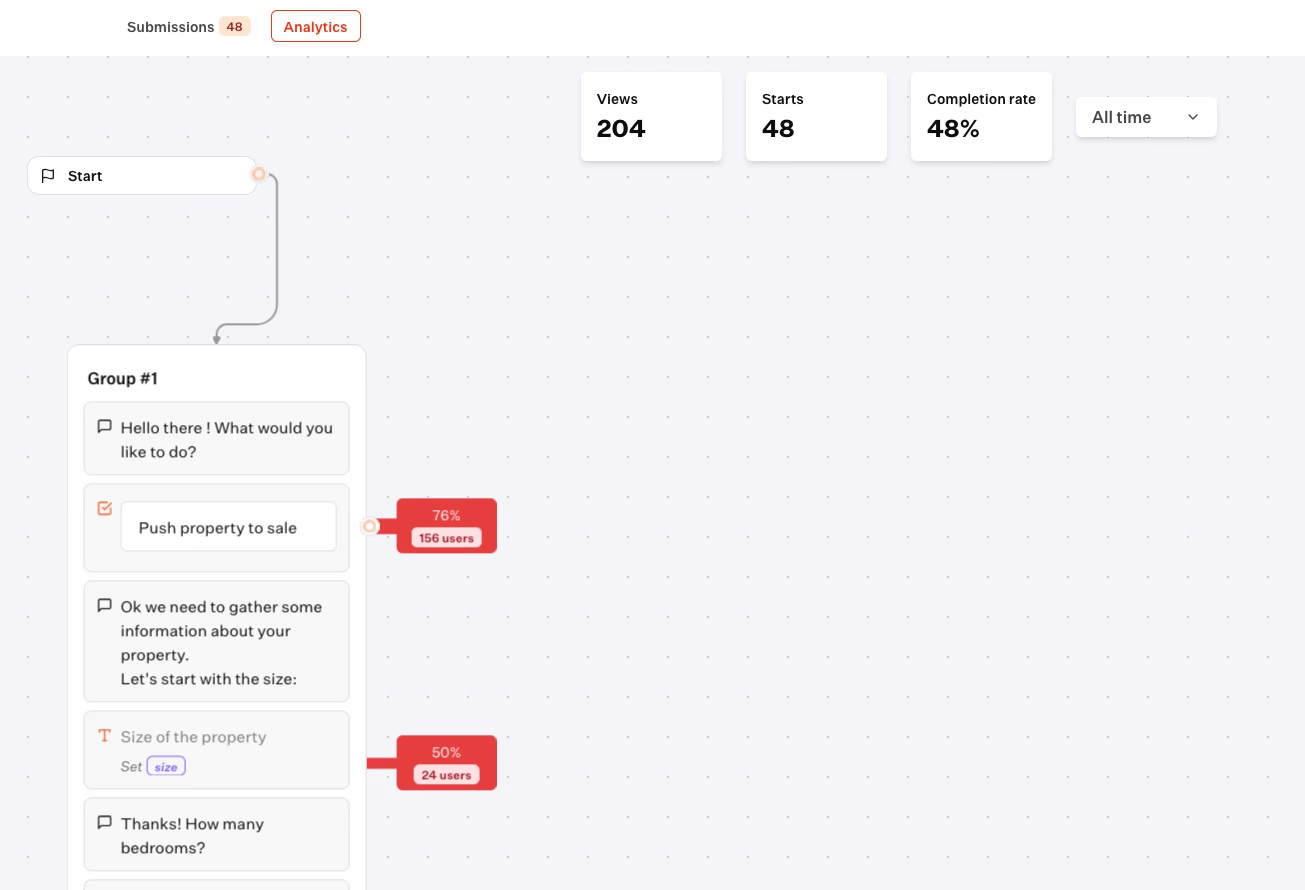
You can export conversation data as a CSV or plug it into your own reporting tools to analyze performance and tune the flow over time.
Deliver real-time responses and boost engagement with Typebot's WhatsApp integration.
No trial. Generous free plan.
What to measure
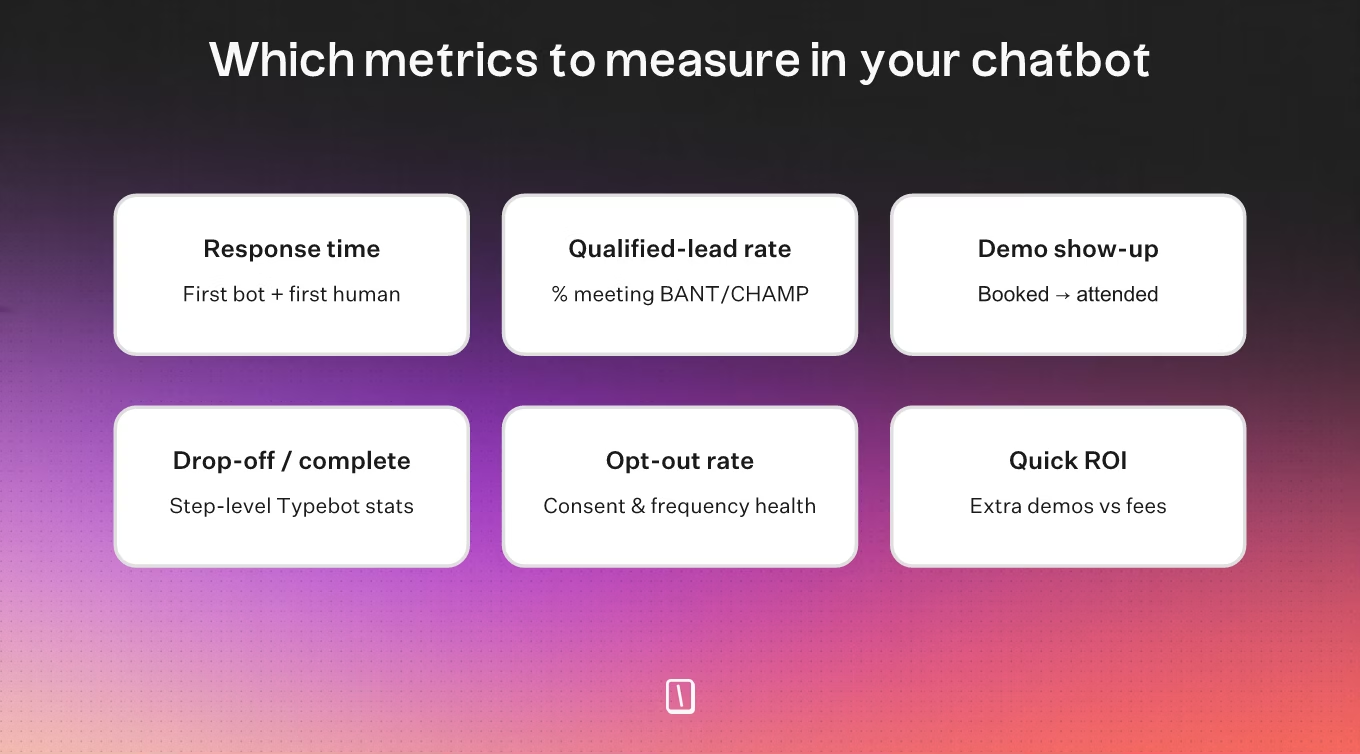
Response time
Check how long it takes from when someone reaches out to when they get the first automated reply, as well as when a live rep steps in.
The faster you respond, the more likely buyers are to stay interested instead of dropping off.
Qualified-lead rate
Watch the percentage of conversations that meet your core qualification criteria.
This helps you see how well your flow is working. It also makes sure your sales team spends time on leads that actually matter.
Demo show-up rate
Look at how many scheduled meetings actually turn into completed demos.
When you track attendance, you can tell if automated reminders are keeping people engaged until the call.
| Reminder method | Show-up rate |
|---|---|
| WhatsApp (auto) | ~70–80% |
| ~10–20% | |
| Phone call | ~5–10% |
Typebot drop-off and completion rates
Pay attention to where prospects leave the conversation.
If a lot of people exit at the same spot, it’s usually a sign there’s a slowdown or confusing message. You can adjust logic or rework your sequence to smooth out these bumps.
Opt-out rate
Monitor unsubscribes and opt-outs.
When you see these spike, it usually means your messaging isn’t connecting, you’re sending too often, or you never got clear consent in the first place.
Quick ROI check
WhatsApp automations move leads through the funnel faster than most outreach, and the ROI is easy to estimate:
ROI = (Revenue generated − Total cost) ÷ Total cost × 100- Costs: For Typebot Cloud, use Pro at $89/month as the hosted baseline because the Starter plan does not include WhatsApp deployment. Self-hosted deployments replace that plan fee with their own infrastructure and maintenance costs. Before estimating WhatsApp fees, exclude utility templates delivered inside the 24-hour customer service window and every template delivered inside the 72-hour free entry window opened by a Click-to-WhatsApp ad or Page call-to-action. Multiply only the remaining marketing, utility, and authentication template volumes by the current rate for each recipient country. Non-template replies inside the 24-hour service window are also free. See the full WhatsApp Business API pricing guide.
- Revenue: If your average deal is $5,000 and 20% of demos close, each qualified demo is worth about $1,000. Two extra demos a month represent $2,000 in attributed revenue; compare that with your calculated monthly Typebot, template-message, and tooling costs in the ROI formula above.
5-minute check:
- Count the conversations your flow started in Typebot analytics.
- Multiply by your qualified-lead rate → qualified leads.
- Multiply by your qualified-to-booked conversion rate → demos booked.
- Multiply by show-up rate → demos attended.
- Multiply by close rate × average deal value → attributed revenue.
- Exclude templates covered by the 24-hour utility or 72-hour free entry windows, estimate spend from the category and recipient country of the remaining delivered templates, then add your Typebot plan and other tooling costs.
- Subtract total costs, divide by total costs → ROI.
Benchmarks: WhatsApp opens ~98% of messages (email ~20–25%), WhatsApp response rates can reach 45–60%, and typical ROI runs 5–6x. If you're far below that, check response time and drop-offs before adding spend, and track revenue with UTM links, promo codes, or CRM tags.
Start converting on WhatsApp
Email and forms are losing their pull. WhatsApp gets 80 to 98% open rates, often within minutes.
The playbook is simple: qualify leads in chat, share proof on the spot, remind them before demos, and retarget the ones who stall. Build it once in Typebot, connect your CRM, and let it run around the clock.
Then measure response time, qualified-lead rate, demo show-up, and opt-outs to find what to fix. Two extra qualified demos a month can cover the tool's cost.
WhatsApp B2B marketing is not the future. It's where your buyers already are. Build your first flow in Typebot and turn chats into pipeline.
Use Typebot's conversational forms to simplify data collection and boost engagement.
No trial. Generous free plan.