
Every business gets the same questions every day. "Where is my order?" "How do I return this?" "Can I book an appointment?"
Most of those conversations can run themselves. A WhatsApp chatbot handles leads, support, bookings, and sales inside the app your customers already use. Here are 12 real examples with live demos you can test.
What is a WhatsApp chatbot and why your business needs one
A WhatsApp chatbot automates conversations with your customers right inside the app. It uses AI and scripted workflows to answer questions, qualify leads, book appointments, and handle support — all without a human.
Real business impact: 24/7 convenience, efficiency, and sales
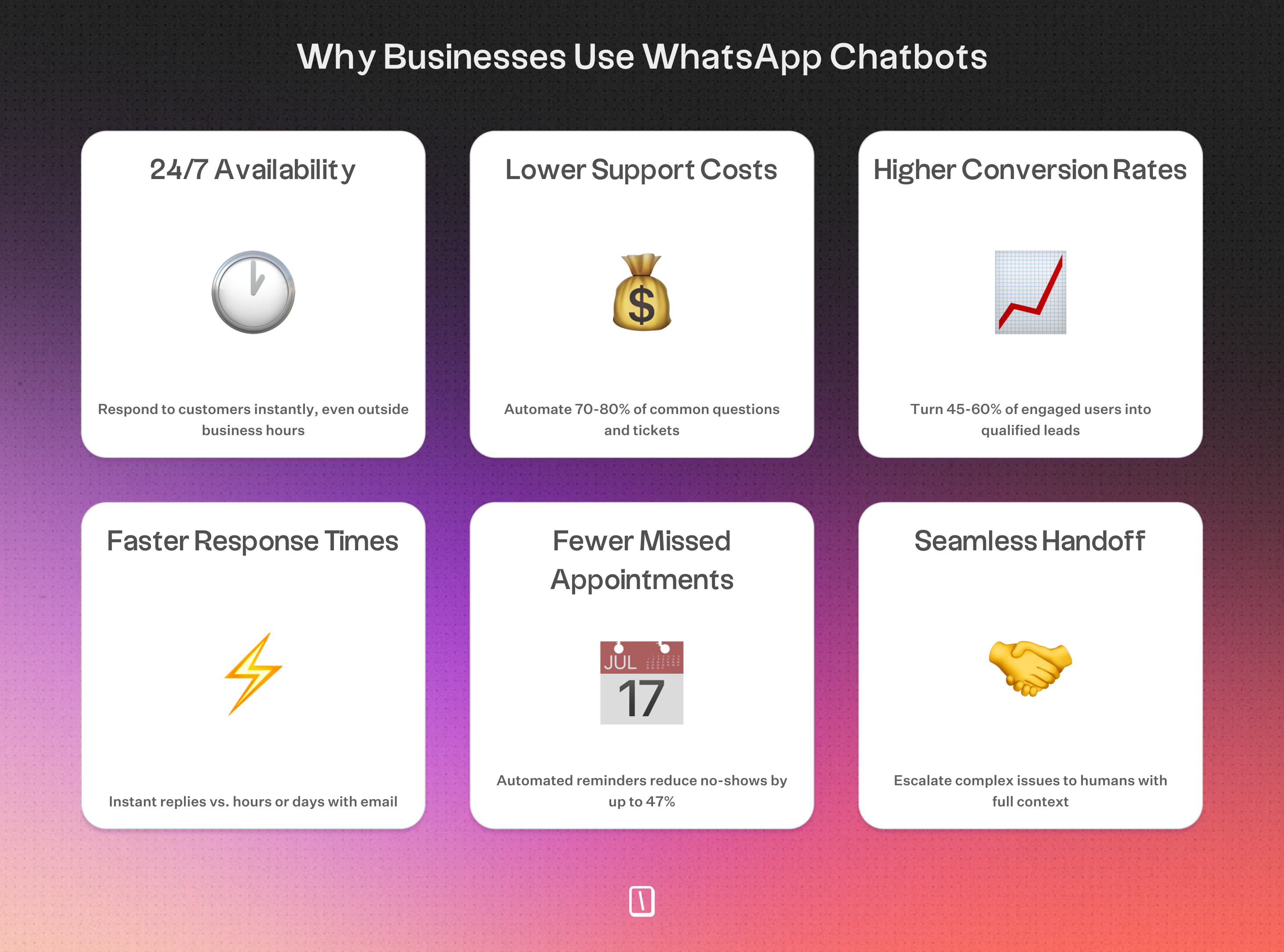
- 45–60% of Click-to-WhatsApp users convert into leads
- 70–80% of routine support tickets can be automated
- Up to 47% fewer missed appointments with automated reminders
- 98%+ open rate — your messages actually get read
Customer support: cost savings and satisfaction
Bots handle repetitive questions like order tracking or return policies instantly. KFC South Africa cut support costs by 38% after rolling out a WhatsApp chatbot. When a problem is too complex, the bot passes it to a human with the full conversation history.
Efficient workflows for appointments and onboarding
Service providers can automate booking, rescheduling, and reminders. NHS clinics saw no-show rates drop by 47% using WhatsApp reminders. Onboarding and surveys completed in chat see much higher finish rates than web forms.
Proven results across industries
Gartner predicts chatbots will be the main customer service channel for about 25% of businesses by 2027. Brands already seeing results:
- Uber: 33% faster responses through WhatsApp
- Lemonade: AI bot handles 25% of insurance requests
- Sephora: 11% higher conversions vs. other digital channels
⬇️ In the sections below, we walk through 12 real-world WhatsApp chatbot examples, from lead generation and customer support to product recommendations and multilingual assistants. Each example includes a live demo you can test yourself, plus practical tips for building something similar for your business.
1. Lead generation and qualification chatbot
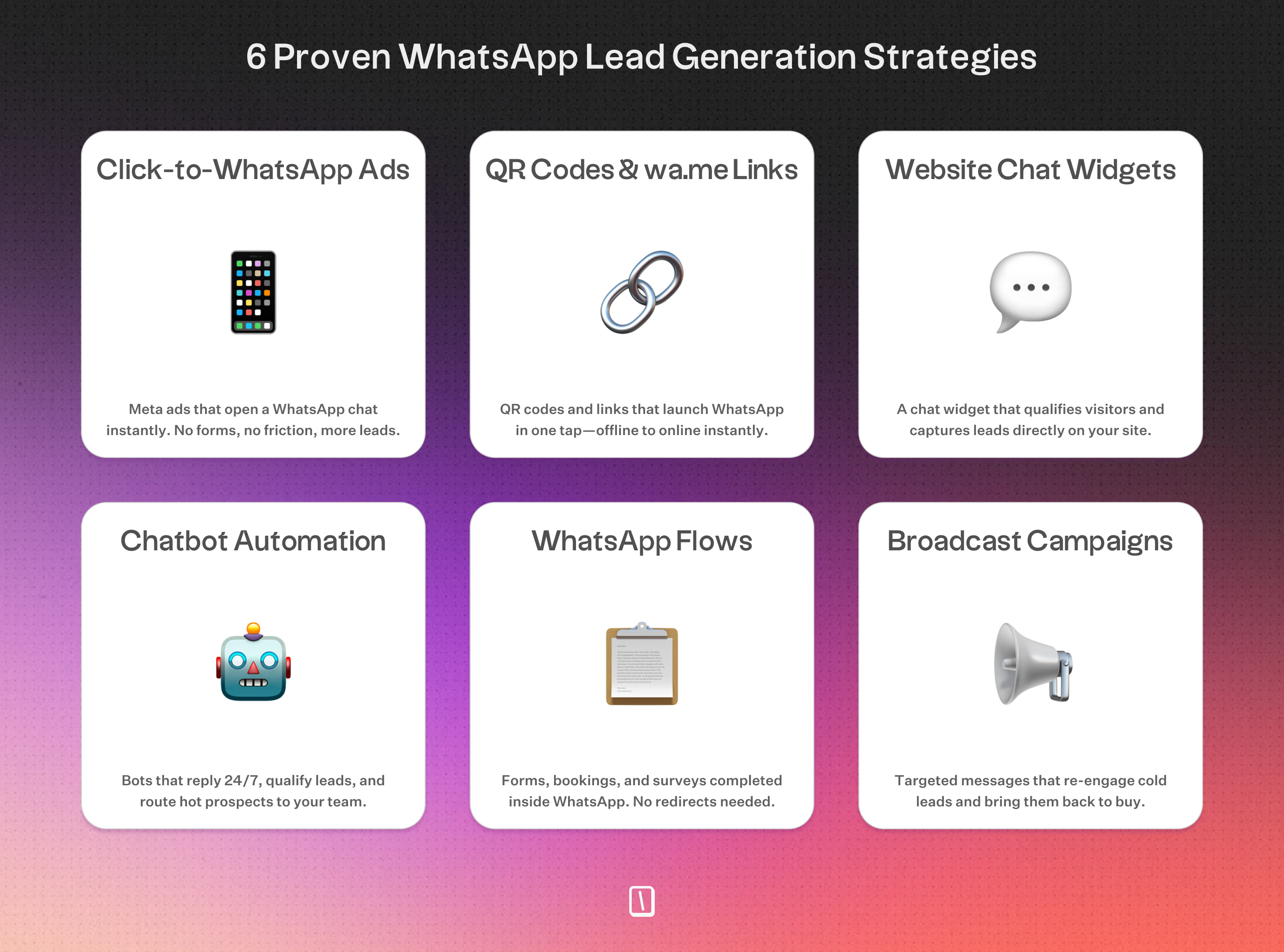
A WhatsApp lead generation chatbot captures, scores, and routes leads through real conversations. Instead of relying on static web forms, these bots use interactive messaging. This usually leads to higher completion rates and better data for your team.
Here’s what makes them stand out:
- Conversational capture: The bot welcomes prospects from Click-to-WhatsApp ads, QR codes, or website widgets. It asks straightforward questions, like budget or specific needs, to reduce friction and boost completion rates. For engaged users, you might see rates around 45 to 60%.
- Intelligent scoring: With frameworks like BANT, Budget, Authority, Need, Timeline, the bot scores leads in real time. High-intent leads can go straight to sales, while others cycle through automated nurturing.
- Industry-specific logic: Take real estate, for example. The chatbot can figure out who is just browsing and who is serious by asking about school districts or price range. It can then share property images or book viewings.
- Interactive lead magnets: Quizzes and assessments make qualification feel more like a game. A marketing skills quiz, for instance, gives personalized results and grabs contact info at the same time.
- Automated data syncing: Everything collected, names, phone numbers, and custom answers, can be exported to your CRM or Google Sheets using Typebot.
For campaign launches, you can embed these bots in ads or QR codes. That helps move prospects from “interested” to “sales-ready” in less than a minute.
Live Demo:
2. Abandoned cart recovery chatbot
An abandoned cart recovery chatbot gets back in touch with shoppers who left items in their cart. It helps turn missed sales into actual revenue. Thanks to WhatsApp’s high open rates, these conversational nudges often work better than standard email reminders.
How it works
Within about 1 to 24 hours after someone leaves your site, the chatbot sends an automated message.
You'll usually see features like:
- Rich media: A product image or short video of what was left behind.
- Personalization: The customer’s name and specific cart details.
- Incentives: A special discount code that’s only available for a limited time.
- Direct action: Simple buttons like "Resume purchase" or "Ask a question", so shoppers can act immediately or clear up any doubts.
Some businesses using WhatsApp to recover carts report success rates up to 60%.
The bot can answer quick questions, like "Is this available in other colors?" or recommend alternatives if the item isn’t in stock.
Discover how Typebot's drag-and-drop builder can transform your website visitors into loyal customers.
No trial. Generous free plan.
3. Promotional campaign chatbot
A promotional campaign chatbot delivers targeted offers and updates through a conversation, not just another mass notification.
Some brands, like Tata CLiQ, have seen click-through rates hit around 57% and reported a 10x return on investment after swapping their usual email blasts for WhatsApp-based interactive flows.
How promotional chatbots drive engagement
Email and SMS are often one-way streets: you send, users may read. A promotional bot changes things by opening up a two-way dialogue.
Instead of sending a generic coupon, the bot might ask, "Are you interested in men's or women's fashion?" Then it sends recommendations based on the answer.
This approach makes the offer feel more relevant, which can improve engagement.
A typical campaign might play out like this:
- Entry points: People join by clicking a Click-to-WhatsApp ad or scanning a QR code.
- Preference mapping: The bot gathers simple info, like style preferences or buying intent, so you can segment your audience more thoughtfully.
- Tailored offers: Next, it sends product images, flash sale countdowns, or exclusive discount codes that match what users want.
- Call-to-action: Quick-reply buttons make it easy to "Claim Discount" or "Shop Now."
- Support integration: If someone has a question, such as "Is the discount valid on sale items?", the bot can respond right away or hand off to a human.
Performance and tracking
This conversational approach gives you a few clear advantages over more traditional marketing.
You can measure engagement in real time and adjust follow-ups quickly.
- Higher CTR: Engagement often beats typical email campaigns, which usually run between 2-8%, mostly because WhatsApp is more personal.
- Real-time analytics: You track clicks, responses, and conversions as they come in.
- Behavioral segmentation: The bot groups users according to their in-chat responses, so you can target follow-up offers more precisely.
4. Customer support automation chatbot
Efficiency and cost savings
Automated bots tend to resolve about 70% to 80% of routine queries, such as “Where is my order?” or “How do I start a return?” That means human agents are freed up for complicated, high-empathy conversations.
Some real-world examples:
- KFC South Africa: Cut support costs by 38% after rolling out a WhatsApp bot.
- Domino’s: Now handles over half of its order-related help through chatbots.
- Bank of America: Their AI assistant, Erica, handled 330 million requests in six months. This shifted much of the bank’s support from reacting to problems to helping customers proactively.
Key capabilities
- Order and account management: Customers can check delivery updates, start returns, or access invoices right from the chat.
- Guided troubleshooting: Bots walk users through tech support or device setup, using text and images for clarity.
- Contextual escalation: When a bot can’t solve the problem, it sends the conversation to a live agent along with the full chat history, so customers do not have to repeat themselves.
- Multi-language support: Offers help around the clock in the customer’s preferred language.
5. FAQ automation chatbot
An FAQ automation chatbot handles common questions inside WhatsApp.
Customers do not need to search long help articles or wait days for a reply. They get instant answers to questions like “How do I return a product?” or “When will my package arrive?”
Transformational support
By automating common topics, such as return policies, shipping info, and troubleshooting steps, businesses can cut support ticket load by 70–80%.
That means live agents can focus on complicated or sensitive issues, which makes things smoother for everyone.
- WHO Health Alert: Runs a menu-based WhatsApp bot so people can access health info in many languages, any time.
- Vodafone’s TOBi: Manages upgrades and device setups, so customers rarely need a human agent.
- KFC South Africa: Saved 38% on support costs by letting their bot handle routine questions.
Platform-optimized design
These bots work best when they are designed for WhatsApp’s unique setup.
- Structured Navigation: Since you only get three message buttons, it helps to organize questions into clear categories. This keeps things simple for users.
- Rich Media Answers: Using images, short videos, or PDFs for step-by-step instructions makes information easier to follow than wall-to-wall text.
- AI Integration: this lets users ask questions in their own words, such as “Where’s my stuff?” or “Track order,” and still get the right answer.
- Automatic Context: Because WhatsApp provides a name and phone number, the bot can personalize replies without asking users to fill in extra details.
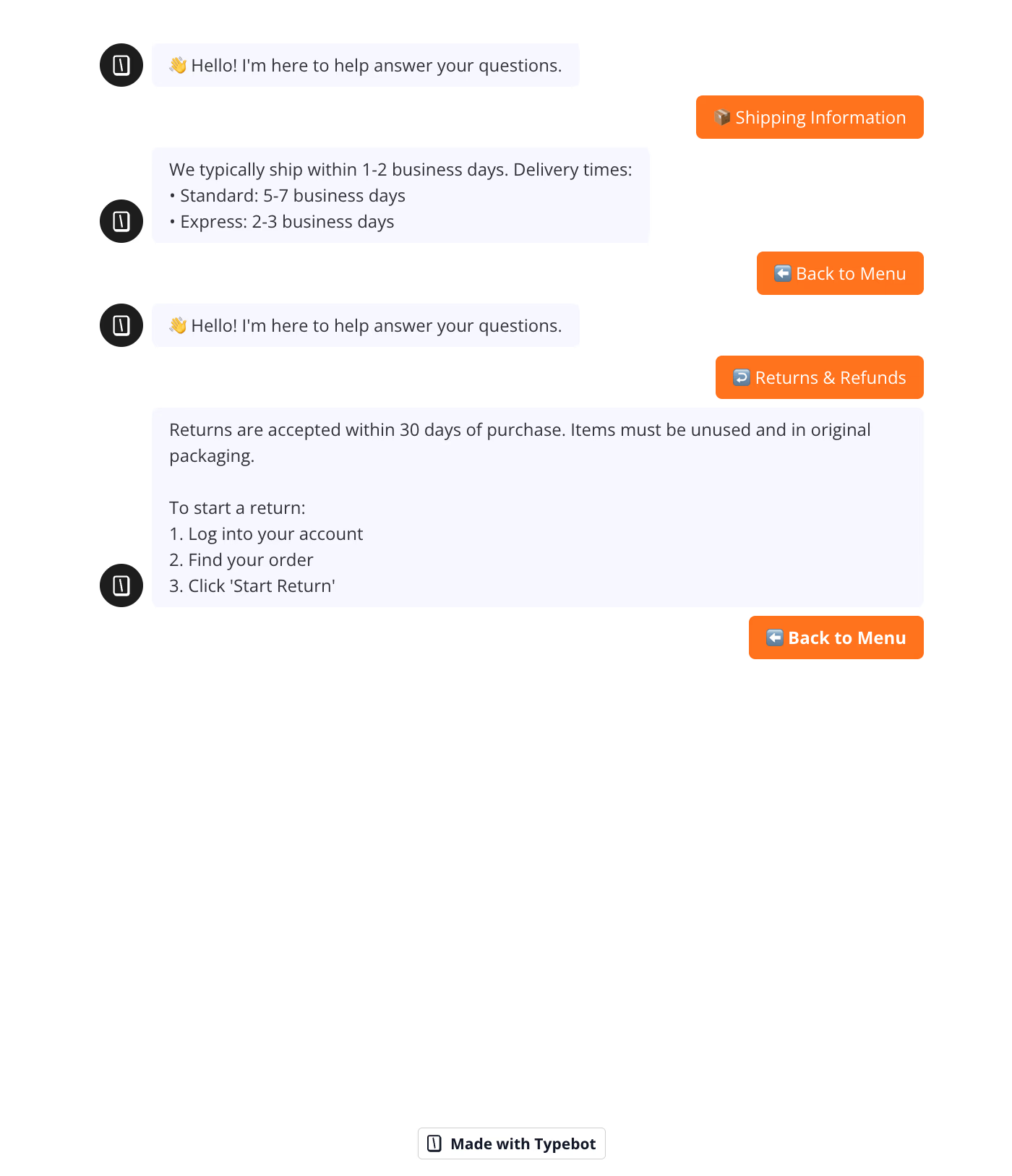
Want to see how dynamic FAQ flows work in practice? Check out our chatbot FAQ example to understand how structured navigation and AI integration come together.
6. Feedback and NPS collection chatbot
A feedback and Net Promoter Score (NPS) collection chatbot lets you gather customer opinions right inside the app, while their experience is still fresh.
The result is more responses and better insights you can actually use. These bots replace lengthy surveys with quick, natural conversations that do not get in anyone’s way.
Higher completion through less friction
WhatsApp surveys tend to beat email-based forms by a wide margin.
For example, a chatbot powered by Typebot for NPS collection can reach completion rates up to 67%, compared to the usual 10% for emails.
That is a big difference.
With this kind of efficiency, you can collect feedback right after a purchase, support chat, or appointment, when people actually remember what happened.
How the conversational flow works
The chatbot typically does the following:
- Instant Ratings: It offers a simple rating scale using quick-reply buttons in WhatsApp.
- Qualitative Follow-up: If someone gives a particularly high or low score, the bot follows up with open-ended questions, like “What’s one thing we could improve?”
- Identity Attribution: Because the bot knows each user’s name and phone number, every response gets linked to the right customer automatically, with no need to log in again.
- Real-time Data: All responses sync right away, so your team can review them and respond fast if there is a problem.
This makes feedback collection feel automatic, while still keeping every response tied to the right customer.
Experience the flow
Take a look at this demo to see how the experience feels from the customer side.
Short prompts and easy responses keep it informal. It is more like a friendly check-in than a drawn-out interview.
7. Welcome and onboarding chatbot
A WhatsApp onboarding chatbot helps new users get started by walking them through setup steps right inside a messaging conversation.
Instead of digging through static email guides, users get real-time, interactive instructions for tasks like product registration or account activation. They do it in an interface they already know.
Interactive guidance and support
Here’s how it typically plays out: the onboarding begins with an automated greeting as soon as the user opts in.
The chatbot handles the transition by:
- Personalized greetings: Using the user’s name to create a friendly, human feel right away.
- Simplified actions: Presenting the first step as a button tap, so it is always clear what to do next.
- Rich media instructions: Sending images or short videos to help with tasks like putting together hardware, uploading documents, or learning features.
- Real-time FAQ handling: Answering questions about the setup process, whether it is KYC verification for a bank or finding your way around a SaaS dashboard.
This kind of hands-on support tends to boost completion rates. Nubank and Samsung, for instance, use WhatsApp onboarding because it gives users quick feedback and cuts back on confusion and drop-offs.
Adaptive onboarding
Good onboarding bots do not just stick to a script, they adjust based on what the user does.
If someone gets stuck, the bot can jump in with a follow-up, such as “Need help with this part? Here’s a quick video.” It can even hand off to a live agent if things get complicated.
Since WhatsApp limits chats to three on-screen buttons, the bot keeps things focused, one action at a time, so users are not overloaded with choices.
A few common use cases include:
- Retail: Guiding customers through loyalty account activation and notification preferences.
- Fintech: Walking users through account setup and ID checks.
- Healthcare: Helping patients sign up for a portal and schedule their first visit.
- Consumer electronics: Explaining device setup with images or clips.
Example onboarding flow
A typical interaction is quick and seamless, with no page switches needed.
- Bot: “Welcome, Joe! Let’s get you started. Tap below to set up your device or explore features.”
- Options: [Set up device] [Explore features] [Get support]
On WhatsApp, your onboarding bot becomes a steady guide that helps every new customer take those important first steps and actually finish them.
Deliver real-time responses and boost engagement with Typebot's WhatsApp integration.
No trial. Generous free plan.
8. Appointment booking chatbot
An appointment booking chatbot lets people schedule, reschedule, or cancel appointments right inside WhatsApp. There is no need for endless calls or email threads.
By connecting to live calendars, these bots cut out the back-and-forth, “phone tag.” They also help reduce missed bookings with automated reminders.
How it works
The booking bot keeps things simple with step-by-step prompts:
- Availability Sync: It checks for open time slots on linked platforms like Cal.com or Google Calendar.
- Instant Confirmation: Users pick a service and time, tap a button, and get a confirmation message instantly.
- Automated Reminders: Before their appointment, customers get notifications with quick-reply buttons to confirm, reschedule, or cancel.
- Data Collection: Along the way, it gathers contact details and updates the business’s CRM or database.
Measurable impact
Automated booking tools are making a real difference in various fields:
- Healthcare: NHS clinics saw no-show rates drop by 47% after using WhatsApp reminders.
- Hospitality: Guests can reserve tables, upgrade rooms, or check in anytime, without reaching for the phone.
- Professional Services: Firms qualify leads using bots before offering slots for consultation appointments.
These results show how booking automation can save time and reduce missed opportunities.
Why WhatsApp?
People already use WhatsApp every day, so appointment reminders there get noticed.
With open rates above 98%, messages are less likely to slip through the cracks. That means fewer missed bookings than reminders sent over email.
9. Order tracking and notifications chatbot
Order tracking chatbots give customers instant updates from the moment they check out until their order lands at the door.
By handling post-purchase messages through WhatsApp, businesses cut down on “Where is my order?” questions and make sure updates do not get buried. Most people check WhatsApp several times a day.
Automated notification milestones
The chatbot can send messages at each step of the order process:
- Order confirmation: Letting the customer know right away that their purchase went through.
- Shipping updates: Sending alerts with tracking links and delivery estimates.
- Out-for-delivery alerts: Notifying customers as soon as the package is headed their way.
- Delivery confirmation: A final message once the delivery is complete, with an option to leave feedback or a quick rating.
Self-service tracking
The bot can also act as a self-serve help desk, ready around the clock.
Customers can simply type “Where is my package?” or “Track order,” and get up-to-date info pulled straight from the fulfillment system.
No need to dig up a tracking number or log into their account.
10. Multilingual support chatbot
A multilingual WhatsApp chatbot helps businesses connect with a wider audience, without needing to hire a whole new team for every language. The bot can detect a user’s language from the first message or a quick selection menu.
That way, each customer gets consistent support in the language they are most comfortable with.
How it works
With a platform like Typebot, you can create one main flow that splits into different languages when needed.
- Language detection: The bot greets users and offers clear choices, like “English | Español | Français,” using simple buttons.
- Dynamic content: After a user picks a language, the chatbot serves everything, from FAQs to troubleshooting steps, in that language.
- Translated media: The bot can share language-specific files, whether that is a translated PDF, a setup video file, or localized product images.
- Context retention: The chatbot remembers which language someone chose and keeps it consistent throughout their 24-hour session.
Practical benefits
Having multilingual support is becoming essential for businesses, whether they are small or large.
- E-commerce: International brands can handle returns and product questions across regions without confusion.
- Tourism & hospitality: Local companies can easily support travelers from other countries, no matter the language.
- Scalability: When expanding into new markets, you do not have to start from scratch, just add another language branch to your chatbot.
11. AI conversational assistant chatbot
AI conversational assistants on WhatsApp tap into large language models (LLMs) and retrieval-augmented generation (RAG) to handle customer questions that go beyond simple replies.
Unlike scripted bots, they understand everyday language and can handle follow-ups. This makes the conversation feel more natural and less robotic.
Capabilities of an AI assistant
An AI agent usually resolves about 72% of support requests on its own, with no human stepping in.
By connecting to your knowledge base or documentation, the bot can:
- Solve technical issues: Walk customers through troubleshooting steps directly from real product manuals.
- Clarify policies: Break down refund periods, warranty specifics, and billing statements in plain language.
- Provide personalized advice: Reference past data and preferences to guide purchase choices.
- Offer 24/7 coverage: Keep support quality consistent during busy hours or holidays, with no need to expand your team.
How RAG-powered assistants work
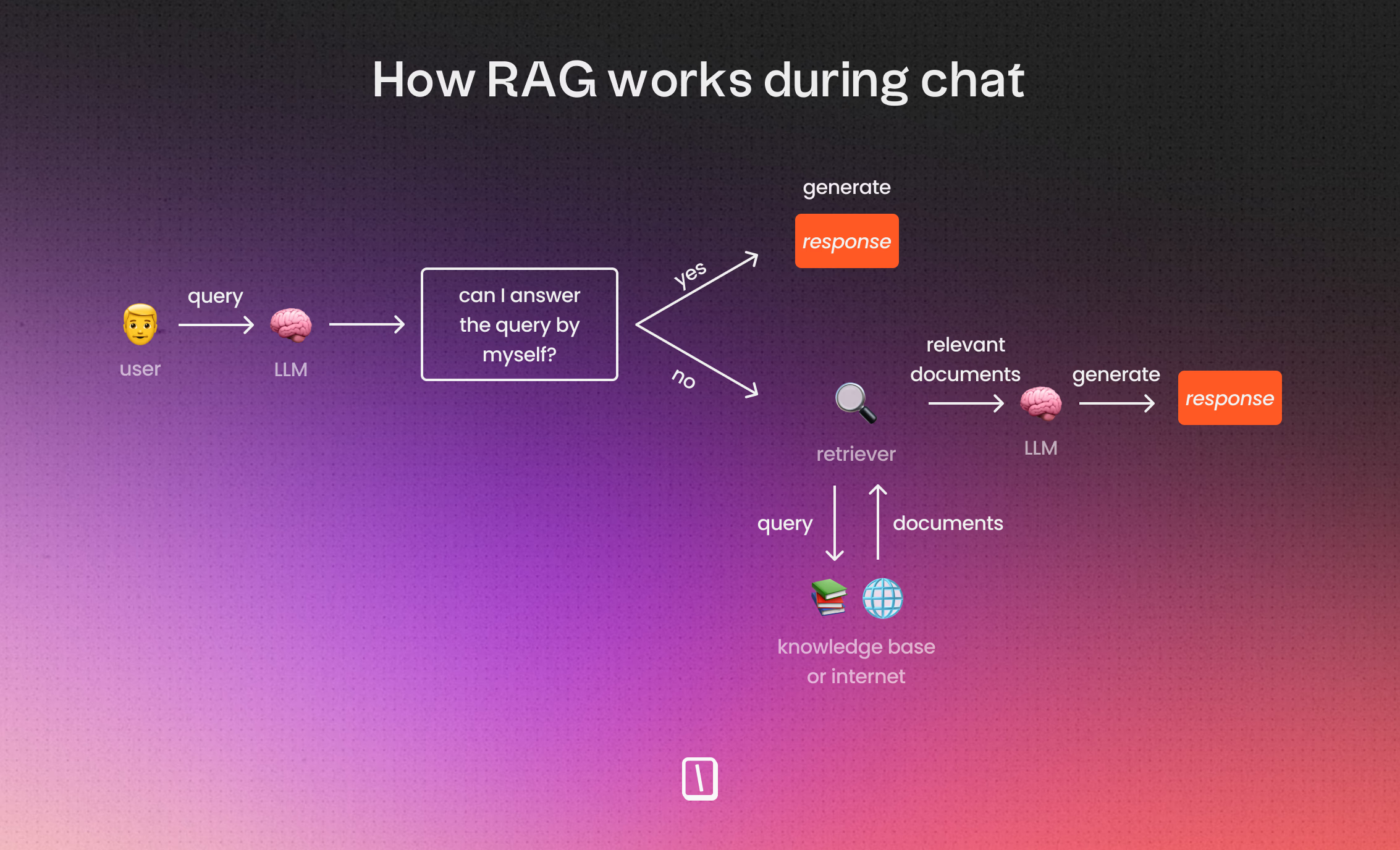
Retrieval-augmented generation (RAG) lets the bot scan your company’s internal docs on demand.
If a customer asks, "How do I reset my particular device model?" the bot grabs the exact answer from your guides instead of guessing with a generic reply.
That keeps responses accurate and reduces the risk of the AI making something up.
Building with Typebot
With Typebot, teams can build these assistants without knowing how to code:
- Capture input: Save what users say as variables.
- Process with AI: Use an AI block, like OpenAI or Mistral, to analyze the question and chat history.
- Cross-reference data: Pull supporting info from your live knowledge base using RAG.
- Respond and loop: Deliver answers instantly in WhatsApp, and be ready for follow-up questions.
If the assistant hits a wall, it hands things off smoothly to a live agent.
The full conversation transcript is included, so the agent has the context needed to continue the chat.
By switching from a fixed script to an AI assistant, businesses offer support that feels genuinely helpful and responsive.
Customers can get clear, reliable answers any time of day or night.
12. Product recommendation chatbot
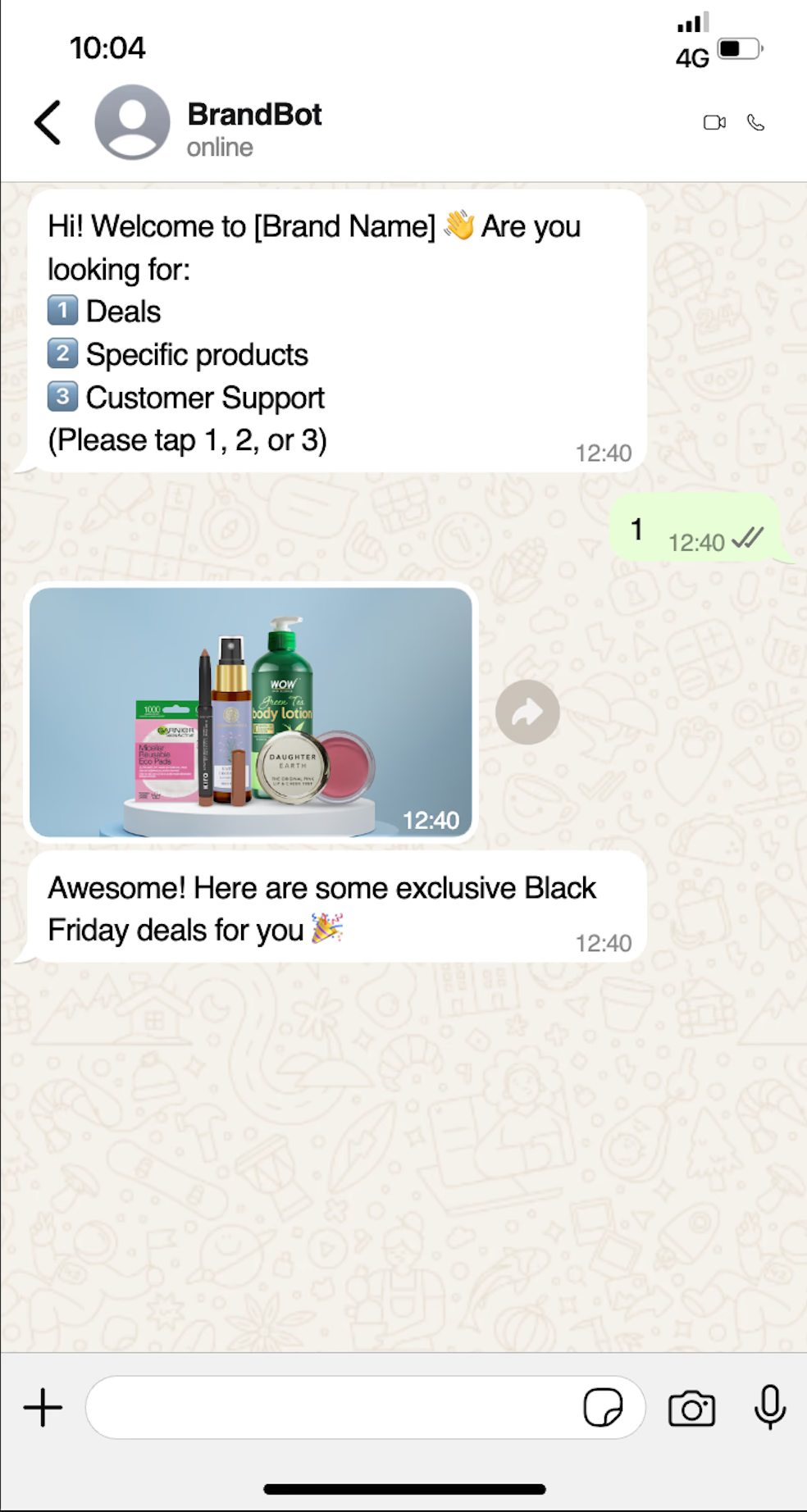
A product recommendation chatbot works a bit like a personal shopping assistant. It chats with shoppers, listens to what they’re looking for, and guides them to the right purchase.
Instead of making people hunt through endless filters on a site, it offers a simple, friendly conversation that helps shoppers find what they want faster.
How it works in practice
Here’s what happens behind the scenes. The chatbot asks key questions, such as style, size, budget, or the reason for the gift. In Typebot, these questions run in a logical sequence:
- Preference mapping: The bot grabs details, such as “eco-friendly only” or “for birthdays,” and saves them as variables.
- Dynamic logic: Based on each answer, it uses branching logic to weed out irrelevant products and focus on what fits.
- Live inventory sync: With HTTP requests or webhooks, it pulls up-to-date product info, like images and pricing, from sources such as Shopify.
- Rich media delivery: The bot then shows options with images and direct links, so buying is just a tap away.
Experience the flow
Want to see it in action? The demo below shows how a short quiz collects preferences and matches people to specific products:
Why it excels on WhatsApp
WhatsApp is purpose-built for quick back-and-forth chats. While plenty of mobile sites lose shoppers midway, a chat-based quiz keeps things moving.
Plus, WhatsApp automatically provides the user’s name and phone number, so switching from browsing to buying happens seamlessly.
Best for:
- D2C brands eager to bump up mobile conversion rates.
- Gift shops and subscription services that need discovery built in.
- Retailers looking to offer a high-touch, concierge-style experience without the manual work.
You can track every interaction, from people who finish the flow to those who drop off early. That means you can keep tweaking your questions and inventory rules to boost sales over time.
How to build your own WhatsApp chatbot with Typebot
Building a WhatsApp chatbot with Typebot is pretty straightforward, even if you don’t know how to code.
It’s a visual process that covers connecting your API, designing the logic, automating tasks, and keeping tabs on performance.
1. Design your conversation flow visually
Typebot’s drag-and-drop editor makes it easy to build your bot’s logic.
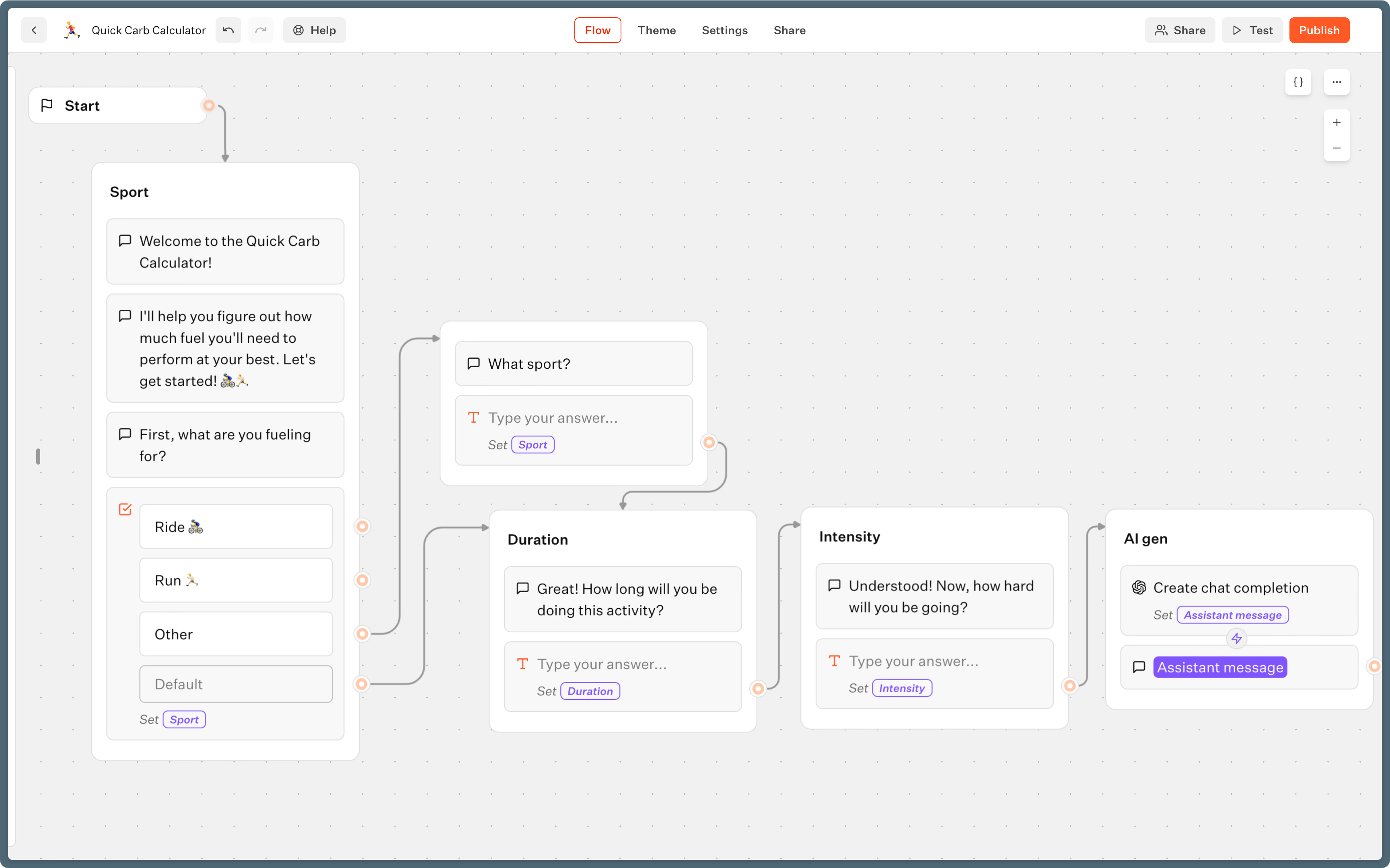
- Map the flow: Use blocks for questions, info bubbles, and paths. Connect these to guide users through the conversation in a way that makes sense.
- Personalize inputs: The user's name and phone number come straight from WhatsApp, so you can greet people personally and save responses for later.
- Conditional logic: Send users down different paths depending on what they need. For example, send new leads one way and support tickets another.
- Native preview: Try out your bot with the "WhatsApp" runtime in the editor so you can see exactly what users will see on their phones, including buttons and media.
Typebot handles WhatsApp restrictions automatically, including the three-button limit per message.
2. Add integrations and AI capabilities
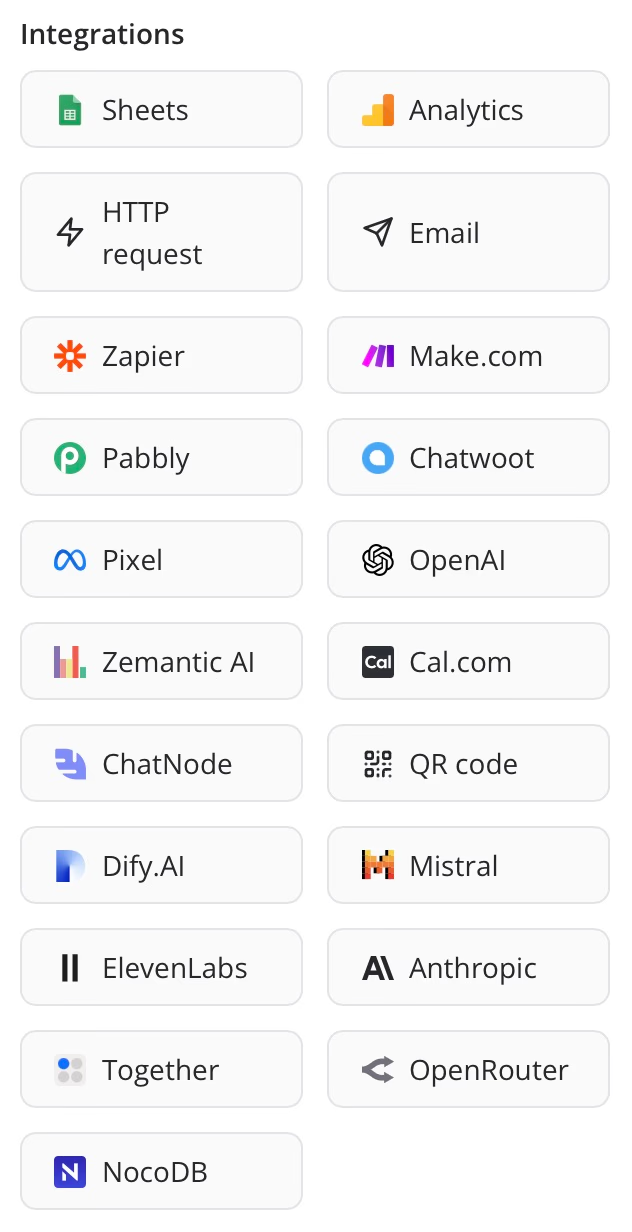
Want your bot to do more? You can add features right inside your flow:
- External data: Trigger webhooks or HTTP requests to sync up with tools like Salesforce or Google Sheets.
- AI blocks: Drop in OpenAI, Anthropic, or Mistral blocks if you need natural language replies or context-aware responses.
- Automation: Grab live product info, send reminders, or update order status using external API calls.
These integrations help your bot feel more useful, responsive, and connected to your other tools.
Deploy and track performance
When your bot is ready, here’s how you launch and monitor it:
- Publish: Choose WhatsApp as your deployment channel. Your bot is now live on your business WhatsApp number.
- Entry points: Bring users in using QR codes, wa.me links, or Click-to-WhatsApp ads.
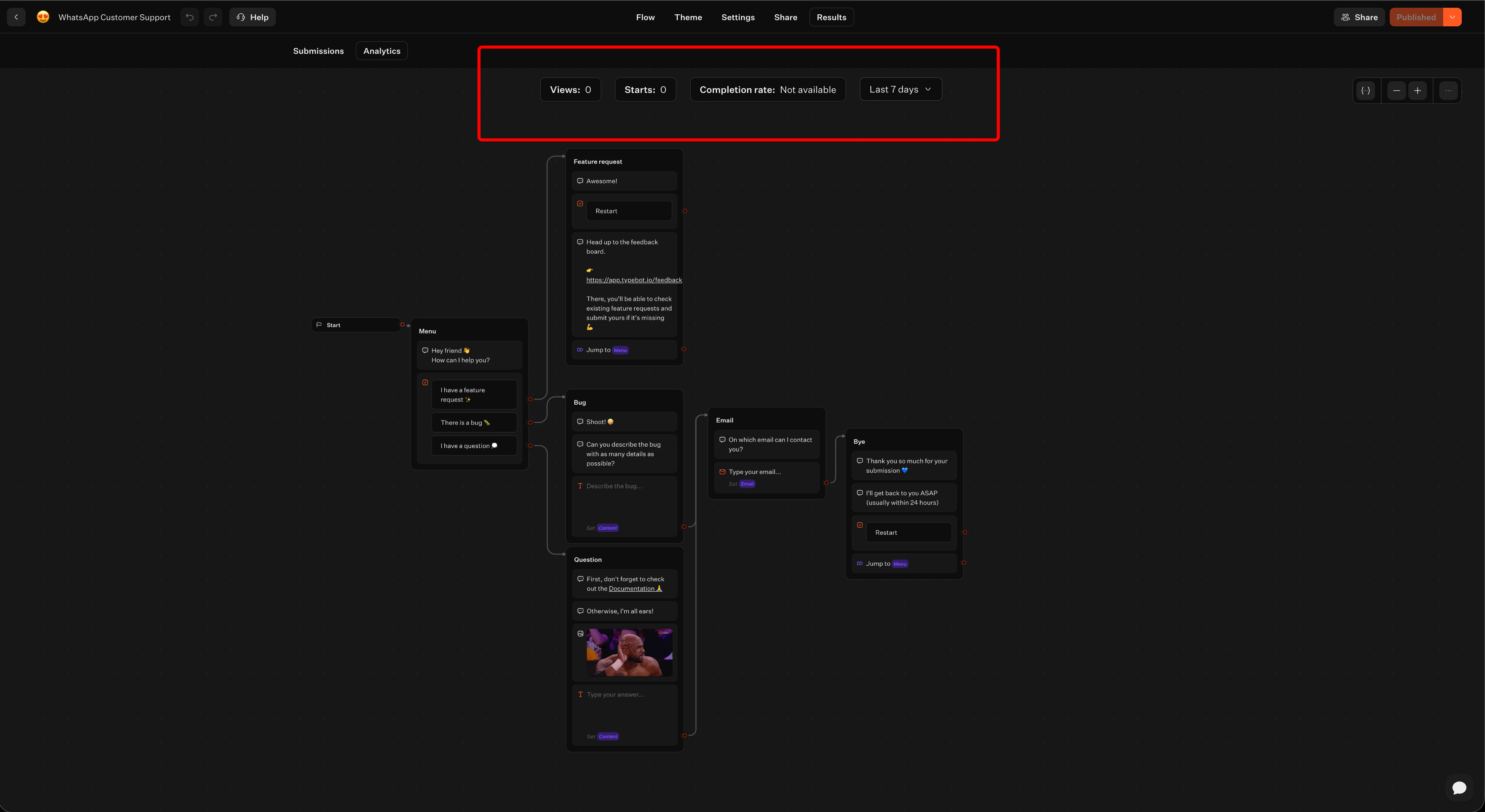
- Monitor analytics: Keep an eye on completion rates and see where users drop off inside the Typebot dashboard. If you want to dig deeper, export your data to CSV or Google Sheets.
Tracking performance helps you improve the flow and catch drop-off points fast.
Start building today
WhatsApp chatbots are a proven tool. From lead qualification and abandoned cart recovery to AI-powered assistants and multilingual support, each of the 12 examples solves a real business problem.
The common thread is simple: your customers are already on WhatsApp. A chatbot helps you show up there instantly, without adding headcount. Pick a use case, design a simple flow, and get started.
Reach your audience where they are. Integrate Typebot with WhatsApp for seamless, personalized communication.
No trial. Generous free plan.