
Most businesses are still fighting the last war. They pour budget into landing pages with eight-field forms and email sequences that barely crack a 25% open rate. Meanwhile, the same prospects who ignore your newsletter are checking WhatsApp 47 times per day.
The uncomfortable truth?
Your leads are not harder to reach. They have simply moved to a platform where your current tactics do not work. This guide shows you how to meet them there.
What is WhatsApp lead generation and why it works
Why WhatsApp outperforms email and traditional forms
People communicate today with quick chats and instant replies. They have little patience for clunky web forms. WhatsApp fits this behavior perfectly.
With over 3 billion users globally and 83% opening the app daily, WhatsApp plays a key role in personal and business communication. The platform boasts a 98% message open rate, far higher than email’s 20–25%.
Web forms have high abandonment rates. 68% of users leave without submitting any information. Traditional lead capture demands long attention spans.
Real-time engagement with 45–60% response rates
When leads respond within minutes, they remain warm and more likely to convert. Chatbots can handle up to 70–80% of routine questions, making sure no inquiry goes unanswered while waiting for a human agent.
Whether qualifying a buyer, assisting with insurance claims, or guiding product setup, WhatsApp routes high-intent leads to live agents and nurtures low-intent leads automatically.
Results improve every stage of the funnel:
- NHS clinics lowered appointment no-shows by 47% using WhatsApp reminders.
- KFC South Africa cut support costs by 38% by resolving most queries through chatbots.
WhatsApp keeps users inside the app, making multi-step processes like qualification, scheduling, or checkout feel smooth. This boosts open rates, response times, and conversions significantly.
6 proven WhatsApp lead generation strategies
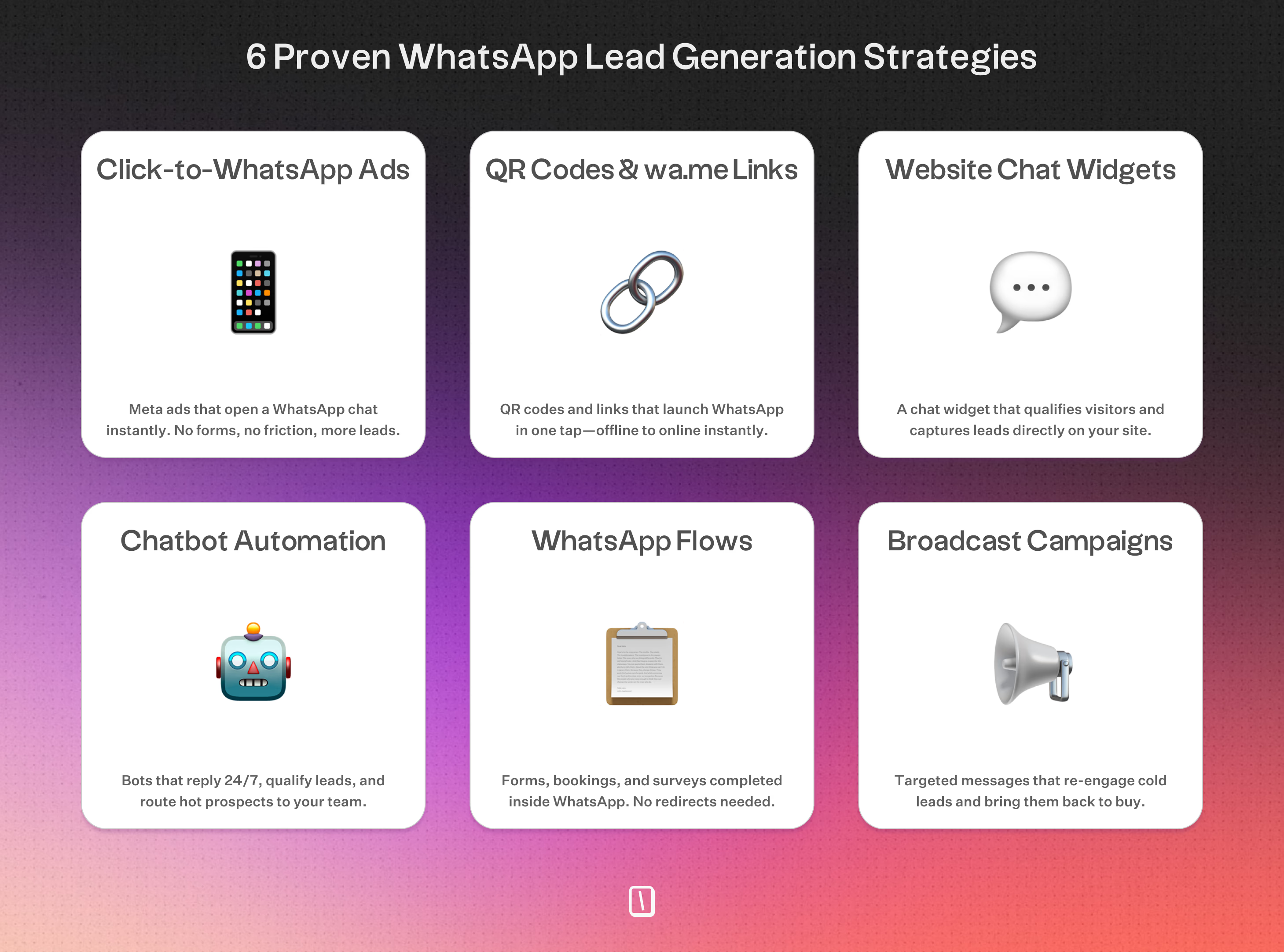
Click-to-WhatsApp ads through Meta
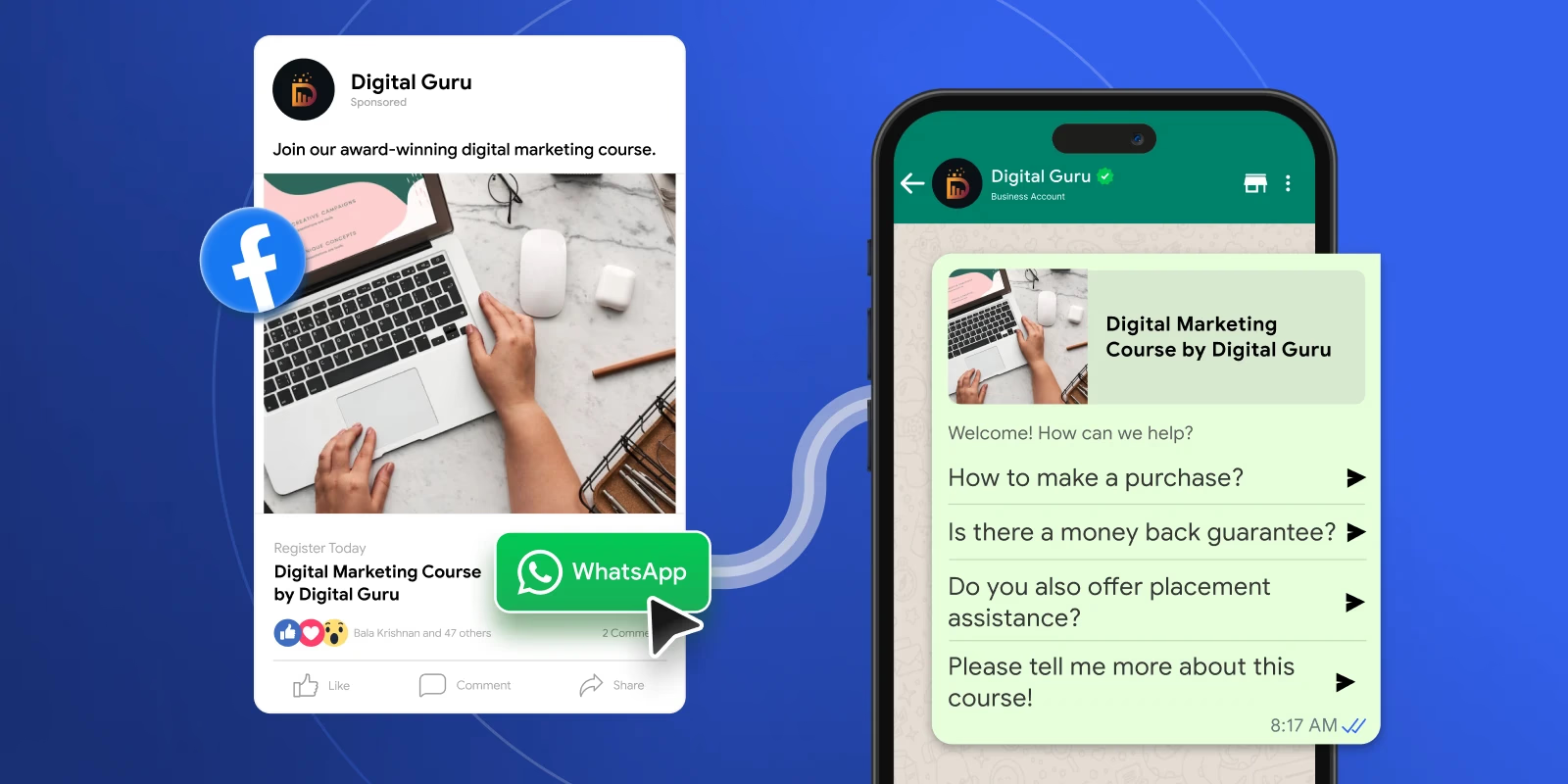
A customer sees an engaging Facebook or Instagram ad. Instead of visiting a website or filling out a form, the ad button opens a WhatsApp chat, direct, immediate, and frictionless.
Users who click want to talk. Their phone number is captured automatically, reducing form abandonment, which happens in 68% of web forms. Pediasure Indonesia reduced cost-per-lead by 64% using this method.
The real boost comes when a chatbot like Typebot greets leads instantly, qualifies intent, and captures details in seconds.
Meta requires the WhatsApp Business API to automate first replies, ask qualification questions, segment leads, and direct high-intent prospects to sales. Bulk and retargeting options use lookalike audiences, previous visitors, and Facebook Pixel data to optimize results continuously.
QR codes and wa.me links for offline-to-online conversion
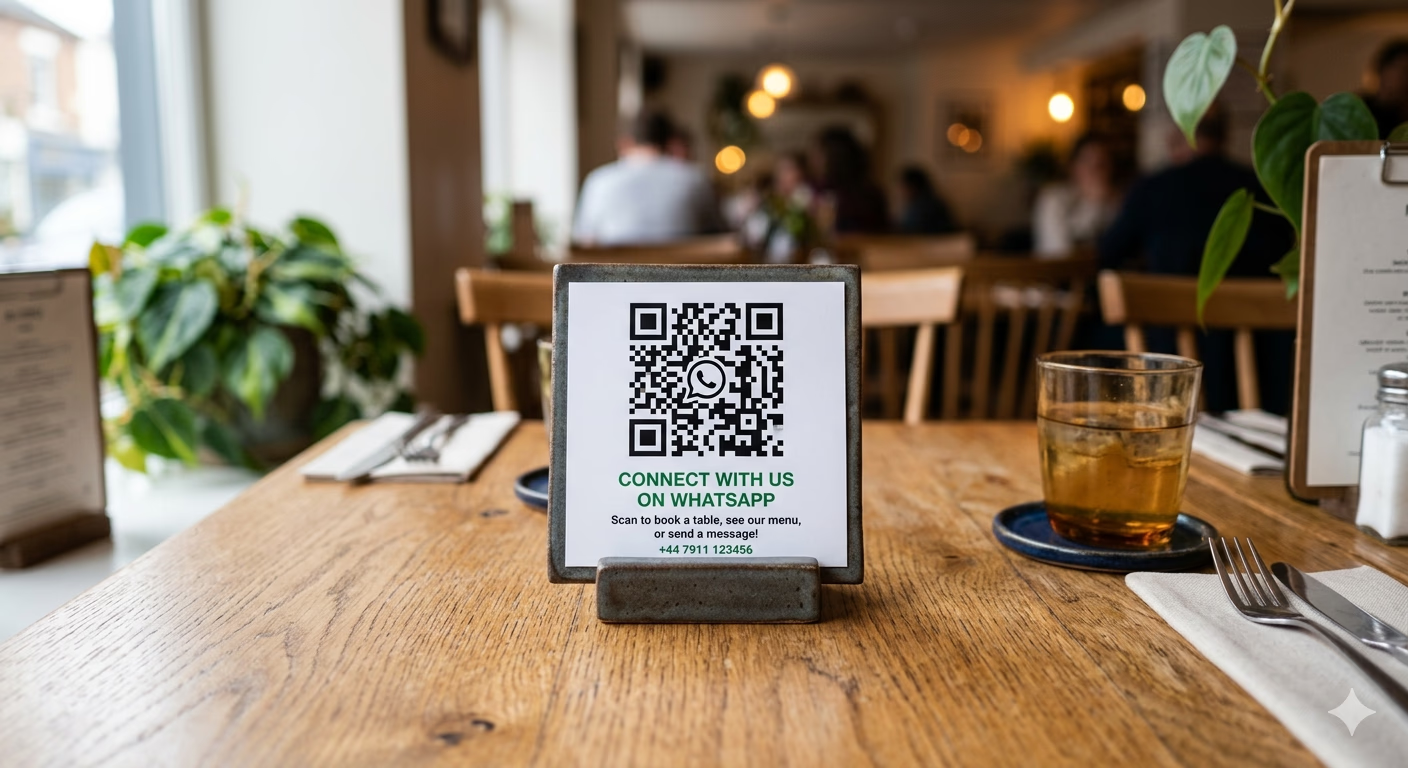
At trade shows, retail stores, or on product packaging, customers can scan a QR code or tap a wa.me link on Instagram Stories or blog posts. These tools launch WhatsApp instantly, turning offline moments into digital conversations without needing to remember URLs.
QR codes on event displays, receipts, signage, or packaging act as conversation starters. Users don’t need to enter information manually. A single tap moves them into your WhatsApp funnel, where you automate inquiries, qualification, and follow-up. This makes casual interest easier to convert and more spontaneous.
Website chat widgets that replace static forms
Static forms often get abandoned. Website chat widgets offer an inviting, interactive alternative. When visitors arrive, a floating bubble, popup, or embedded container encourages real conversation.
Instead of filling out dry fields, the widget guides users through conversational flows, qualifying them in real time, answering questions, and capturing phone numbers smoothly.
These widgets engage visitors directly on your site but can also redirect users to WhatsApp for deeper follow-up. All interactions are tracked, leads scored, and the channel remains open for future contact. Tools like Typebot let you build these widgets without coding.
Chatbot automation for 24/7 lead capture
Leads lose interest quickly if no one replies within five minutes. WhatsApp chatbots solve this by delivering instant, always-on engagement.
Bots handle up to 70–80% of routine questions, allowing teams to focus on high-value prospects and complex issues.
A chatbot can welcome leads, qualify them on interest, budget, or timeline, and forward high-intent responses to live agents for follow-up. Leads with low budgets or those not ready get routed to self-serve info or nurturing campaigns. This WhatsApp automation keeps the funnel moving and prevents leads from going cold, even outside business hours.
WhatsApp flows for structured data capture
Traditional lead capture usually redirects users to outside websites or uses impersonal forms. WhatsApp Flows offer interactive, in-chat experiences. Users complete tasks, provide details, schedule appointments, or answer qualification questions right inside WhatsApp.
Flows enable multi-step surveys, progressive lead scoring, conditional branching, and structured data collection. Businesses respond instantly and personalize based on user data. Unlike traditional methods, Flows keep users engaged because each step feels manageable and interactive.
Examples include real estate bots qualifying buyers, ecommerce checkouts happening in-chat (even WhatsApp!), and healthcare appointment booking, all without leaving WhatsApp.
Broadcast campaigns to reactivate dormant leads
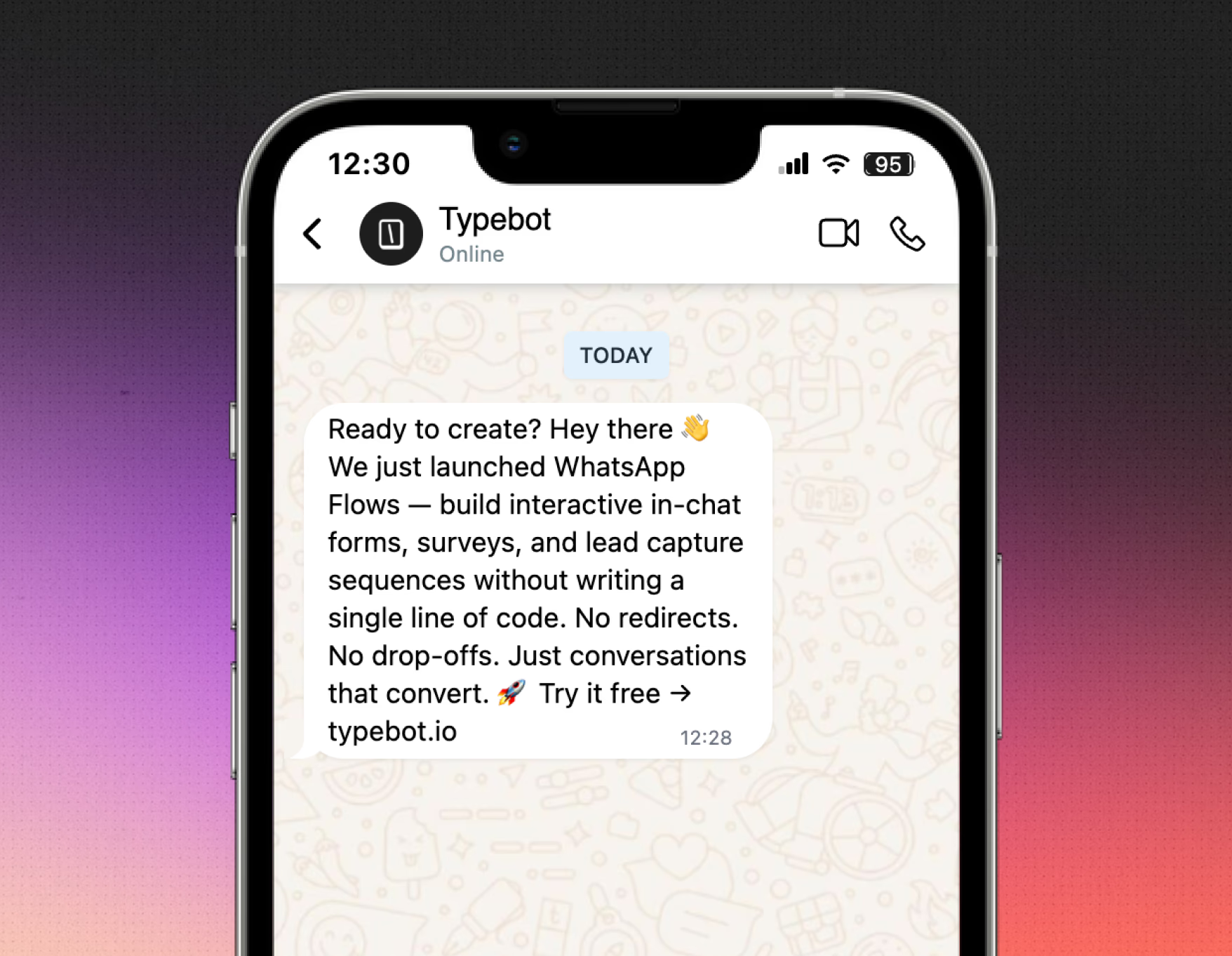
Not all leads buy immediately. WhatsApp broadcast campaigns target inactive prospects with tailored messages, offers, or reminders to reignite interest.
Tools like Brevo or Wati send rich media campaigns to opted-in audiences triggered by CRM signals, such as visiting a pricing page without purchasing.
Broadcasts use Meta-approved templates, follow strict compliance, and require user opt-in. Frequency is capped, especially with recent API changes. When done right, broadcasts deliver personalized, context-aware messages, such as discounts, follow-ups, or invitations, to pull leads back into the funnel.
How to build a WhatsApp lead generation chatbot with Typebot
Example scenario: building a real estate lead qualification bot
As a real estate agent, you want prospects to inquire about properties directly through WhatsApp. The chatbot asks a few qualifying questions and automatically routes high-value leads to your sales team.
Start with a welcoming message, such as "Hi, are you looking to buy or rent?" Using WhatsApp's native integration, Typebot personalizes the chat with the prospect's name and phone number.
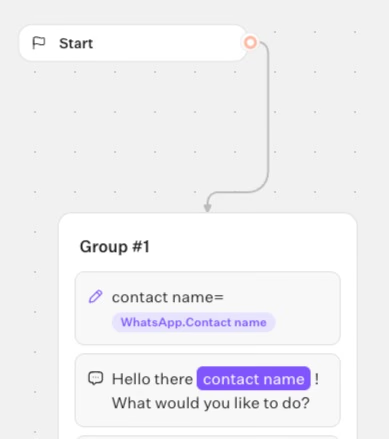
These details are system variables, so every conversation begins with the needed context.
Your chatbot moves from the intro to collecting data, asking questions like "What's your budget range?" or "When are you hoping to move?" Typebot stores answers in variables. These variables help branch the flow based on user responses.
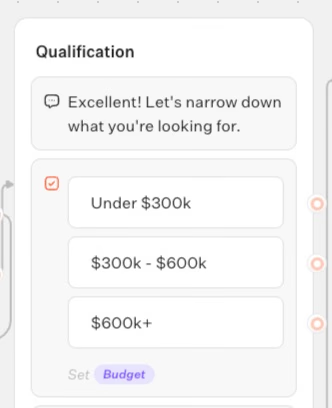
By combining conditional logic and variable storage, the chatbot qualifies leads during the conversation. The entire chat stays within WhatsApp, no redirects, no complicated forms. This creates an effortless, conversational experience for users.
Setting up your visual drag-and-drop flow for property inquiries
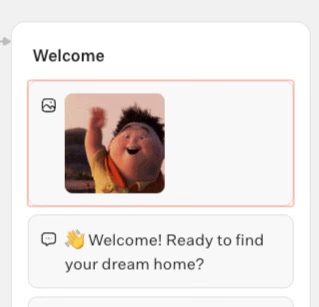
Add Text bubbles to introduce and explain the process. Use Input blocks like Text, Number, Date, Phone, or Buttons to collect details such as budget, location preference, timeline, and desired amenities.
Each response fills a variable for later use. Branching is simple: Condition blocks segment users according to criteria.
For example, flag users with budgets above $500k as premium leads.
You can include quick reply Buttons for navigation, but remember WhatsApp limits buttons to three per message. Typebot manages extra options to keep multi-choice questions smooth.
Use hidden fields and URL parameters for deep personalization. For instance, a QR code from an open house can pass the event location into the chat to add context to follow-ups.
WhatsApp Flows provide structured in-chat forms, improving lead capture. Instead of website redirects or long forms, users respond to short, conditional questions that maintain engagement and reduce friction.
Adding qualification logic to score buyers by budget and timeline
Typebot’s variable and condition blocks enable effective lead scoring and routing.
After collecting answers, you can define simple rules:
- Tag buyers with budgets above a set threshold as VIPs.
- Flag those moving within a month for urgent follow-up.
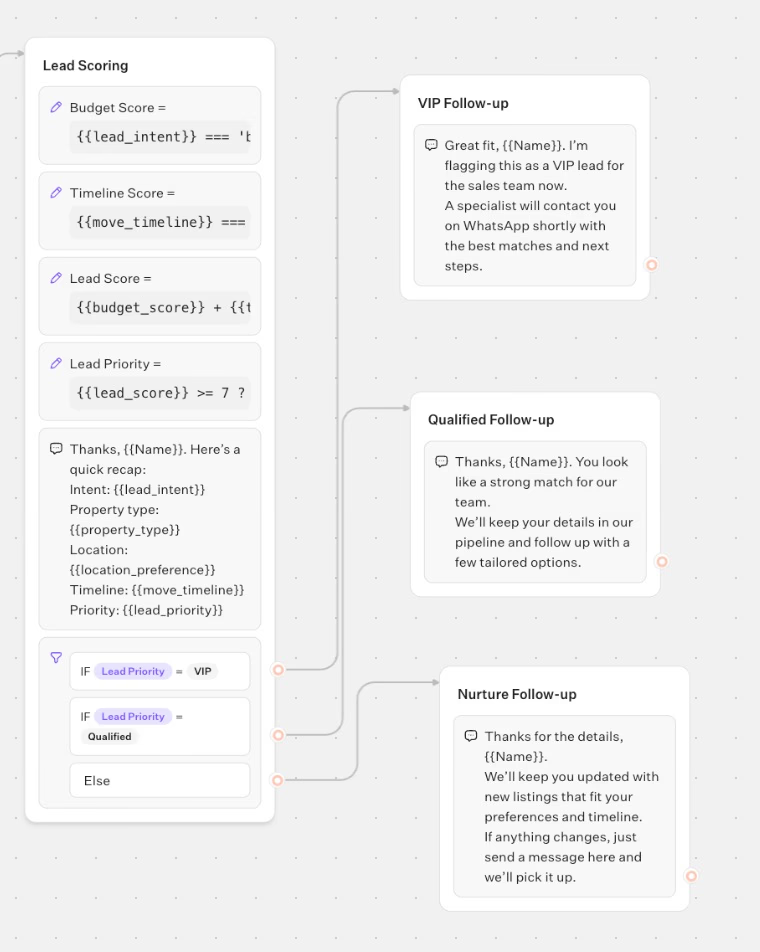
The flow includes steps to:
- Collect budget, location, and timing.
- Assign numerical scores through variables.
- Branch flows based on scores ; a premium lead receives a personalized offer, while others get general resources or options for updates.
Since the logic is visual, you can easily adjust criteria or test new follow-up strategies. You can simulate the experience as a WhatsApp user before launching.
Connecting to your CRM and tools
Integration plays a key role for real estate teams and other industries.
Typebot connects with:
- Google Sheets for simple storage.
- Any CRM via Webhooks and HTTP Requests.
Once you identify lead value, Typebot can trigger API calls or send data to Zapier, Make.com, or custom workflows.
This ensures every lead captured on WhatsApp enters your sales pipeline instantly. By mapping user responses to CRM fields, you can tag or route leads. You can also automate email or SMS follow-ups directly from the Typebot editor.
For teams wanting AI-driven qualification, Typebot supports OpenAI, Anthropic, Mistral, and others. You can add blocks that summarize user answers, draft personalized messages, or auto-score prospects based on the chat.
Deploying via embed, popup, or chat bubble
Deployment adapts to your needs.
After building your Typebot WhatsApp flow, users can access it through:
- Click-to-WhatsApp ads.
- QR codes.
- Dedicated landing pages.
- A widget on your website.
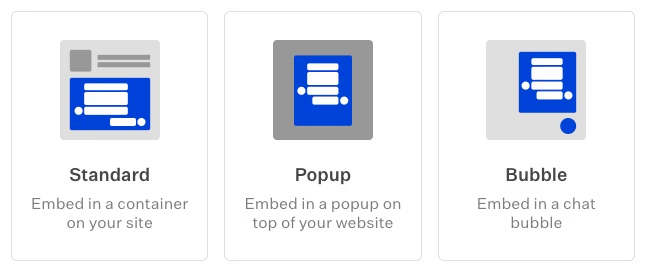
Typebot also supports embedding as:
- An inline container.
- Popup window.
- Chat bubble.
This flexibility lets you launch the same flow in multiple places. For example, visitors to your property website start in a chat bubble and switch to WhatsApp for a seamless handoff.
Whether in real estate, ecommerce, healthcare, or consulting, Typebot’s WhatsApp integration turns simple inquiries into smart, personalized lead journeys. It is fully visual, customizable, and always connected to essential business tools.
Deliver real-time responses and boost engagement with Typebot's WhatsApp integration.
No trial. Generous free plan.
Qualifying and nurturing leads automatically
Routing high-intent leads to live agents
WhatsApp lead generation relies on speed, personalization, and conversational context.
Typebot combines these elements in a flow-driven system that directs users exactly where they need to go.
For example, a real estate bot might ask about budget and timeline, then assign lead scores based on responses. When a user meets your criteria, Typebot’s conditional blocks instantly route them to a live agent.
The handoff is seamless: the bot collects data, scores the lead, and sends all relevant details directly to a human teammate once a threshold is crossed.
Using WhatsApp's contact variables, every agent receives name, number, and context immediately. This setup allows your team to offer tailored follow-ups.
Your sales team can also use Typebot’s integration tools, like webhooks, Zapier, or direct CRM API calls, to receive alerts instantly. This reduces response times and maximizes conversion rates.
Sending low-budget prospects to self-serve resources
Not all conversations require a sales representative’s full attention. Typebot segments and scores prospects using logic blocks, guiding less qualified leads into automated nurturing flows.
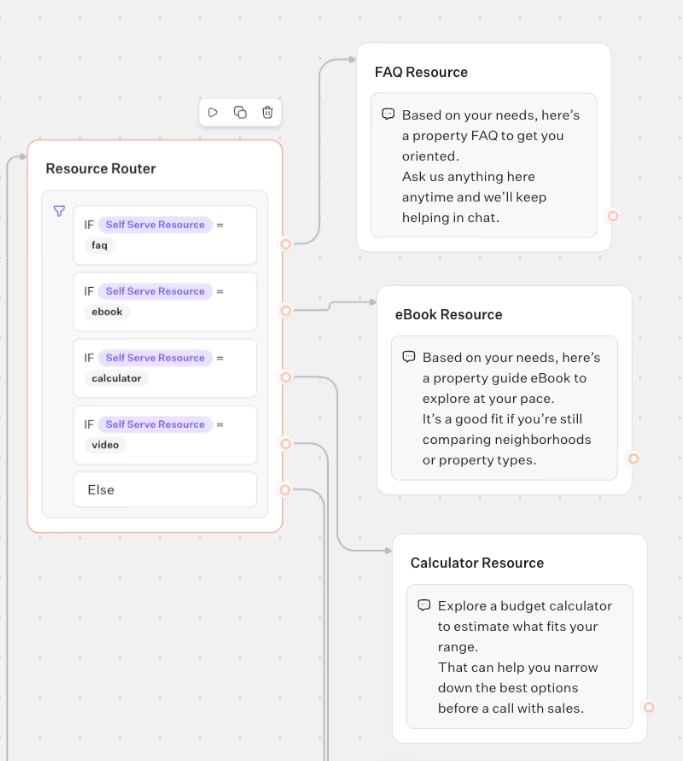
For instance, if a user indicates a lower budget or longer buying timeline, the bot directs them to digital resources such as:
- FAQ pages
- eBooks
- Calculators
- Video tutorials
In WhatsApp conversations, this matters because users expect instant, relevant replies, not generic “thank you” messages.
By using WhatsApp’s rich media blocks, your bot can share interactive cards, links, and videos to keep slow-moving or price-sensitive users engaged.
Automated follow-ups based on responses
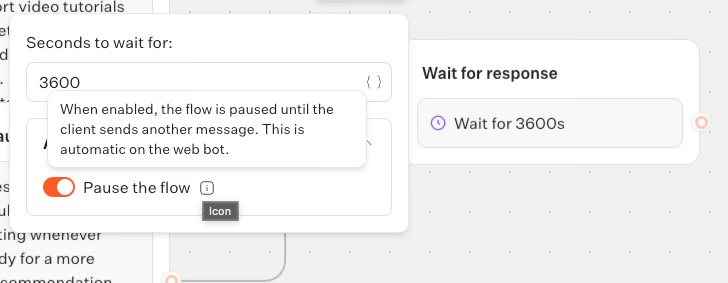
Typebot stores responses and variables throughout the chat and triggers follow-ups only when relevant.
For example, if a user abandons a booking form, the bot sends a personalized WhatsApp message referencing their last input, sometimes within minutes.
Automation does not sacrifice personalization. Typebot’s AI blocks create unique messages, answer niche questions, and suggest products based on chat history.
Tracking metrics and optimizing your WhatsApp lead funnel
Drop-off and completion rate analysis
Your funnel's weak spot is where users ghost you. Typebot tracks every block automatically: who reaches it, who bails, who finishes.
WhatsApp's 98% open rate and 45-60% response rate sets high expectations. When users drop off after question two or three, your flow is the problem, not their interest. Too many steps or confusing branching kills conversions. Each block's metrics show exactly where conversations die, so you cut steps or clarify prompts accordingly.
The critical difference: conversational flows keep users in chat. Redirects to external sites or form-like experiences bleed engagement. Compare completion rates between native WhatsApp flows and redirect-heavy ones, your data will show you what actually hooks people.
Using Typebot's built-in analytics dashboard
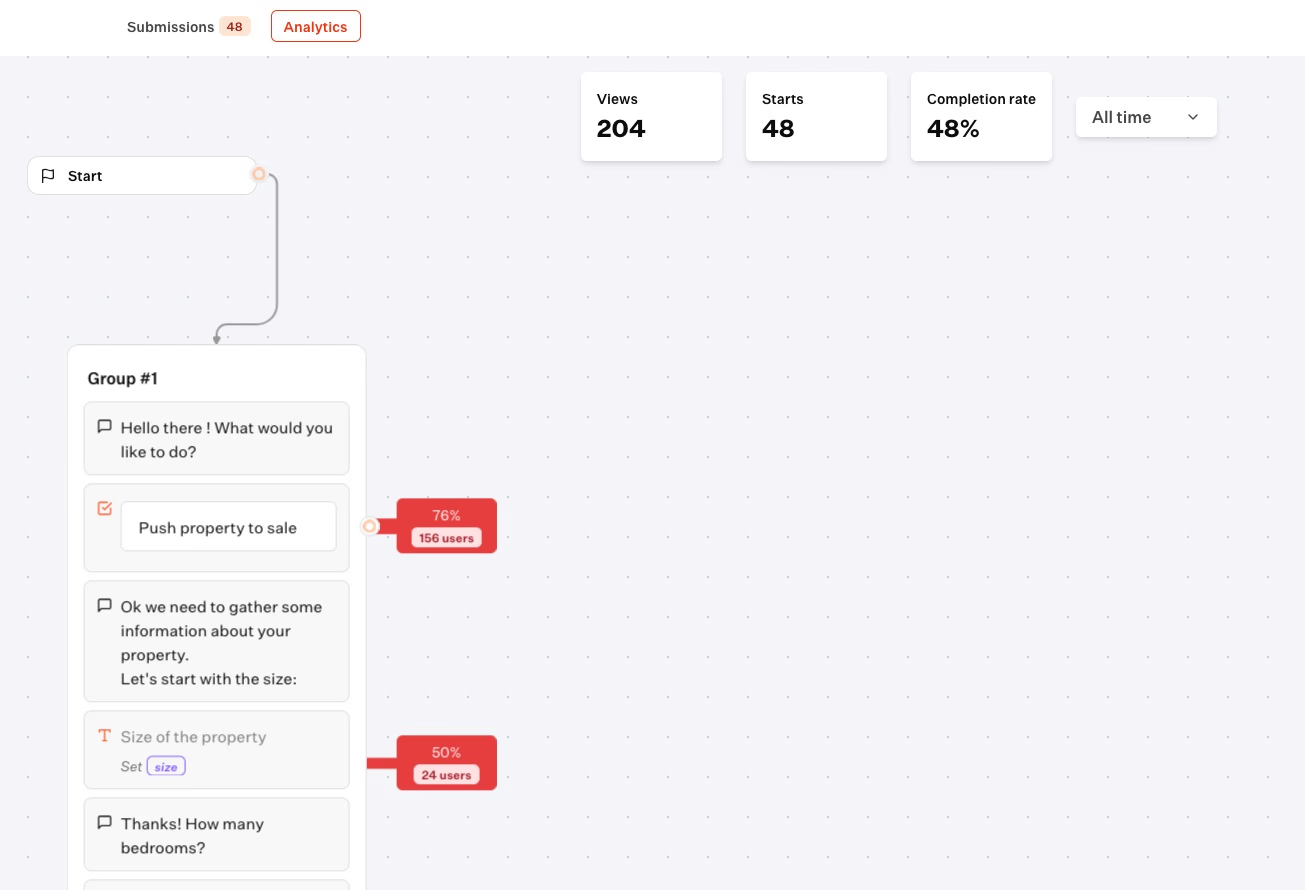
Typebot's dashboard gives you block-by-block visibility, no external tools needed. You see exactly where users exit and why.
Key metrics:
- Drop-off rate: Where users bounce before converting
- Completion rate: Who finishes your flow
- Block analytics: Visual bottleneck identification
Real example: your property inquiry bot loses users at the email request step. Solution? Move email later or make it optional.
This matters because WhatsApp users expect snappy, mobile-native interactions. Long forms trigger the same 68% abandonment rate that plagues web forms. Your analytics surface friction points immediately, fix them before they cost you leads.
Exporting data to CSV for deeper insights
Export everything to CSV for deeper analysis. The data includes user responses, timestamps, and exact drop-off points, ready for Google Sheets, BI tools, or Google Analytics.
Use this to spot patterns: Do younger buyers hesitate on budget questions? Do certain times convert better?
Typebot also connects to Google Sheets, Zapier, and CRMs via webhooks. This means you can trigger follow-ups to incomplete leads or route hot prospects straight to sales without manual work.
A/B testing conversation flows
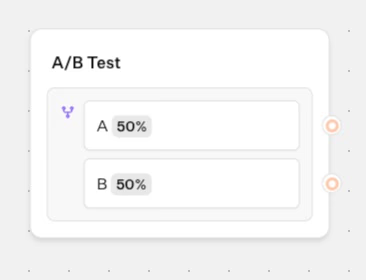
Typebot's AB Test block lets you run variants head-to-head.
Test ideas:
- Ask for phone numbers upfront vs. after delivering value
- Greeting styles: professional vs. casual
- Follow-up timing for broadcasts
Track completion rates and lead quality to find the winner. Since response times under 5 minutes correlate with higher conversions, continuous testing isn't optional, it's how you build funnels that actually convert.
Compliance and best practices for 2026
Per-user frequency limits and opt-in requirements
Meta limits users to receiving about two marketing messages per day across all brands. Sending more triggers delivery errors and saturates users. Marketers must focus on timing and relevance, not volume. This constraint ensures only the most engaging, valuable messages reach users.
Opt-in is mandatory. Users must explicitly consent before contact. Businesses must document opt-in sources, use clear consent language, and always provide an easy opt-out. Compliance begins at first contact and continues throughout all interactions.
Avoiding spam and personalizing outreach
WhatsApp’s quality rating affects message volume and tiers. High-quality accounts (green rating) can access higher messaging tiers. Medium or low-quality accounts face warnings or freezes unless policy violations occur.
Quality depends on user feedback like blocks, spam reports, and template rejections. Businesses should:
- Segment audiences precisely
- Avoid contacting cold leads
- Monitor feedback signals continuously
Responding quickly to complaints and adjusting outreach maintains a green rating.
The evolving role of AI and chatbots
WhatsApp policy distinguishes business-purpose AI bots from general-purpose chatbots. It bans bots that impersonate friends, give advice without context, or serve mainly for entertainment.
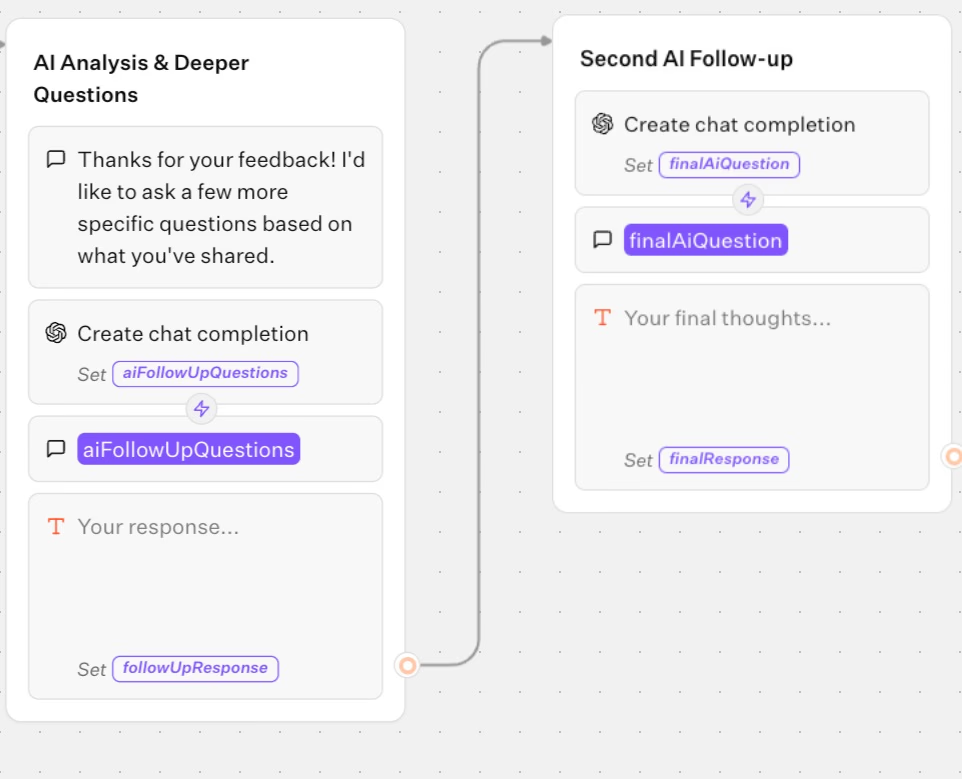
Instead, AI automation is allowed and encouraged when supporting defined business functions such as:
- Customer service
- Lead qualification
- Onboarding
- Sales flows
Typebot’s drag-and-drop builder and AI integrations align with these approved uses as long as the bot maintains clear business identity and scope.
Messaging limit tiers and new structural changes
Unlimited sending is no longer possible. WhatsApp enforces tiered messaging limits:
- Unverified accounts start at 250 unique users per day
- Verified businesses can scale to higher tiers
- Enterprise accounts reach unlimited messaging
Since October 2025, limits apply portfolio-wide, all numbers under a Meta Business Manager share the highest tier. New numbers instantly inherit that tier. Tier upgrades occur every six hours, tying operational performance directly to growth potential.
The US market has specific restrictions. Since April 2025, marketing templates to US users are paused; utility and authentication messages continue. International marketers must adapt campaigns by geography.
Balancing automation with real-world responsiveness
Following rules is not enough; businesses must consider user experience. Fast, trigger-based follow-ups, especially those within five minutes, increase conversions significantly.
Personalization, prompt responses, and transparency transform WhatsApp into a conversion tool rather than just a broadcast channel. Avoid rigid or repetitive schedules. Instead, adapt automation to user actions and context.
Tools like Typebot combine structured flows with AI personalization, enabling compliant yet effective communication.
The bottom line
WhatsApp lead generation in 2026 demands respect for user preferences, compliance frameworks, and evolving standards. Success relies on using Meta-approved templates, obtaining explicit opt-ins, scaling based on quality, and segmenting audiences carefully.
With tools such as Typebot offering automation, personalization, and analytics, compliance does not mean bland or bureaucratic messaging. It means creating authentic conversations that earn attention and trust, one message at a time.
What's next for your WhatsApp lead strategy
You have seen the full picture now. WhatsApp delivers 98% open rates and response times measured in minutes, not days. The six strategies we covered give you multiple entry points into this channel.
Success here requires more than tools. It demands a shift in how you think about lead generation. Stop collecting email addresses to nurture later. Start conversations you can continue now. Use Typebot to build qualification flows that route hot leads to sales and nurture others automatically. Monitor your analytics to cut friction. Stay compliant as Meta tightens restrictions. Test relentlessly.
The brands winning in 2026 are not those with the biggest ad budgets. They are the ones removing every obstacle between curiosity and conversation. Your next lead is already on WhatsApp. The only question is whether you will be there when they arrive.
Reach your audience where they are. Integrate Typebot with WhatsApp for seamless, personalized communication.
No trial. Generous free plan.
FAQ about WhatsApp lead generation
How to generate leads from WhatsApp?
Generating leads with WhatsApp means removing obstacles and connecting with prospects where they respond best. Instead of using static forms or cold emails, you start conversations that feel easy and personal.
Many companies use click-to-WhatsApp ads. Users tap a button in a Meta ad and enter a chat. Tools like Typebot guide them through tailored questions. QR codes and wa.me links link offline experiences to digital ones. Someone can scan a product or event display and start chatting right away.
On websites, chat widgets qualify visitors in real time. They capture contact info automatically and move the interaction to WhatsApp for deeper engagement.
Behind the scenes, chatbots built with Typebot handle most lead capture and qualification. They ask questions and segment prospects based on responses. High-intent leads can go directly to sales agents. Others receive relevant resources or follow-ups.
This method uses WhatsApp’s 98% open rates and 45-60% response rates to make lead generation more effective and faster. Most responses happen within five minutes, a major improvement over email.
Can I send bulk messages for lead generation?
WhatsApp allows broadcasting, but it’s heavily restricted. You can send outbound campaigns, like reactivation offers or product launches, to users who opted in. Platforms like Wati or Brevo support this. However, every message must use Meta-approved templates.
Compliance requires explicit opt-in before messaging. Users can get only about two marketing messages per day across all brands. If a contact is “saturated,” your message won’t deliver and you'll get an error.
The key is relevance and timing, not volume. Conversations started by the user or free-form messaging within a 24-hour service window have more flexibility and better engagement.
Best practices include:
- Segment audiences carefully
- Provide clear opt-out options in every marketing message
- Monitor quality ratings closely
Too many blocks or spam reports can lower your sender status. In the US, marketing templates are paused for +1 numbers as of April 2025, but transactional or authentication messages still work.
Do I need the WhatsApp Business API for lead generation?
To scale lead generation with chatbots, CRM integrations, and automated flows, you need the WhatsApp Business API. The API provides features like:
- Message templates
- Data collection
- Real-time CRM syncing
- Automation
Typebot’s WhatsApp integration lets you build conversational bots visually and deploy them directly to WhatsApp.
The free WhatsApp Business App has limits. You can only send basic auto-replies or manual messages. It doesn't support chatbot logic or integrations.
For small-scale or manual lead capture, the Business App can work. But for structured, scalable automation, the API is essential.
What's the difference between WhatsApp Business App and API?
The WhatsApp Business App suits single users or small teams. It offers simple automation like quick replies and business profiles on a free mobile app. You manage chats manually, without automation, CRM integration, or bots.
The WhatsApp Business API supports automation. It handles chatbots (like Typebot), advanced integrations, multiple users, and high messaging limits, from 250 up to 100,000+ daily conversations.
API accounts use conversation-based pricing, require business verification, and must follow Meta’s rules, including:
- Explicit opt-in
- Approved templates
Here’s a comparison of the two:
| Feature | Business App | Business API |
|---|---|---|
| Automation | Basic quick replies | Full chatbots and flows |
| Integrations | Limited | CRM, AI, analytics, webhooks |
| Scale | Manual, 1:1 chats | 250 to unlimited daily messages |
| Compliance | Low | High (opt-in, templates, tiers) |
| Pricing | Free | Conversation-based, scalable |
| Team access | Single user | Multiple users |
| Typebot support | Not compatible | Full integration |
| If you want to capture, qualify, and nurture WhatsApp leads efficiently, especially at scale, the API is the foundation. Typebot helps you build visually and deploy everywhere, including WhatsApp, with full compliance and analytics. |